Expressions Guide
1. What Can Expressions Do?
Expressions act like "smart formulas" in your prototype, bringing static elements to life! They allow you to achieve various effects, such as:
Dynamic Calculation 📦 Automatically calculate the total price in a shopping cart. 🔊 Real-time volume bar scaling. 📊 Dynamic progress bar changes.
Smart Logic & Judgment ✅ Login status validation. 🔒 Form required field checks. 📱 Device adaptation judgment.
Dynamic Content 👋 Personalized greetings like "Welcome [User]". 📅 Dynamic time display. 🎲 Random content generation.
2. Basic Operators Table
| Operator | Applicable Data Type | Description |
|---|---|---|
| + | String | Concatenate strings |
| + | Number | Add |
| - | Number | Subtract |
| * | Number | Multiply |
| / | Number | Divide |
| == | Boolean | Equal to |
| != | Boolean | Not equal to |
| && | Boolean | AND |
| || | Boolean | OR |
| ! | Boolean | NOT |
| > | Boolean | Greater than |
| < | Boolean | Less than |
| >= | Boolean | Greater than or equal to |
| <= | Boolean | Less than or equal to |
3. 5-Minute Quick Start Case
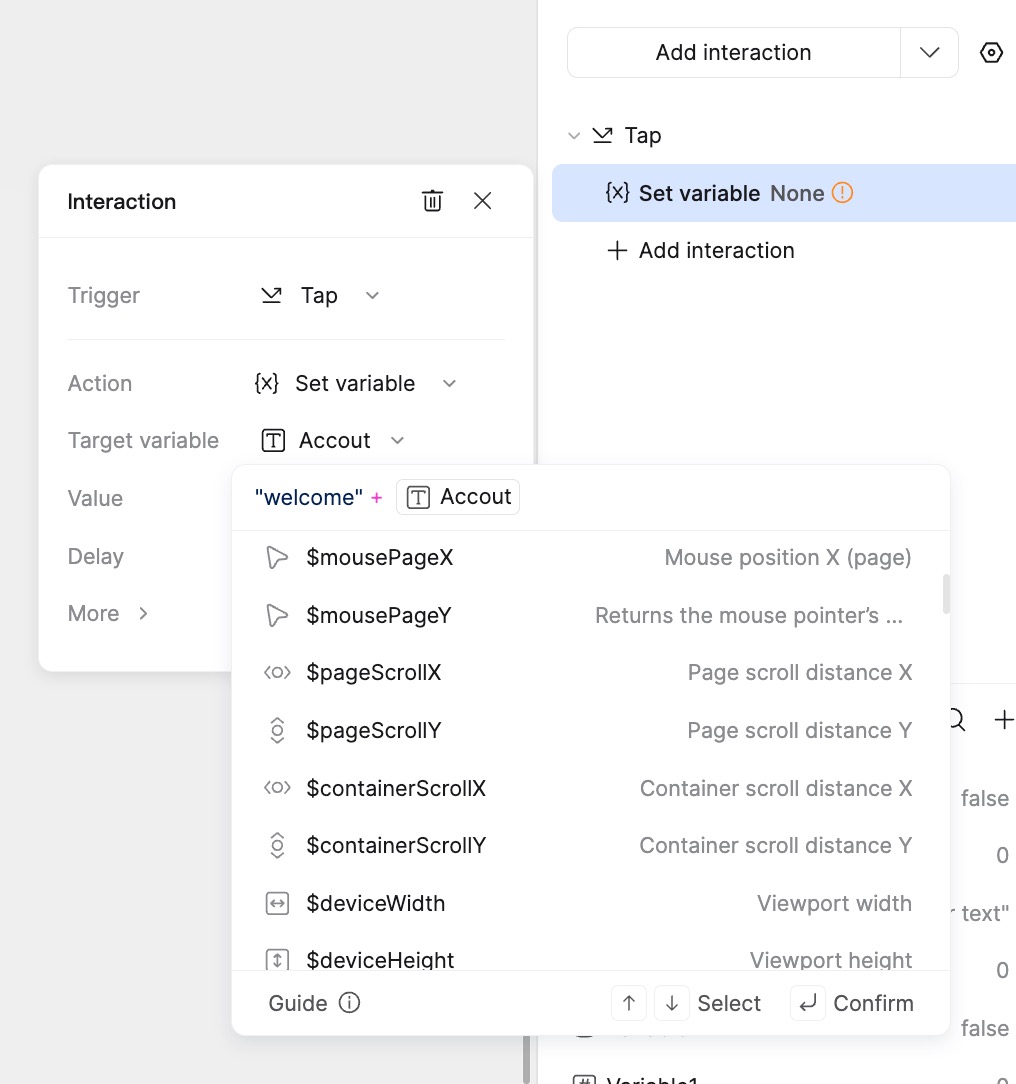
Example: Display "Welcome [Username]" on the interface after the user enters their username in the login box.
- Create a String variable named "Account" and leave the default value empty.
- Create a Single-line Input widget and bind its text property to the variable "Account".
- Create a Text widget and bind its text property to the variable "Account" (or use another variable to store the result if you don't want real-time mirroring, but for this specific "Welcome" logic via button click, see step 4).
- Create a Button named "Login". Set a Click interaction with the action Set Variable. Select "Account" (or a separate display variable) as the target variable, and set the value expression to:
"Welcome " + Account.
Note:
- Text strings (like "Welcome ") must be enclosed in double (
") or single (') quotes. - Numbers do not require quotes; input them directly.
- Boolean values (true/false) do not require quotes.
4. Functions Table
Mockitt provides built-in functions for processing and calculation within expressions. The logic is similar to JavaScript.
Supported Functions List:
| Function | Parameters & Types | Return Value | Description |
|---|---|---|---|
| String Processing | |||
| string.length | None | Number | Returns the length of the string. |
| string.charAt(index) | index: Number |
String | Returns the character at the specified index. |
| string.charCodeAt(index) | index: Number |
Number | Returns the Unicode of the character at the specified index. |
| string1.concat(string2) | string2: String |
String | Joins two or more strings and returns a new string. |
| string.endsWith(searchString, length[opt]) | searchString: String, length: Number |
Boolean | Checks if a string ends with the specified string. |
| string.includes(searchString, start[opt]) | searchString: String, start: Number |
Boolean | Checks if a string contains the specified string. |
| string.indexOf(searchString, start[opt]) | searchString: String, start: Number |
Number | Returns the index of the first occurrence of a specified value in a string. Returns -1 if not found. |
| string.lastIndexOf(searchString, start[opt]) | searchString: String, start: Number |
Number | Returns the index of the last occurrence of a specified value. Returns -1 if not found. |
| string.padEnd(targetLength, padString[opt]) | targetLength: Number, padString: String |
String | Pads the current string with a given string (repeated, if needed) so that the resulting string reaches a given length. |
| string.padStart(targetLength, padString[opt]) | targetLength: Number, padString: String |
String | Pads the current string with another string from the start. |
| string.repeat(count) | count: Number |
String | Returns a new string with a specified number of copies of an existing string. |
| string.replace(search, replacement) | search: String, replacement: String |
String | Searches a string for a specified value and returns a new string where the specified values are replaced. (Replaces only the first match). |
| string.replaceAll(search, replacement) | search: String, replacement: String |
String | Searches a string for a specified value and returns a new string where all specified values are replaced. |
| string.slice(start, end[opt]) | start: Number, end: Number |
String | Extracts a part of a string and returns the extracted part in a new string. |
| string.startsWith(searchString, start[opt]) | searchString: String, start: Number |
Boolean | Checks if a string starts with specified characters. |
| string.substring(start, end[opt]) | start: Number, end: Number |
String | Extracts the characters from a string, between two specified indices. |
| string.toLowerCase() | None | String | Converts a string to lowercase letters. |
| string.toUpperCase() | None | String | Converts a string to uppercase letters. |
| string.trim() | None | String | Removes whitespace from both ends of a string. |
| string.trimStart() | None | String | Removes whitespace from the beginning of a string. |
| string.trimEnd() | None | String | Removes whitespace from the end of a string. |
| Number Processing | |||
| number.toExponential(fractionDigits[opt]) | fractionDigits: Number |
String | Converts a number into an exponential notation. |
| number.toFixed(digits[opt]) | digits: Number |
String | Formats a number using fixed-point notation. |
| number.toPrecision(precision[opt]) | precision: Number |
String | Formats a number to a specified length. |
| Math Operations | |||
| Math.abs(x) | x: Number |
Number | Returns the absolute value of x. |
| Math.acos(x) | x: Number |
Number | Returns the arccosine of x, in radians. |
| Math.asin(x) | x: Number |
Number | Returns the arcsine of x, in radians. |
| Math.atan(x) | x: Number |
Number | Returns the arctangent of x as a numeric value between -PI/2 and PI/2 radians. |
| Math.atan2(y, x) | y: Number, x: Number |
Number | Returns the angle (in radians) from the x-axis to a point (x,y). |
| Math.ceil(x) | x: Number |
Number | Returns x, rounded upwards to the nearest integer. |
| Math.cos(x) | x: Number |
Number | Returns the cosine of x (x is in radians). |
| Math.exp(x) | x: Number |
Number | Returns the value of E^x. |
| Math.floor(x) | x: Number |
Number | Returns x, rounded downwards to the nearest integer. |
| Math.log(x) | x: Number |
Number | Returns the natural logarithm (base E) of x. |
| Math.max(n1, n2, ...) | n: Number |
Number | Returns the number with the highest value. |
| Math.min(n1, n2, ...) | n: Number |
Number | Returns the number with the lowest value. |
| Math.pow(x, y) | x: Number, y: Number |
Number | Returns the value of x to the power of y. |
| Math.random() | None | Number | Returns a random number between 0 (inclusive) and 1 (exclusive). |
| Math.round(x) | x: Number |
Number | Rounds x to the nearest integer. |
| Math.sqrt(x) | x: Number |
Number | Returns the square root of x. |
| Math.sign(x) | x: Number |
Number | Returns the sign of a number (1, -1, or 0). |
| Math.sin(x) | x: Number |
Number | Returns the sine of x (x is in radians). |
| Math.tan(x) | x: Number |
Number | Returns the tangent of an angle. |
| Date and Time | |||
| $date.getDate() | None | Number | Returns the day of the month (1-31). |
| $date.getDay() | None | Number | Returns the day of the week (0-6). |
| $date.getFullYear() | None | Number | Returns the year (4 digits). |
| $date.getHours() | None | Number | Returns the hour (0-23). |
| $date.getMilliseconds() | None | Number | Returns the milliseconds (0-999). |
| $date.getMinutes() | None | Number | Returns the minutes (0-59). |
| $date.getMonth() | None | Number | Returns the month (0-11). |
| $date.getSeconds() | None | Number | Returns the seconds (0-59). |
| $date.getTime() | None | Number | Returns the number of milliseconds since Jan 1, 1970. |
| $date.getTimezoneOffset() | None | Number | Returns the time difference between UTC time and local time, in minutes. |
| $date.getUTCDate() | None | Number | Returns the day (date) of the month in the specified date according to universal time. |
| $date.getUTCDay() | None | Number | Returns the day of the week in the specified date according to universal time. |
| $date.getUTCFullYear() | None | Number | Returns the year in the specified date according to universal time. |
| $date.getUTCHours() | None | Number | Returns the hours in the specified date according to universal time. |
| $date.getUTCMilliseconds() | None | Number | Returns the milliseconds in the specified date according to universal time. |
| $date.getUTCMinutes() | None | Number | Returns the minutes in the specified date according to universal time. |
| $date.getUTCMonth() | None | Number | Returns the month in the specified date according to universal time. |
| $date.getUTCSeconds() | None | Number | Returns the seconds in the specified date according to universal time. |
| $date.setDate(day) | day: Number |
Number | Sets the day of the month of a date object. |
| $date.setFullYear(y, m[opt], d[opt]) | y, m, d: Number |
Number | Sets the year of a date object. |
| $date.setHours(h, m[opt], s[opt], ms[opt]) | h, m, s, ms: Number |
Number | Sets the hour of a date object. |
| $date.setMilliseconds(ms) | ms: Number |
Number | Sets the milliseconds of a date object. |
| $date.setMinutes(m, s[opt], ms[opt]) | m, s, ms: Number |
Number | Sets the minutes of a date object. |
| $date.setMonth(m, d[opt]) | m, d: Number |
Number | Sets the month of a date object. |
| $date.setSeconds(s, ms[opt]) | s, ms: Number |
Number | Sets the seconds of a date object. |
| $date.setTime(ms) | ms: Number |
Number | Sets a date to a specified number of milliseconds after/before Jan 1, 1970. |
| $date.setUTCDate(day) | day: Number |
Number | Sets the day of the month of a date object according to universal time. |
| $date.setUTCFullYear(y, m[opt], d[opt]) | y, m, d: Number |
Number | Sets the year of a date object according to universal time. |
| $date.setUTCHours(h, m[opt], s[opt], ms[opt]) | h, m, s, ms: Number |
Number | Sets the hour of a date object according to universal time. |
| $date.setUTCMilliseconds(ms) | ms: Number |
Number | Sets the milliseconds of a date object according to universal time. |
| $date.setUTCMinutes(m, s[opt], ms[opt]) | m, s, ms: Number |
Number | Sets the minutes of a date object according to universal time. |
| $date.setUTCMonth(m, d[opt]) | m, d: Number |
Number | Sets the month of a date object according to universal time. |
| $date.setUTCSeconds(s, ms[opt]) | s, ms: Number |
Number | Sets the seconds of a date object according to universal time. |
| $date.toDateString() | None | String | Converts the date portion of a Date object into a readable string. |
| $date.toISOString() | None | String | Returns the date as a string, using the ISO standard. |
| $date.toJSON() | None | String | Returns the date as a string, formatted as a JSON date. |
| $date.toLocaleDateString(locales[opt]) | locales: String |
String | Returns the date portion of a Date object as a string, using locale conventions. |
| $date.toLocaleString(locales[opt]) | locales: String |
String | Converts a Date object to a string, using locale conventions. |
| $date.toLocaleTimeString(locales[opt]) | locales: String |
String | Returns the time portion of a Date object as a string, using locale conventions. |
| $date.toString() | None | String | Converts a Date object to a string. |
| $date.toTimeString() | None | String | Converts the time portion of a Date object to a string. |
| $date.toUTCString() | None | String | Converts a Date object to a string, according to universal time. |
5. Preset Variables Table
Preset variables are provided to access system parameters, such as mouse position.
| Preset Variable | Return Value | Description |
|---|---|---|
| $mouseX | Number | Returns the X-axis coordinate of the mouse (relative to the viewport). |
| $mouseY | Number | Returns the Y-axis coordinate of the mouse (relative to the viewport). |
| $mousePageX | Number | Returns the X-axis coordinate of the mouse (relative to the page, including scroll). |
| $mousePageY | Number | Returns the Y-axis coordinate of the mouse (relative to the page, including scroll). |
| $pi | Number | Returns the value of PI. |
| $deviceHeight | Number | Returns the height of the current presentation device (viewport). |
| $deviceWidth | Number | Returns the width of the current presentation device (viewport). |
| $pageScrollX | Number | Returns the horizontal scroll distance of the presentation page. |
| $pageScrollY | Number | Returns the vertical scroll distance of the presentation page. |
| $containerScrollX | Number | Returns the horizontal scroll distance of the parent container. |
| $containerScrollY | Number | Returns the vertical scroll distance of the parent container. |
6. Common Scenario Examples
Scenario 1: Password Validation
Check if the password is at least 6 characters and matches the confirmation.
Expression: PasswordInput.trim().length >= 6 && PasswordInput == ConfirmPassword
Scenario 2: Check if Input is Empty
Expression: VariableA.trim().length > 0
Scenario 3: Contains Specific Text
Check if VariableA contains a keyword.
Expression: VariableA.includes('keyword')
Scenario 4: Get Local System Time
Expression: $date.toTimeString()
Scenario 5: Random Integer (1-1000)
Expression: Math.ceil(Math.random() * 1000)
Scenario 6: Generate 6-digit Random Verification Code
Expression: Math.floor(Math.random() * 900000 + 100000)
Scenario 7: Element Follows Mouse
Set Element X to $mousePageX, Element Y to $mousePageY (often used within an "On Mouse Move" interaction).
7. Tips
Operator Precedence
Expressions are generally executed from left to right, with the following precedence for basic math:
- Parentheses
() - Multiplication
*/ Division/ - Addition
+/ Subtraction-
For Boolean operators:
- Parentheses
() - Comparison (
==,!=,>,<, etc.) - AND (
&&) - OR (
||)
Example 1: x + y * z -> First, y is multiplied by z. Then, x is added to the result.
Example 2: x == (y > z) -> First, evaluate if y is greater than z. Then, evaluate if x equals the result (true/false).
By mastering these expressions, you can easily achieve dynamic data display, smart form validation, complex interaction logic, and personalized content generation.