Variables Guide
1. What are Variables?
Containers for storing dynamic content, making design elements "alive"!
| Variable Type | Use Case | Example |
|---|---|---|
| String (Text) | Username / Address / Dynamic Copy | "John Doe" |
| Number | Inventory / Step Count / Rating | 100 |
| Boolean | Toggle State / Show/Hide Control | true / false |
2. Quick Start in 3 Steps
Step 1: Create a Variable
Click + Variable at the bottom right of the Interactions panel.
- Select the variable type.
- Enter the variable name.
- Set the initial value.
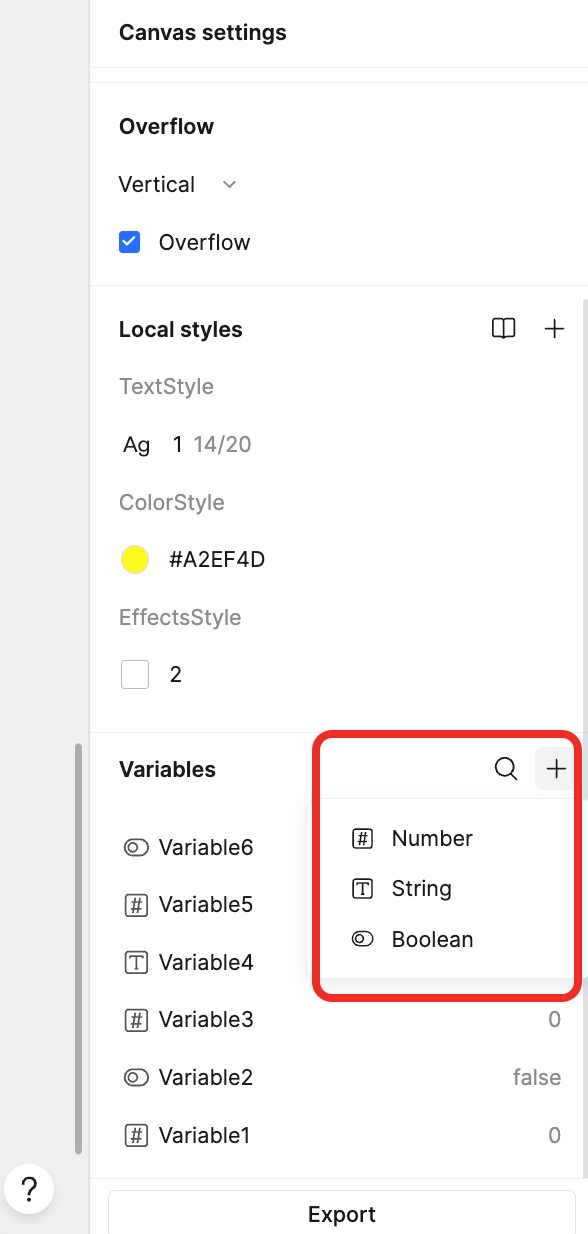
Examples:
- Product Name (String):
"Summer T-Shirt" - Inventory Count (Number):
150 - Sold Out (Boolean):
false
Step 2: Bind Variable
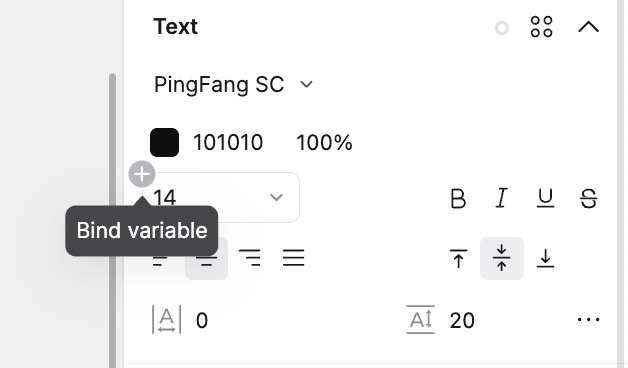
Dynamic Text Display:
- Select a text box → Click the Bind icon (Link icon) in the properties panel.
- Select a String variable (e.g., Username).
Real-time Value Update:
- Select a progress bar or text field → Bind a Number variable.
- Enter the binding formula if needed.
Boolean Binding:
- Select components like Switches or Checkboxes.
- Hover over properties like State or Disabled to see the binding icon.
- Click the Bind icon to link a Boolean variable.
Step 3: Apply Variables in Interactions
After creating and binding variables, you can use interaction events to change their values, making the prototype "move".
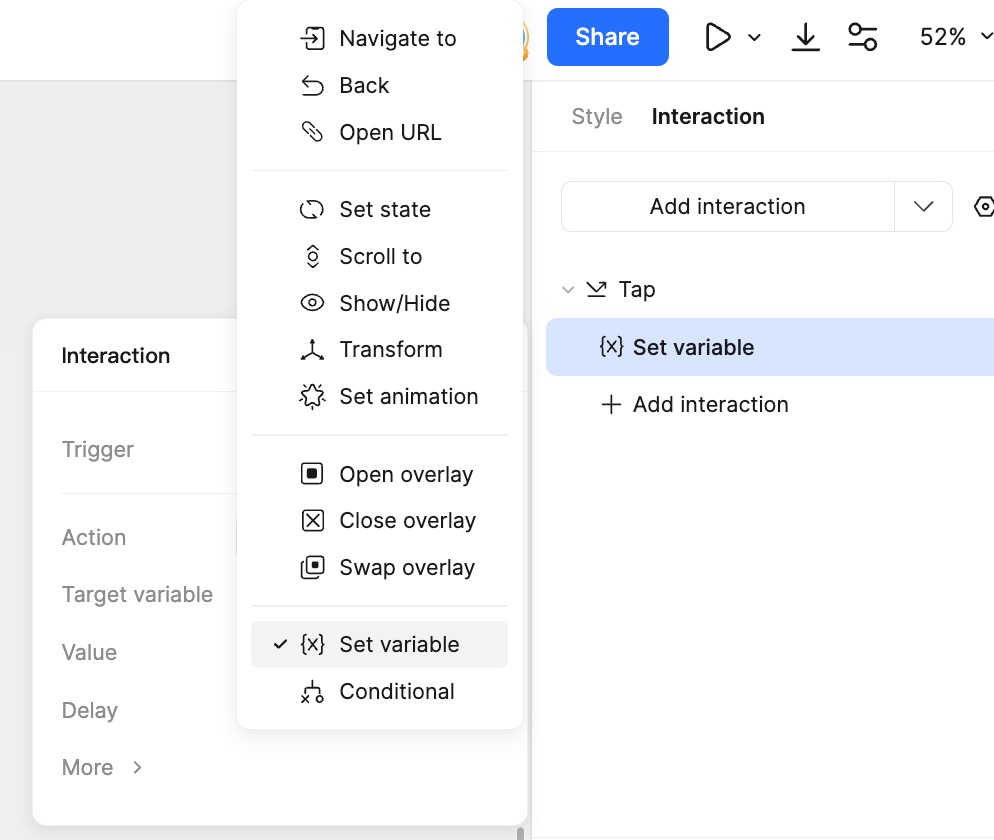
Modify Variable
Change variable values through interaction events:
- Select a page or element. In the right property panel, go to Interactions and click New Interaction.
- Select a Trigger (e.g., Click).
- Select the Action: Set Variable.
- Choose the Target Variable to modify.
- Set the new value. This can be a specific value or an expression. For details, refer to the Expressions Guide.
Example: Shopping cart interaction - increasing item quantity:
- When "+" button is clicked:
Target Variable: Quantity; Value: Quantity + 1 - When "-" button is clicked:
Target Variable: Quantity; Value: Quantity - 1
Conditional Logic
- When creating an interaction, add a Condition.
- Set the logic rules (supports operators like Equals, Not Equals, Greater Than, Less Than).
- Boolean values can be judged directly.
You can use expressions for more complex logic. Refer to the Expressions Guide.
Example: Shopping cart interaction - show a popup if stock is low:
- If
Quantity > 100: Open Overlay (Popup) showing "Insufficient Stock". - Else:
Set Variable: Quantity = Quantity + 1.
3. Typical Use Cases
Scenario 1: Dynamic Counter
Example: Shopping cart quantity adjustment using +/- buttons.
Scenario 2: Smart Form
Example: Login form validation, error prompts, or generating random verification codes.
Scenario 3: State Management
Example: Notification red dots, unread message count updates.
Scenario 4: Conditional Navigation
Example: Showing different overlays based on user identity (Guest vs. Admin).
Scenario 5: Real-time Calculation
Example: Calculating discounts or total price in a shopping cart based on quantity.
Scenario 6: Dynamic Content
Example: App splash screen greeting. Greeting = "Good morning, " + Username + "! Temp: " + Temperature + "°C"
4. Best Practices & Troubleshooting
❌ Common Mistakes
- Variable Not Bound: Check if the element is correctly bound to the variable.
- Type Mismatch: Text variables cannot perform mathematical operations directly without conversion.
- Naming Conflict: Use a naming convention like
PageName_VariableNameto avoid confusion.
✅ Best Practices
- Naming Convention: Variable names can only contain letters, numbers, Chinese characters, and underscores. They cannot start with a number. Names are case-sensitive. Example:
bool_hasUnread,num_totalPrice. - Default Values: Initialize numeric variables to
0unless otherwise required. - Preview Testing: Use the Quick Preview button to test interactions frequently.
5. FAQ
❓ Why isn't the variable value updating? 👉 1. Check if the value actually changed: Create a text box bound to the variable to visualize the value in real-time. 👉 2. Check the binding: Ensure the variable is bound to the correct property. 👉 3. Check interaction order: If multiple interactions exist without delays, they execute top-to-bottom. Conflicts might occur.
❓ How to implement automatic calculation?
👉 Use expressions when setting variable values (e.g., Total = Price * Quantity). See Expressions Guide.
❓ Do variables reset during presentation? 👉 Yes! Variables reset to their initial values when the page is first loaded or refreshed.
❓ Scope of variables? 👉 Variables are global within the project file. They can be used across different pages and canvases. Updating a variable updates all bound elements automatically.
❓ Why is there no bind button in the property panel? 👉 You need to create a variable of the matching type first. For example, to bind a rectangle's width, create a Number variable first.
❓ How to make a variable take effect immediately upon presentation? 👉 Select the Page, add an interaction with Trigger: On Load, and Action: Set Variable.
❓ Does deleting a variable affect interactions? 👉 Yes. Deleting a variable will break all interactions and bindings associated with it. Please proceed with caution.