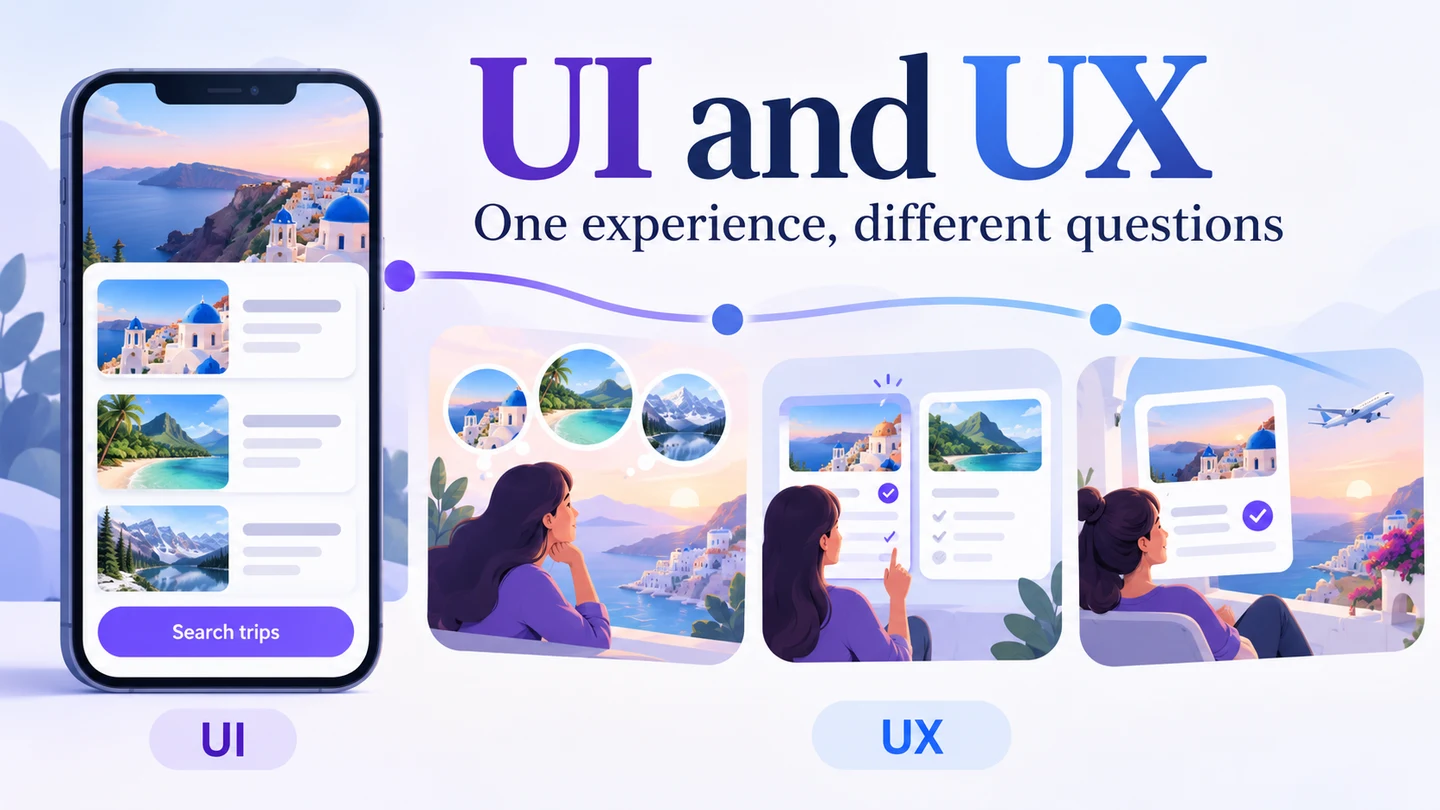
UI (user interface) design shapes the controls, content, visual hierarchy, and feedback people use to interact with a product. UX (user experience) design considers the broader experience of achieving a goal with that product or service. The two overlap: a clear interface contributes to a good experience, while research into the experience informs what the interface needs to do.
In web and app designing, some of the most commonly used words are UI and UX. In most cases you will find them placed together as UI/UX design, and at first glance you might think they describe the same thing. It is useful to look at UI vs UX so that people can understand the role they play and their differences. A connected interface prototype gives both disciplines something concrete to review: the screen people see and the task they can complete.
Differences between UI and UX Design
What is UI?
UI design refers to the design of a user interface. For an app, it includes the buttons that the end-user clicks, the text they read, sliders, images, and text entry fields. UI design also includes interface animations, screen layouts, transitions, and micro-interactions users encounter. When creating a user interface, visual elements, feedback, and interaction states all need attention.
The job is usually done by UI designers who make decisions about button shapes, color schemes, fonts, spacing, and other details. The designers ensure that the application interface is themed consistently to match the overall personality of the application. They also ensure that each element is united in purpose and appearance. The role goes beyond aesthetics: a button needs a clear label, an understandable state, and an appropriate response when someone activates it.
For example, a travel-search interface needs readable destination names, a visible selected date, and a clear way to change the search. A beautiful search field with an ambiguous label still presents an interface problem. Visual design and usability are connected in these everyday decisions.
What is UX?
UX refers to user experience, which involves the way that users interact with a product or service. The experience might be smooth, positive, confusing, or frustrating. It might also involve whether the application feels arbitrary or logical. User experience includes whether the app is helping people accomplish the objectives they want to achieve efficiently, or whether they are struggling.
UX extends beyond the interface elements created by UI designers. Nielsen Norman Group's definition of UX includes the wider relationship with a company's products and services. Someone may find a booking screen easy to use but still have a poor experience if the offered dates are unavailable or the cancellation conditions are unclear.
UX designers work hard to ensure that an interface is not complex or unintuitive, but they also investigate the task and context around it. They may study how people choose a destination, what information they need before booking, and what happens when a booking must change. UI designers contribute to that work rather than receiving a finished answer only at the end.
What are the differences between UI and UX?
Functionality
UX and UI design usually overlap, but there are several distinctions to understand. In simple terms, UX design is user experience design while UI design is user interface design. Both are closely related but ask different questions. UX work might ask whether a traveler can find a suitable trip and understand the conditions. UI work might ask how the destination field, date picker, price, and error message should behave and appear.
Both disciplines involve a process and produce deliverables. Research findings, user flows, interface components, and interactive prototypes can inform the same decision. It is misleading to classify UX as only a process and UI as only a finished screen.
Major focus
Another UI/UX difference is the scope of attention. UI focuses on the interface people interact with; UX considers the whole experience of using the product or service. This is not a front-end versus back-end development split. Both UI and UX designers need to understand technical constraints, while developers determine how the system implements the agreed behavior.
For the travel example, slow or inaccurate search results affect the experience even when the screen looks clear. The team needs to establish whether the problem comes from the wording, the interaction, the available data, or the underlying service. Calling every experience issue a “back-end task” would hide the actual question.
Colors used
Color does not distinguish UI from UX. A designer may use black, white, and gray to review structure without distraction, or full color when contrast, emphasis, and recognizable states matter to the question. These are choices about prototype fidelity, not rules about job titles.
For instance, as you develop the bottom navigation bar, the team needs to decide where it appears, what the labels mean, and how the selected destination is shown. The UI designer may define the color and shape of each state, while the UX designer investigates whether people understand the destinations. Both need to check the resulting interaction. A written note alone cannot establish that it works.
Tools used
The tools used in UI and UX can overlap because the work overlaps. A wireframe can help a designer review information and navigation before investing in detailed styling. A visual design tool can help develop reusable components; a research method can help investigate whether the resulting design meets a need. The number of tools someone uses does not define their discipline or expertise.
How do They Work Together
A designer must ensure that both UI and UX are well integrated into the app. The process involves collaboration, meaning that the UX designer and UI designer must work together. The UX designer may work on the flow of the app design, improving how buttons navigate through tasks and how the interface offers the information the user requires. At the same time, the UI designer considers how these elements appear, communicate their state, and respond on the screen. In smaller teams, one person may take on both responsibilities.
For instance, let's say that at one point during the design process, extra buttons need to be added to a certain screen. This will require changes to how the buttons are organized and might require them to be changed in size and shape. The team first needs to understand why the extra actions are necessary. Then the UX designer can help review the task flow while the UI designer adapts the layout and visual hierarchy. They must work together to make sure that the final user interface has a good look while working intuitively and efficiently.
For both UX and UI design, research is critical as it helps gather information for the right design decisions. Users can interact with the visual design and functionality of the app being tested to help the team see whether it is on the right path. In both UX and UI, feedback informs the next revision. Neither a polished screen nor a positive comment by itself establishes a successful experience.
One travel search, two sets of questions
Imagine reviewing a travel app where someone needs to find a trip for a particular weekend. Start with the same task for both disciplines. For UI, examine whether the date control has a clear label, whether the current selection is visible, and whether the search action stands out. For UX, examine whether the person can compare relevant trips, understand unavailable dates, and revise the search without losing their work.
Keep the observations specific: “The participant changed the destination but did not notice that the date had reset” is more useful than “the UI feels wrong.” The response may involve both an interaction change and clearer visual feedback. This is an illustrative review task, not a report of a completed study.
Use Mockitt to review UI and UX decisions together
As you look for ways to create UI and UX designs, choose a tool that lets the team examine the same flow. Mockitt provides reusable widgets and components, links between screens, preview, and shared review. In case you are not designing the interface alone, its collaboration features let the team work around the same project. You can use dynamic states and in-page animations when a changing component is part of the question.
Another useful feature is having the screens of a flow in one place. This lets you review the overall workflow as well as the individual screen. For the travel task, connect the search action to a results screen and provide a route back to revise the criteria. Then preview the path and check both the visible controls and the information needed to complete the task.
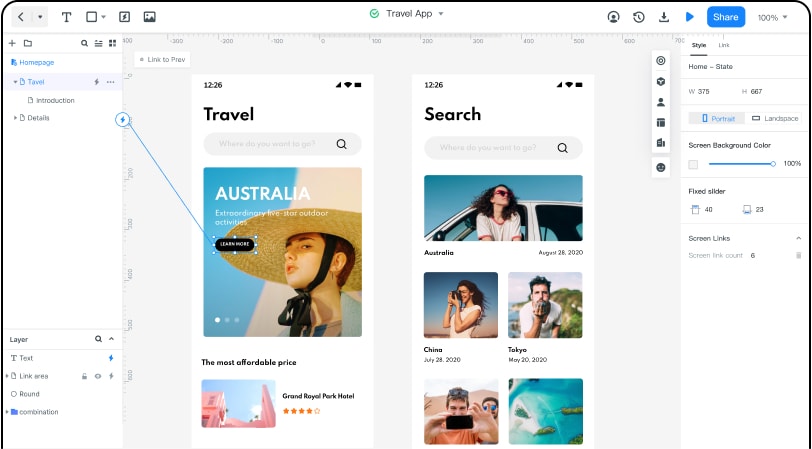
When the flow is ready for detailed visual work, Mockitt Design's components and shared styles can support consistent UI decisions. Keep the review question attached to the design: what should the traveler understand or accomplish at this point? A prototype helps the team examine that question before implementation; it does not prove that live availability, payments, or other services work.