Iterative design
Flexible Workflow
Build the prototype step by step, keeping the layout and interaction decisions visible to your team.
Lovable
alternative
Compare Mockitt and Lovable by what you need to build next. Mockitt combines visual design and prototyping with AI app generation and React export. Lovable focuses on building web applications with code, data, and deployment. Both support iteration and team collaboration.
Terrv
John
7 min ago
The main elements have been identified and can be taken forward 👍
Eric
Chloe
Sebastian
music_app
V1
Start with an AI-assisted design draft or build on the canvas, then refine screens and interactions for a focused review. Use the separate AI app workflow when you need a runnable draft and React project.
Iterative design
Build the prototype step by step, keeping the layout and interaction decisions visible to your team.
Visual editing
Position interface elements on the canvas, edit the content, and inspect the result in a prototype preview.
Complete control
Add variables, conditions, and complex interactions. Prototype real user flows, not just static screens.
Built for teams
Co-edit designs, leave comments, review version history, and use shared component libraries to keep the team working from the same design decisions.
Hybrid approach
Refine AI-assisted design drafts on the visual canvas. In the app-generation workflow, continue the conversation to revise the application.
Developer-friendly
Inspect design specs and assets for implementation, or export a React project from the AI app workflow for engineering review.
AI now plays a more direct role in product design and development. Instead of only drafting copy, suggesting code changes, or sketching a screen, it can turn a product brief into an application you can open and use. That shift has brought tools such as Lovable into product teams' workflows and created more ways to move from an idea to an app. Mockitt is one alternative for teams that want to connect requirements, interface design, interactive review, and AI app generation. The learning-app example below shows how to describe a product, generate a working draft, refine it, and prepare a React project for development.
Lovable builds web applications from natural-language requests. A prompt such as "Build a to-do list app" can become a project with screens and basic behavior, giving a team something to try before it has produced a separate requirements document, prototype, and implementation. Its output is interactive: people can click through the app and use the generated features. Its development workflow also extends beyond front-end screenshots or limited code snippets. Lovable documents source-code access, GitHub synchronization, and a built-in backend for data, authentication, storage, and functions.
The appeal is a shorter path to a usable first draft. A conventional project may pass through requirements, wireframes, detailed design, and development before stakeholders can try the experience. Generating an application from a brief can bring that review forward. Teams can then spend the next conversation on the actual screens and behavior rather than imagining how a written proposal will work.
The choice still depends on how your team works. A generated app does not settle every requirement, interaction, or engineering decision. Lovable supports planning, visual edits, and collaboration, so those capabilities should not be treated as reasons to rule it out. Instead, decide where you need the most control: exploring layouts and user flows on a design canvas, reviewing a shared prototype, or building an application with data and deployment. Teams looking for a Lovable alternative should compare those activities across the full path from product definition to implementation.
Explore Lovable's planning workflow, preview editing, collaboration, and built-in backend.
For many teams, the decision is about fitting AI into an existing product process. A useful app draft still needs clear requirements, a reviewable interface, feedback from the people building and using it, and a practical engineering handoff. Mockitt brings a visual design and prototyping workflow alongside AI application generation. A team can work through screen and interaction decisions, generate an application draft, and carry the approved direction into development. Evaluate that combination against the way your team already handles product reviews rather than assuming that one generator must replace every other tool.
Generate a connected, multipage app draft. Describe the product you want to build, and Mockitt AI creates an application structure with its screens and interface. The result is a draft you can browse and run, rather than a collection of unrelated screen images. That makes it possible to review how the pages fit together and whether the application structure supports the intended task.
Refine the draft through conversation. The first generation is a starting point. Describe the changes you want, much as you would discuss a revision with a product designer, and continue working on the generated application. You can adjust the interface and clarify behavior as the team learns more about what the product needs to do.
Export a React project for development. Once the team has reviewed the interface and interactions, the AI app workflow can provide a React code package with page components and basic application logic. Developers can use that project as a starting point instead of reconstructing every screen from a design image. They still need to review the code, connect the required services, and test the application before release.
The useful comparison is how a tool helps the team agree on what to build. Requirements can be misunderstood even when code is quick to generate. A prototype makes the intended experience visible; a shared application draft lets reviewers try it; and an exported project gives engineering something concrete to evaluate. Mockitt's design, review, and AI app workflows can support those conversations. Start with a small, representative task and see how well its output fits your team's next handoff.
Explore Mockitt AI app generation if your next step is a runnable application draft.
Compare the design, app-generation, collaboration, and handoff tasks your team needs to complete. The tools overlap; their editing surfaces and delivery workflows differ.
| Task | Mockitt | Lovable |
|---|---|---|
| Primary deliverable | Interactive designs and prototypes; AI-generated app drafts with React export | Working web app with source code and optional built-in backend |
| Editing workflow | Visual design canvas; conversational changes in AI app generation | Project chat, planning, preview editing, and code tools |
| AI starting point | Design draft or multipage application, depending on the selected workflow | Generated web application project |
| UI refinement | Edit layouts and components on the canvas; revise app drafts through conversation | Select elements, edit text, annotate the preview, and request changes |
| Interaction review | Connect prototype screens and states, or try the generated app draft | Run and test the generated web app |
| Team workflow | Shared design editing, comments, libraries, and review links | Project and workspace collaboration with roles and permissions |
| Reusable patterns | Design components, shared libraries, and app design-system choices | Design guidance and systems applied to app projects |
| Handoff | Design specifications and assets, or a React application project | Application source, GitHub synchronization, and deployment options |
| Before release | Validate the experience; review exported code, data, errors, and deployment | Test behavior, data access, security, and deployment |
Use a study app as a practical example: learners browse courses, plan their study sessions, manage tasks, and track progress from a profile screen. The four steps below follow the app-generation workflow from a written brief to an interactive draft and a React handoff.
Open Mockitt AI and choose the app-generation workflow. Enter a brief that names the product and its main screens. For example: "Create a study app with a course list, a study plan, task management, and a profile screen." Naming the screens gives the first draft a clear scope and makes it easier to check whether the result covers the requested experience. Include daily check-ins and progress statistics when tracking study habits is part of the product.
Choose an available design system and an app color theme to give the draft a consistent visual direction. At this stage, focus on what the product should do and how its pages relate to one another. Mockitt AI uses the brief to propose the screen structure and organize the features, giving you an initial application framework to review before you refine the details.
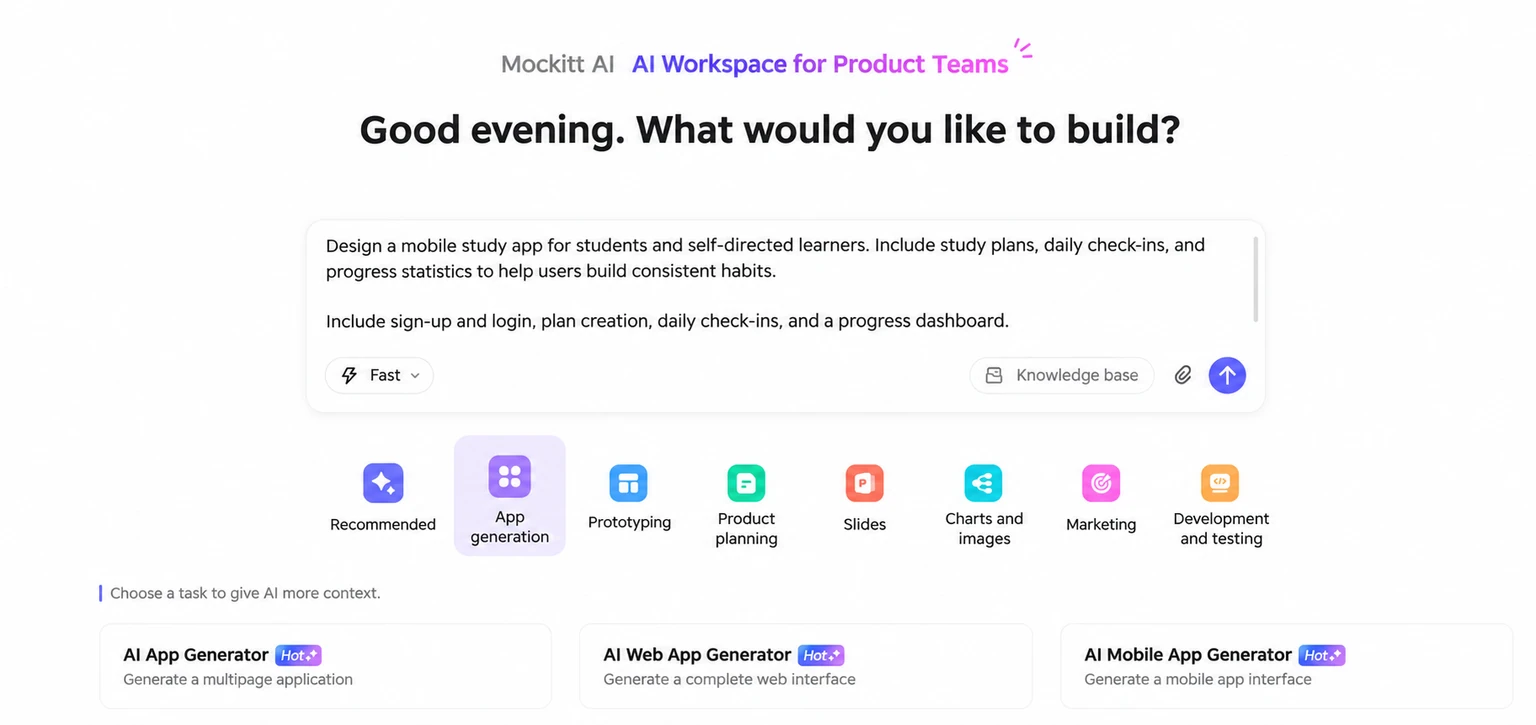
Submit the brief to generate the app screens. The draft is interactive, so you can click through the experience instead of reviewing only static images. Follow the route from the course list to a study plan, open the task area, and return to the profile. Check whether navigation, feature entry points, and page organization match the intended product flow. Treat the draft as a way to test the product logic and find missing behavior before adding more detail.
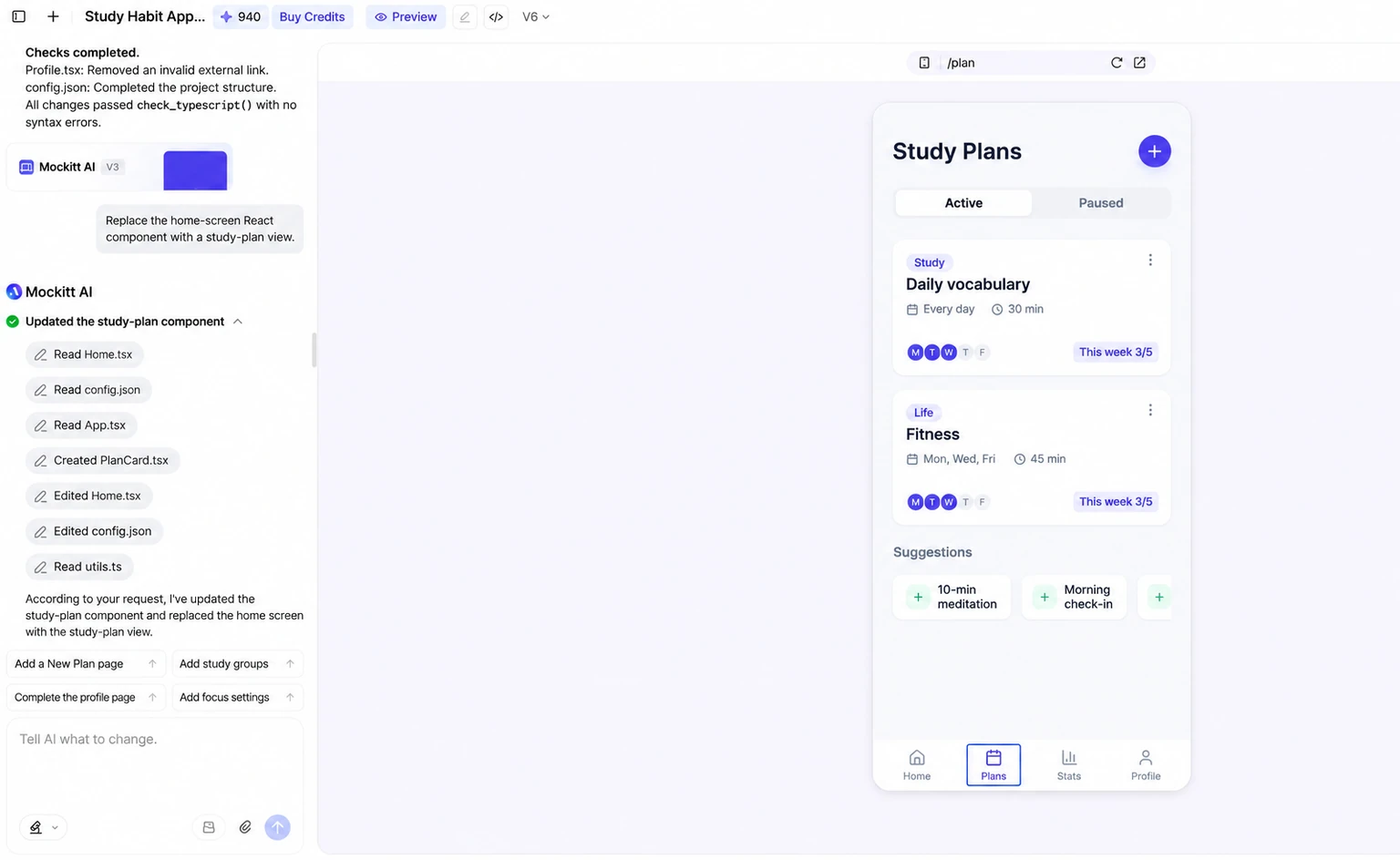
If the first result does not match the brief, continue the conversation with a specific revision. For example, ask "Simplify the home screen" or "Display the task list as cards." Mockitt AI uses the current application as the basis for the change, so you can refine the product without starting a separate project for every request. After each revision, try the affected screens again and make sure the neighboring parts of the flow still work as expected.
Once the interface and interactions are ready for review, use Share in the upper-right corner of Mockitt AI to create an online link. Teammates can review the application and its generation history together. For an internal presentation or a client walkthrough, share the preview so people can try the proposed experience. When the team is ready for engineering handoff, use the download control to get the React project, including the page structure, component logic, and files developers can extend. This export is a code asset for continued development, not just a picture of a prototype. Review data handling, authentication, error states, dependencies, accessibility, and deployment before releasing the finished application.
AI app generation gives product teams another way to move from a requirement to something people can try. Lovable and Mockitt both support continued iteration after the first generation. For a product concept, a startup experiment, or a new application flow, begin with a small brief, review the result with the people involved, and use what you learn to decide the next step. Try the study-app brief in Mockitt AI, then compare the design controls, review process, and development handoff with the work your team needs to complete.
Give designers, product managers, and developers a shared view of the product decisions that affect their work.
Create high-fidelity prototypes with AI assistance and a component library. Review layouts and interactions before handing the design to engineering.
Visual component library
Auto-layout & constraints
Interactive prototyping
Design tokens
Validate ideas with interactive prototypes before development. Align teams with living specs.
Prototype the core user journey
Prepare tasks for a user review
Stakeholder sharing
Feedback collection
Inspect dimensions, colors, spacing, and design assets for developer handoff.
Design details for implementation
Organized design assets
Design specs panel
Component inspection
Work together in real-time with multiplayer editing, shared libraries, and organized project structures. Keep everyone aligned from concept to launch.
Real-time co-editing
Version control
Shared libraries
Team permissions
Practical questions about design, AI app generation, and developer handoff.
Choose Mockitt when your team needs a visual design canvas, detailed prototype review, and an AI app workflow with React export. Consider Lovable when you want to build a web application with an integrated backend, source-code workflow, and deployment. Both support collaboration and iterative changes. Try the same small product brief in each and compare the output, review process, and work still needed before release.
Yes. Use the visual editor to arrange components and content, then connect screens and configure the interactions needed for your review.
Yes. Team members can co-edit designs, leave comments, use shared component libraries, and review version history. Lovable also supports project and workspace collaboration; compare each workflow with the way your team shares feedback and manages access.
There are two different handoff paths. In a design project, developers can inspect dimensions, colors, spacing, and assets. In Mockitt AI app generation, you can download a React project with page structure and component logic for continued development. A design-spec export and an application code package are different deliverables.
Mockitt offers a free plan. Review the pricing page for its project, collaboration, export, and AI allowances before choosing a plan.
Mockitt supports AI-assisted design and prototyping as well as a separate app-generation workflow with conversational revisions and React export. Lovable builds and revises web apps, with planning, preview editing, source code, collaboration, and backend services. Compare how each handles your specific screens, interactions, data, and handoff requirements.
Mockitt supports importing selected design file formats, including Figma and Sketch. Try a representative file and check fonts, layout, components, and interactions before moving a larger project.
Start with a small project: define a few screens, connect the main flow, and ask a teammate to review it. Mockitt offers documentation, tutorials, and templates to help you learn the design workflow. For AI app generation, use a clear brief and inspect each revision so you understand the result before extending it.
Explore the interface, review the flow, and turn an approved app draft into a React project for development.