Business process mapping
Business process mapping that makes every handoff clear
A useful process map shows what starts the work, who handles each step, and what happens when something goes wrong. Use Mockitt Whiteboard to put the flow, its rules, and the team's open questions in one shared view.
Start with a process you can walk through
Choose a specific trigger and a recognizable result. For an equipment purchase, the map might start when an employee requests a laptop and end when the employee confirms that the right equipment arrived. Supplier selection and payment can stay outside this view unless they change the handoffs you need to discuss.
In the Mockitt whiteboard, place the process beside the request details, existing policy, and questions from the people doing the work. A map of the current process should describe what actually happens. Keep proposed changes visibly separate until the team agrees to them.
Trigger
What event starts the work, and what information must be available?
Boundary
Which part of the process is this team responsible for mapping?
Result
What observable outcome lets someone mark the process complete?
Example: take a laptop request from approval to delivery
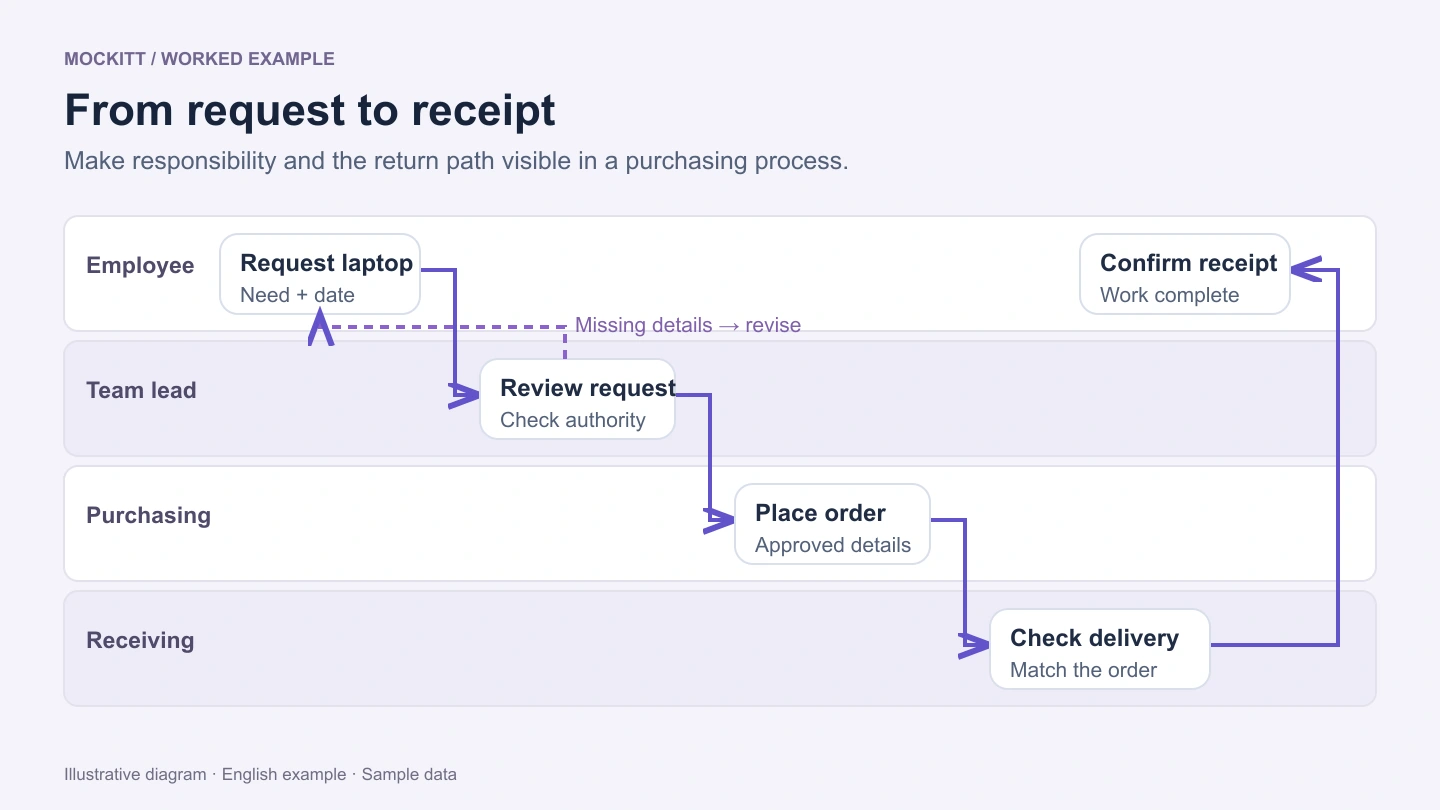
This illustrative workflow uses four lanes: Employee, Team lead, Purchasing, and Receiving. Put each action in the lane of the person responsible for it. Label a cross-lane connection with the information being handed over, not just the word Next.
The example is a starting point for discussion, not a purchasing policy. Your organization's approval rules, spending authority, and suppliers determine the actual paths.
| Owner | Action | Handoff or result |
|---|---|---|
| Employee | Submit the laptop request | Role requirements, requested model or specifications, needed-by date, and estimated cost |
| Team lead | Review the need and spending authority | Approved request, or a specific reason to revise it |
| Purchasing | Place the order against the approved request | Order confirmation and expected delivery information |
| Receiving | Check the delivery against the order | Receipt confirmation, or a discrepancy to resolve |
| Employee | Confirm the equipment was received | A clear completion record |
A person can participate in more than one lane. Use lanes to clarify responsibility, not to reproduce the organization chart.
Give every exception somewhere to go
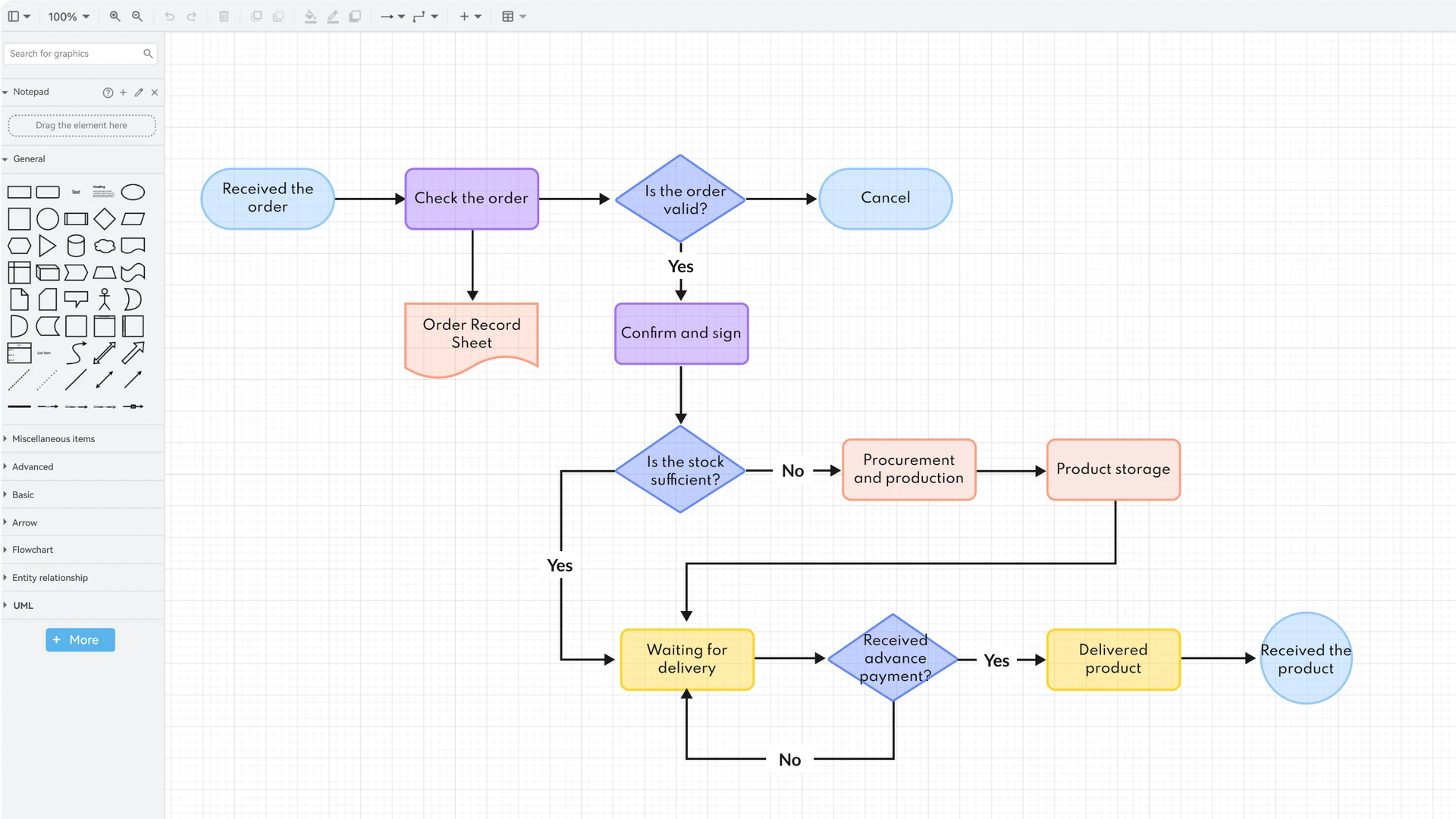
Add decisions where the work can change direction. Request complete? belongs before approval. Approved within the lead's authority? may lead to purchasing, revision, or another approver. Label those branches with their actual conditions.
Avoid a floating Rejected box with no next action. If specifications are missing, return to Update request and identify who supplies them. If a laptop is unavailable, route the proposed substitution back to the person who can approve it. If nothing should proceed, mark the cancellation endpoint.
Waiting is also part of the process. Record what the team is waiting for, who follows up, and which event resumes the flow. Do not invent an escalation deadline just to make the diagram look complete.
Build the map around actions, then connect the handoffs
Use the whiteboard when the conversation needs notes and supporting material alongside the flow. For detailed shapes and connectors, the Mockitt flowchart tool provides a focused diagram editor. Choose the workspace that fits the work you need to review.
Capture one actual request
Ask the participants what they received, what they did, and what they passed on. Note differences between written policy and everyday practice.
Create the lanes and action labels
Use concise verb phrases such as Review request or Confirm receipt. Keep supporting documents beside the map instead of placing paragraphs inside every shape.
Connect the normal path
Follow the request from its trigger to its result. Check that every transfer has an owner and enough information for the receiving person to act.
Add alternate paths
Include missing information, rejected requests, substitutions, and cancellations where they affect the process. Connect each return path to a named step.
Walk through the map together
Use a normal request and an exception case. Ask each participant whether they could perform their step using only the information shown.
Keep decisions beside the step they change
Use shared editing and comments to discuss unclear handoffs in context. A comment such as Who confirms a substitute model? is more useful beside that branch than in a separate list with no connection to the process.
When a question is resolved, update the map itself. Keep an owner, a review date, and any remaining questions visible so the next person knows whether the diagram describes the current process or a proposal. Before sharing a link, check who can access the board.
Agreed
Put confirmed actions and conditions into the flow.
Open
Keep uncertain rules visibly labeled as questions.
Next
Name the person who will confirm the rule or supply the missing evidence.
Business process mapping questions
When should I use a swimlane diagram?
Use swimlanes when responsibility changes between people or teams and those handoffs are important to understand. A simple flowchart may be clearer when one person performs every step.
Does the map have to use BPMN?
No. A team discussion may only need actions, decisions, lanes, and labeled arrows. If the process requires formal modeling, agree on the notation and its meaning before adding more symbols. A visual diagram alone does not make a process executable.
How is a process map different from a system architecture diagram?
A process map follows work through actions and decisions. An architecture diagram describes the systems and dependencies that support that work. Use separate views when combining them would obscure either question.
Bring your next process discussion onto one board
Start with a real handoff, add the people and rules around it, and work through the exceptions together.
Start with Mockitt