Understand why each requirement exists
Start with what users need to accomplish, then add the features that support it. Identify ideas that have a feature name but no clear use case.
Mockitt AI · Product planning
Scattered requirements.
One clear product picture.
Describe your product goals and user scenarios, then use AI to organize the user journey and feature hierarchy. Add details to an editable product map and work with your team to define the scope of a release. A map organized around user activities also gives story-mapping discussions a clear starting point.
See the whole picture before deciding
A product map connects who is using the product, what they need to accomplish, and which features support that work. During a review, your team sees more than a to-do list: it sees where each requirement fits into the user's journey.
Start with what users need to accomplish, then add the features that support it. Identify ideas that have a feature name but no clear use case.
Break user activities into specific tasks. Distinguish screens, actions, and business rules, then look for gaps and duplication.
Keep the features needed to complete the main task. Set experience enhancements aside so the team has a shared basis for deciding what to include now and what to defer.
One example brings the map into focus
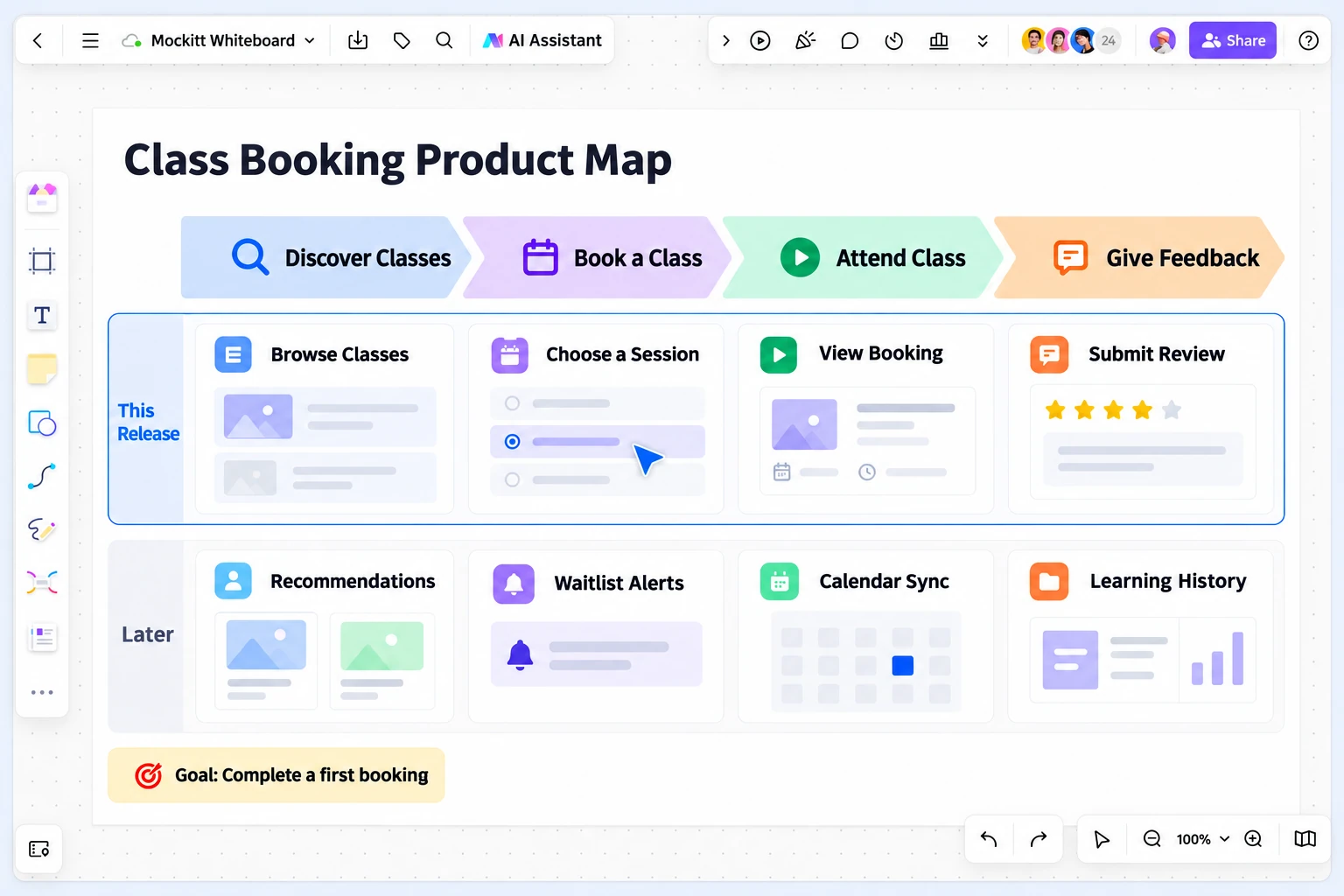
Read across to see how the user completes the task. Read down to see how much is included in the current release. This product map is organized around user activities, making it easier to discuss release slices.
Find a suitable class
Class description · Time · Location
Recommendation preferences and rules
Choose a session and submit
Available spots · Submit booking · View the result
Join a waitlist and receive updates when a class is full
Use the booking details to attend
Class time · Location · Booking history
Sync the schedule and reminders
Describe the class experience
A simple rating · Written feedback
Past classes and progress records
Adjust the scope to the goal. If you only need to test whether people want to book, post-class reviews can wait. But users must still know whether their booking succeeded after they submit it.
AI drafts. Your team decides.
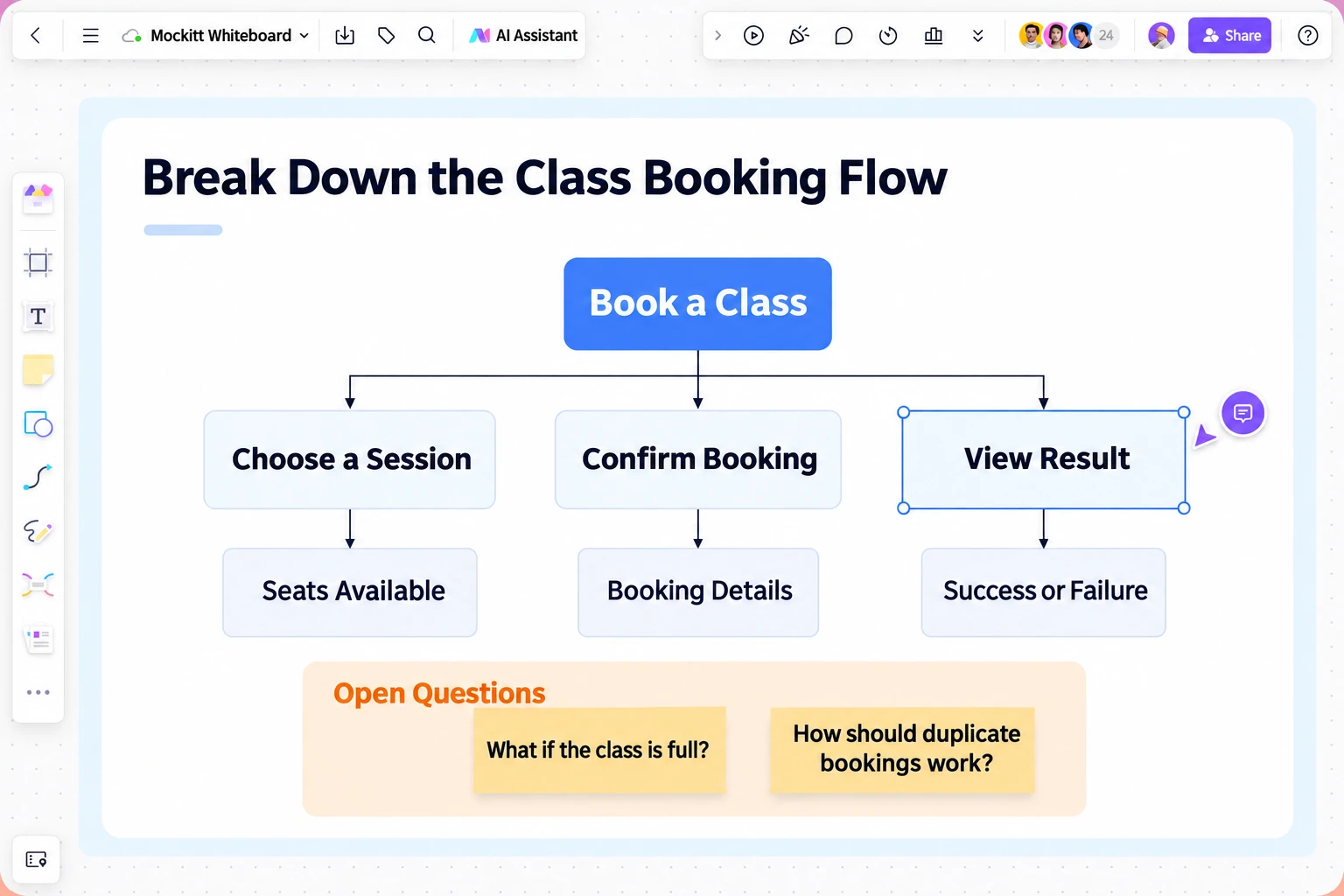
A single feature name often hides several different questions. Unpack it so the discussion moves from “that seems about right” to specific rules.
Start with a description
You do not need to draw the entire structure first. Provide the business context, let AI organize an initial draft, and then revise it around your actual requirements.
Explain who the product serves, what problem it solves, and any ideas or constraints you already have. Specific context produces a more useful structure than simply asking to “make a booking product.”
Ask AI to organize tasks and features around user activities. First, check whether the main journey holds together. Then look for missing roles, information, or exception scenarios.
Keep editing the map: merge duplicate features, add business rules, and discuss the scope of this release. Resolve the open questions before moving on to the requirements document and prototype review.
Make the request specific
Choose a scenario close to yours, copy the prompt, and replace the users, goals, and constraints with your own before sending it to Mockitt AI.
Create a product map for a class-booking product for working adults in a city.
Goal: Help new users find a suitable class and complete their first booking.
Organize user activities into Discover classes, Book a class, Attend the class, and Share feedback. Then break them down into user tasks and the features each task requires.
For the first release, include browsing classes, choosing a session, submitting a booking, viewing the booking result, and leaving a simple review. Put personalized recommendations, waitlist notifications, calendar sync, and learning history in the list for later discussion.
Include scenarios such as a full class, duplicate submissions, and failed bookings. List unresolved business rules separately rather than assuming the answers.
Create a product map for a customer follow-up system used by a sales team.
Goal: Give sales representatives a clear path from receiving a lead to recording the outcome of a follow-up.
Organize user activities into Receive a lead, Understand the customer, Schedule a follow-up, and Record the outcome. For each activity, list the tasks, required features, and questions that need to be confirmed.
Keep the first release focused on customer details, the account owner, follow-up records, and the next follow-up date. Leave complex automation and predictive analysis for later.
Identify which business rules are needed when the owner changes, duplicate customers appear, or someone tries to access information without permission.
Create a product map for the member hub of an existing e-commerce product.
Goal: Help users understand their membership status and find and use the benefits currently available to them.
Organize user activities into View membership status, Understand benefits, Use benefits, and Check history. Break each activity down into user tasks and features.
Focus the first release on displaying status, explaining benefits, providing access to those benefits, and viewing history. Leave tier progression and personalized engagement for later discussion.
Flag situations that need clarification, such as expired or temporarily unavailable benefits and delayed status updates. Do not invent membership tiers or pricing rules.
One map, different perspectives
The value of a map extends beyond generating it. It becomes useful when the team uses it to agree on a direction, find gaps, and make trade-offs.
Connect features to user tasks and explain where the requirements came from, what they aim to achieve, and what belongs in this release.
Use the tasks to identify the screens, interaction feedback, and exception paths that need to be designed.
Raise API, permission, and data dependencies during scope discussions so gaps do not come as a surprise at handoff.

Choose the view that fits the question
The same product can have several useful views. Choose based on the question you need to answer now. You do not have to fit every piece of information into one diagram.
Show the tasks users need to complete, the features they require, and what to build in the current release.
Best for: organizing requirements and reviewing scopeBranch out from a central topic, group ideas, and create a hierarchy of knowledge or concepts.
Explore AI mind maps ↗Communicate the goals, planned direction, and timing of upcoming phases.
Explore AI product roadmaps ↗About product maps
A product map brings user goals, journeys, and planned features into one view. It helps the team understand why a feature exists, where it belongs in the journey, and how far the current release should go. A feature list is useful for recording individual requirements; a product map is better for discussing those requirements in the context of a complete user task.
Describe the target users, the problem you want to solve, the main use cases, and any known constraints. Include existing feature ideas if you have them. When requirements are still unclear, ask AI to list questions first, then complete the map based on your answers. This keeps assumptions from being treated as confirmed requirements.
Yes. AI generates a first draft of the product map. You can continue adjusting the content, adding missing tasks, organizing the hierarchy, and discussing it with your team. Decisions about business rules, feature priorities, and release scope should still be confirmed by the people who understand the business.
Choose a user goal to validate, then follow the journey and identify the tasks that cannot be omitted. For class booking, users must at least be able to find a class, choose a session, submit a booking, and see the result. Put the features essential to that journey in the first release and save experience enhancements for later. Define how exceptions will be handled, too.
No. A product map organizes the overall product and its scope. A PRD specifies rules, fields, and acceptance criteria, while an interactive prototype shows individual screens and responses to user actions. Once the scope is agreed, expand the key tasks into requirements and a prototype to give the next design and review stages a clearer focus.
Start with your next product idea