An AI text generator can turn a marketing brief into email drafts, landing-page copy, and social posts. The useful starting point is a clear audience, a verified offer, and one action you want the reader to take. Choose a tool that fits where you write, then revise its output against those facts. A fluent paragraph is still a draft.
For a campaign with several contributors, organize the brief before generating channel copy. Mockitt's AI document workflow can help arrange source notes into a document for review and handoff. Use that document to keep approved messages, deliverables, and open questions together; a document generator and a marketing-copy assistant serve different parts of the job.
Below, you'll find five tools with different strengths, a complete prompt for a fictional product launch, and an example of how to edit the resulting copy. This guide focuses on usable marketing work. If your main question is cost, the separate guide to free online text generators covers that selection task.
What an AI text generator can do for marketers
Text-generation systems use language models to produce text from instructions and context. They can propose a structure, rewrite a paragraph, summarize supplied notes, or create several versions of a message. They do not automatically know your approved claims, customer research, or current product limits.
The most useful work is often small and specific: shorten a subject line without losing the offer, turn a product note into a customer benefit, or adapt a launch announcement for a second channel. Supplying the original material gives the model something concrete to work with.
Where AI helps most
- Getting a first draft on the page. Turn a rough outline into a starting point when the facts are settled but the wording is not.
- Exploring different angles. Ask for a practical, reassuring, and concise version of the same offer. Choose the angle that fits the audience rather than combining all three.
- Adapting an approved message. Rework a launch email into a shorter post while preserving the release scope and call to action.
- Editing with a specific constraint. Remove repeated claims, simplify a technical explanation, or replace abstract language with an action the reader can take.
Where the draft still needs your judgment
An AI assistant may invent a feature, sharpen a tentative statement into a promise, or add a plausible customer quote. It can also reproduce stereotypes or assume the wrong audience. Give it approved facts and explicit exclusions, then compare the output with those inputs.
Brand voice needs more than an adjective such as “friendly.” Include a short approved sample and explain what makes it right: direct verbs, concrete benefits, no slang, or a restrained tone. Do not provide confidential customer records or unreleased plans unless your organization has approved that service and its data settings.
AI is less useful when the missing ingredient is evidence. It cannot supply a real customer interview, a product test you have not run, or a trustworthy conversion result simply because the prompt asks for one. Gather that material first.
Five tools for different writing jobs
The best choice depends on your deliverable and working environment. The table compares the kinds of work these tools support. Use the same brief when trying tools so a change in the instructions does not look like a difference in product quality.
| Tool | Useful starting point | What to evaluate |
|---|---|---|
| Mockitt | Organizing source material into a campaign brief or handoff document | Whether the document keeps facts, open questions, and responsibilities distinct |
| HuggingChat | Exploring drafts with different available open-source models | Consistency across revisions and the selected model's handling of constraints |
| Rytr | Writing and rewriting messages with a chosen voice and format | Whether suggested language fits your actual relationship with the audience |
| HyperWrite | Continuing or revising a draft while you work | Whether autocomplete and edits preserve meaning rather than adding claims |
| ChatGPT | Developing and revising a brief through a conversation | Whether each revision preserves the offer, audience, and requested output format |
Mockitt: organize the brief and handoff
Mockitt is useful when several people need to work from the same source material. In the AI client, organize your notes into a document, then revise its sections and tables. For a campaign brief, collect the audience, approved offer, asset list, and owners in one place so the next person has what they need.
Keep the deliverable clear. Preparing a Word document is different from writing a headline inside a prototype, and neither action publishes a campaign. Use the brief to establish what is approved before handing channel copy to a writer, designer, or stakeholder.
HuggingChat: explore different model responses
HuggingChat is Hugging Face's chat application powered by open-source AI models. Its current interface offers automatic model selection as well as a choice among available models. The model you select shapes the response, so record that choice when comparing drafts.
It can be useful for exploring different phrasing or response styles. Keep the brief unchanged, record which model you selected, and compare how well each draft follows the constraints. Availability in a chat app does not by itself establish a model's license or suitability for your organization's data.
Rytr: write and revise in a consistent voice
Rytr's current product includes Create for writing and rewriting, alongside Engage for relationship context and follow-up work. Its writing tools cover formats such as emails and posts, with voice, tone, and language controls. That makes it a candidate when your work centers on repeated message formats.
For a product announcement, test whether it keeps the benefit specific and avoids treating every recipient like a sales prospect. An outreach draft and an existing-customer update need different openings. Plan to review product claims, names, and tone before publishing.
HyperWrite: work within an existing draft
HyperWrite offers writing assistance, rewriting, autocomplete, chat, and research features, including a browser extension. Consider it when you already have material and want help developing a paragraph or shortening a message without moving the whole task into a separate chat.
Suggestions are useful only if they preserve the point you intended to make. When research or citations are involved, open the underlying source and check that it supports the precise claim. A relevant-looking reference does not validate a generated sentence.
ChatGPT: refine the message through conversation
ChatGPT supports drafting, rewriting, summarizing, and creative suggestions. Its available tools depend on the plan and settings, and the application can use different models.
For marketing copy, the conversational format makes it practical to ask for a draft, point out a specific problem, and request a targeted revision. Keep approved facts in the prompt and ask it to change only the section at issue. Repeatedly asking for a “better” version can gradually alter the original offer.
From campaign brief to usable copy
A workable brief should answer five questions: who is reading, what has changed, why it matters, what is supported by the product, and what the reader should do next. Add the channel's space constraints and the claims that must not appear.
Write down the facts before the prompt
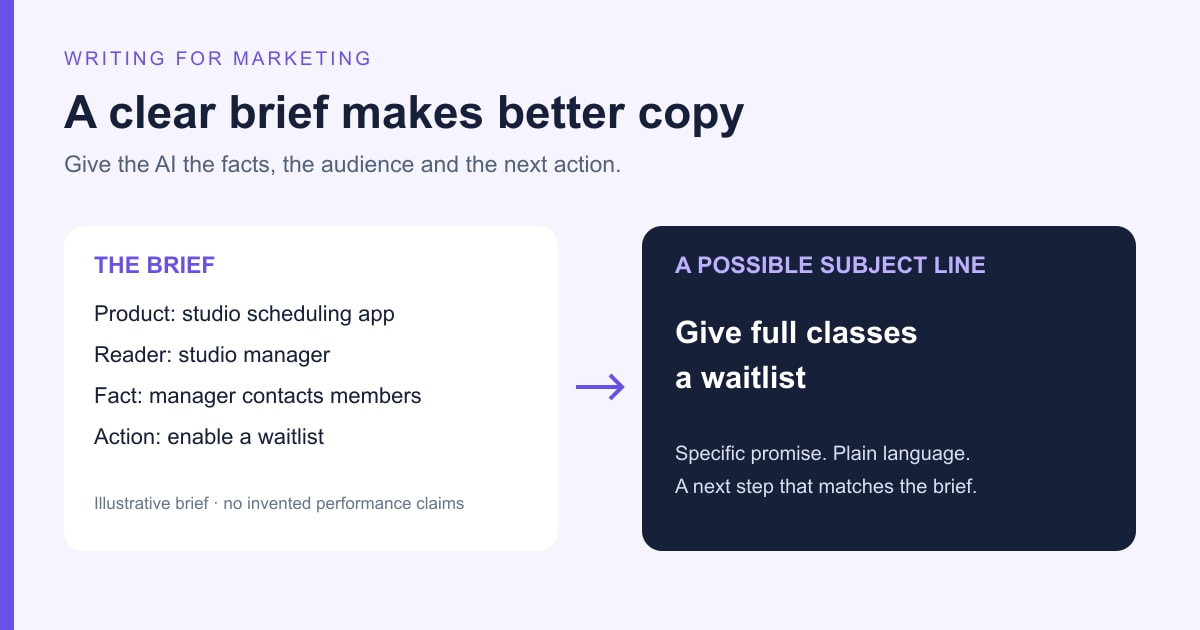
Consider a fictional scheduling product called Trailside. Its team is announcing a waitlist feature to existing studio managers. The following brief and copy are illustrative examples, not results from a customer campaign or a live product test.
- Audience: studio managers who already use Trailside to schedule classes.
- New capability: members can join a waitlist for a full class.
- Confirmed behavior: the manager sees the list and chooses whom to contact when a spot opens.
- Not supported: automatic enrollment, payments, or guaranteed attendance.
- Action: open a class and enable its waitlist.
- Tone: helpful and matter-of-fact, with no invented urgency or performance claims.
If this material is spread across meeting notes and product specifications, put it into a short shared brief first. Separate unresolved questions from approved facts. “Automatic notification is being considered” must not become “Members are notified automatically” in a launch email.
A prompt you can adapt
Use a prompt that specifies the facts and the deliverable. Replace the fictional details with your own approved information:
Write a launch email for existing Trailside customers who manage fitness studios. Announce a waitlist for full classes. Members can join the list; the manager chooses whom to contact when a spot opens. Do not imply automatic enrollment, payment collection, or automatic messages.
Give me three subject-line options under 50 characters, one preview line, an email body of about 100 words, and a button label. The call to action is to open a class and enable its waitlist. Use plain American English and a helpful, matter-of-fact tone. Do not add statistics, customer quotes, dates, prices, or features. List any missing information separately.
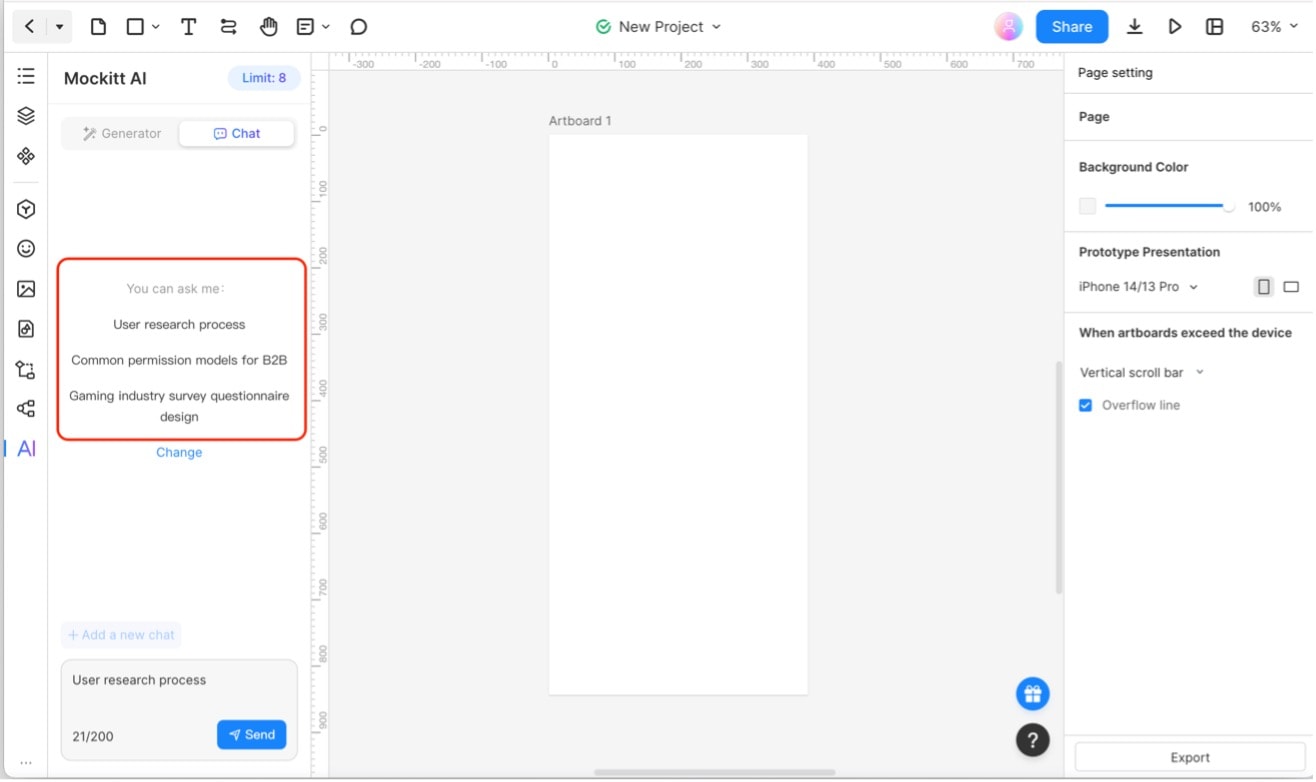
In a chat-based writing tool, submit the brief and the prompt together. In a document workflow, keep the brief and draft in separate sections so another person can compare them. The archived Mockitt capture below illustrates the earlier AI Chat panel beside a prototype canvas; it is not a current walkthrough of the AI document client.
Edit the promise before the polish
A weak draft might say: “Never lose a booking again. Trailside automatically fills every empty spot so you can focus on growing your studio.” It sounds confident, but it invents automation and a business result. Changing “never” to “rarely” would still leave an unsupported promise.
A more accurate version keeps the action visible:
Subject: Give full classes a waitlist
Preview: See who's interested when a spot opens.
Hi there,
A full class doesn't have to mean turning away every interested member. With Trailside's waitlist, members can add their names when a class is full.
You can see who's waiting and choose whom to contact when a spot opens. You stay in control of the next step—joining the list doesn't automatically enroll a member.
Open a class, enable its waitlist, and let members register their interest.
Button: Enable a waitlist
The useful changes are specific: “fills every empty spot” becomes an observable waitlist, the manager's responsibility is explicit, and the button describes the next action. Ask for that kind of revision rather than “make it more engaging.”
For example: “Keep the approved facts and button label. Shorten the second paragraph, remove the business-growth claim, and make clear that the manager contacts the member.” Check the revision against the brief again; an edit can fix one sentence and introduce a new error elsewhere.
Adapt the message to the channel
Once the email is approved, reuse its facts rather than asking for an unrelated social post from scratch. A short post could read: “Class full? Let members join a waitlist, then choose whom to contact when a spot opens. Enable the waitlist in your class settings.” The offer is unchanged, but the greeting and explanatory paragraph are gone.
For a landing page, pair a direct headline with enough context to explain the behavior. For an in-product message, keep the action close to the relevant control. For a subject-line test, change one meaningful angle while keeping the audience and offer consistent. Do not call a favorite draft the winner without actual audience results.
Review copy in its final destination. A button label that looks fine in a document may wrap in a mobile layout; a preview line may repeat the subject; a social post may need context that the email's recipients already have. Those are editing decisions the draft alone cannot settle.
Questions about AI-generated marketing text
Can I use an AI text generator for free?
Some services offer free access, but models, quotas, and features change. Compare the current plan against your actual task: the length of the source material, the revisions you need, and how your team handles private information. Historical GPT-3 API prices do not describe today's writing products.
Are ChatGPT and GPT-3 the same thing?
No. ChatGPT is an application; GPT-3 is an earlier language-model family. A current writing app may use different models and additional tools. Choose by the work you need to complete rather than assuming a familiar model name describes the whole product.
Which AI writing tool is best for marketing?
Start with your work: organizing a brief, drafting a new message, revising existing copy, or exploring several approaches. Compare a small set with one real, approved brief. Look for accurate claims, useful revisions, an appropriate voice, and a manageable editing burden. A longer draft is not necessarily a better one.
Does Google penalize AI-written content?
AI use alone does not make a page a violation of Google's guidance. Google emphasizes accuracy, quality, and relevance, and warns that generating many pages without added user value may violate its scaled-content-abuse policy. Replacing words to avoid an AI detector is not a useful SEO strategy.
For a marketing article, add information readers can use: firsthand product details, a supported comparison, an original example, or a clear answer to a real question. Check the title, description, and image text as well as the body. Neither using AI nor passing a detector guarantees visibility.
Give the draft a clear job
Start with one audience, one approved offer, and one action. Use AI to explore and shape the wording, then edit the promises, details, and placement before publishing. Keep the final brief with the approved copy so the next email, page, or post builds on the same facts.