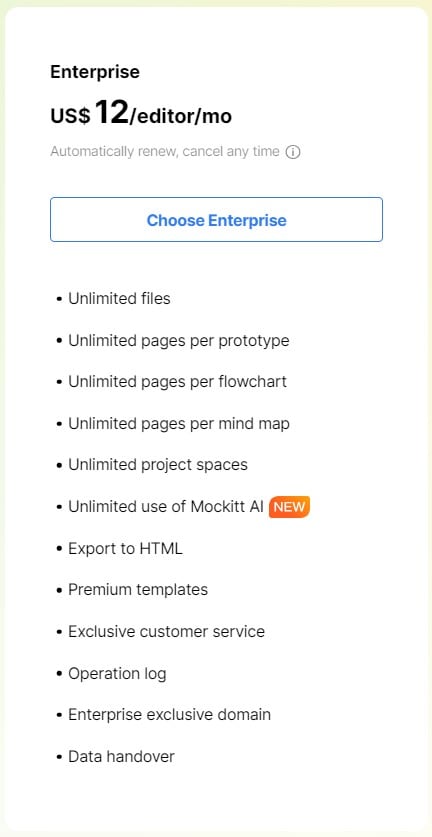
Mockitt Pricing Plans: How to Compare Features, Limits, and Billing
Choose a Mockitt plan by matching the work you need to the allowances shown on the current pricing page. Plan names, file limits, AI credits, seats, and billing terms can change, so use the pricing page and the entitlements in your account when making a purchase decision.
Start with the work you need to do
- Prototype a flow and share it for review: check available files, screens, sharing, and preview permissions.
- Generate or revise work with Mockitt AI: check the current AI credit allowance and any renewal or expiry rules in your account.
- Work with a team: check seats, workspaces, roles, permissions, version history, and support for the selected plan.
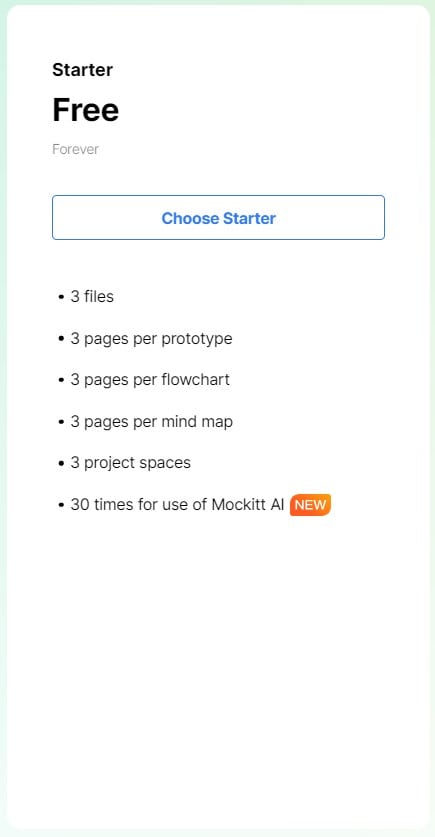
How to compare plans
Compare the same workflow on each candidate plan. Record the plan name, billing period, number of editors, file and storage limits, export or handoff options, AI allowance, and collaboration controls. Keep the pricing page date and a screenshot or account readback with your purchasing notes.
For an individual subscription, confirm whether collaborators need their own seats. For a team or enterprise agreement, confirm the seats, workspace ownership, admin controls, support terms, and any negotiated entitlements in writing before rollout.
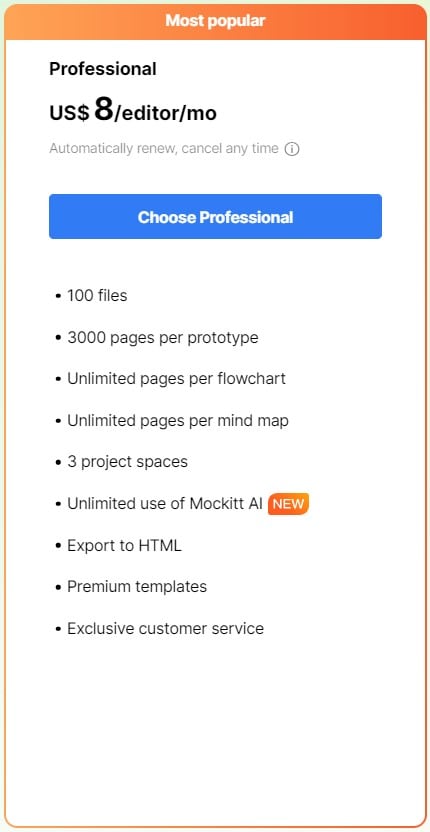
Before and after purchase
Before payment, review the billing period, renewal behavior, taxes, cancellation terms, and the features included in the selected plan. After payment, open your account and verify that the expected capacity and AI balance are active. If the account and pricing page disagree, contact Mockitt support and keep the order or agreement as the reference.