- Part 1. Left Quick Toolbar
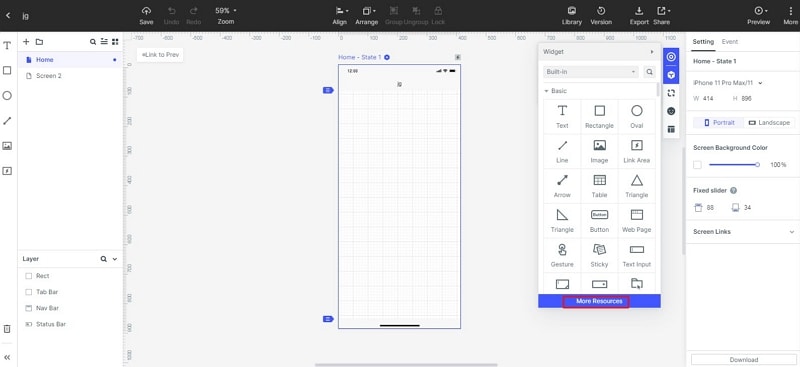
- Part 2. Right Build-in Widgets
- Part 3. Add Icons
- Part 4. More Widget Resources
Left Quick Toolbar
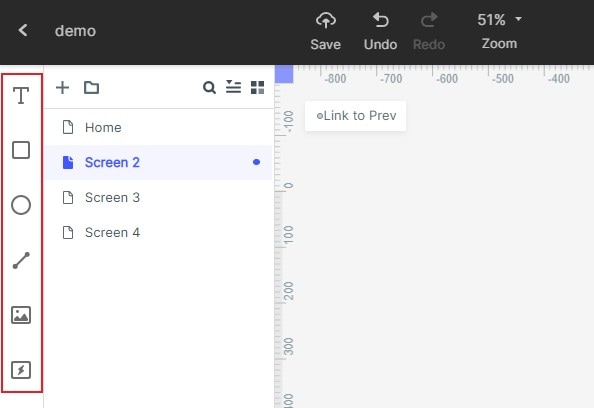
The Quick Toolbar on the left side of the Dashboard gathers commonly created components to facilitate quick operations. The user can edit by dragging the corresponding icon to the project.
Add text to your project
Add a rectangle to your project
 Add text to your project
 Add a rectangle to your project
 Add an oval to your project
 Add a straight line to your project
 Add an image view to your project
 Add a link area to your project
 Find your deleted screen to recover
Right Build-in Widgets
You can quickly drag and drop basic or platform widgets which are built-in Mockitt. (iOS, Material Design, Ant Design...).
Add Icons
You can select open-source icons in the library directly or via category searching; meanwhile, you can freely set the default color and size of the icons
More Widget Resources
We have prepared dozens of materials to improve the user's experience, including prototype templates, icons, and design components.