Cognitive science studies the mind and intelligence across disciplines, including psychology, computer science, neuroscience, linguistics, anthropology and philosophy. In UX, it helps explain why a person notices a control, remembers a choice or struggles to complete a task. These explanations guide design questions; UX research helps check whether the proposed solution works for the people using it.
The connection extends beyond thinking in the abstract. Language, memory, attention and learned expectations all matter when someone reads a form, compares plans or finds a saved item. A screen can support those processes by keeping relevant information visible and giving actions familiar names.
Everyday examples and major application areas help translate the science into practical interface decisions. A psychological principle does not guarantee that one layout will work for everyone.
 Original conceptual illustration; the visible UC San Diego credit is retained. It does not imply a partnership or new research by Mockitt.
An Example of Everyday Cognitive Science
Everyday activities provide useful starting points for understanding cognition. Learning a new route, comparing two purchases and troubleshooting a device all involve mental processes. Cognitive science studies those processes through evidence and models; the activities themselves are not separate branches of the science.
Consider what information each activity requires, what the person already knows and what the environment makes available. That same set of questions is useful when examining an interface.
Cognitive psychology is one contributor to this broader field. As the Stanford Encyclopedia of Philosophy overview explains, cognitive science combines different disciplines and research methods. It has substantial research on memory, perception and problem solving, alongside continuing debates about how best to explain them.
Examples of Cognitive Science or Psychology
1. Learning: when you encounter an unfamiliar concept, you connect it with prior knowledge and practice using it. In an interface, a consistent label and a clear first example can support that learning. A tooltip alone does not establish that someone has understood the task.
2. Decision making: choosing a train ticket requires comparing route, departure time and fare conditions. Organizing those details around the choice can be more helpful than simply reducing the number of tickets shown.
3. Problem solving: suppose your laptop repeatedly shuts down. You might check its power connection, recent changes and any visible error message before deciding what to try next. The example illustrates using remembered knowledge and current evidence together. An interface can help by showing what happened and which recovery options are available.
4. Development and experience: people acquire skills over time, but age alone does not tell a teacher or designer exactly what a person can do. A learner's prior knowledge, language and access needs matter. Instructions should be checked with the intended learners rather than based on a fixed age stereotype.
5. Working toward a goal: planning a journey involves attention, memory and monitoring progress. A visible summary of completed choices can help someone return to the task after an interruption without reconstructing every previous step.
These examples connect everyday behavior to questions researchers can investigate. The next section looks at five areas where those questions arise.
Common Uses of Cognitive Science
Cognitive science investigates processes such as reasoning, perception, language, learning and decision making. Its applications are varied because the same activity can involve several of these processes at once.
Artificial intelligence is one important contributor and application area, alongside work in psychology, neuroscience, education and language. Computer models can help researchers express and test an explanation; their behavior should not automatically be treated as a complete account of human thought.
The field contains competing theories and methods. For a UX designer, the practical response is to use a theory to form a clear question and then look for evidence relevant to the actual task.
The following five areas provide a useful introduction:
1. Artificial Intelligence
AI researchers build computational systems that perform tasks associated with intelligence, while cognitive researchers may use computational models to investigate human behavior. The two overlap, but an AI system's success does not prove that it reasons in the same way as a person.
2. Language Processing
Language research examines how people understand and produce language. For interfaces, familiar terms, clear instructions and meaningful error messages matter because readers must connect the words to an action. A label that makes sense to the product team may still be unfamiliar to a new user.
3. Learning & Development
Learning and development concern how knowledge and abilities change with experience. A person learning a new application may benefit from a worked example, practice and feedback. Avoid assuming that all intelligence comes only from learning or that everyone will follow the same learning path.
4. Memory
Memory lets people retain and retrieve information, but a design should not demand unnecessary recall. For example, a ticket-review screen can repeat the selected route and fare instead of asking the traveler to remember what appeared on the previous screen. This is a practical design choice, not a claim about a universal memory capacity.
The W3C guidance on clear visible labels recommends familiar terms located near the relevant control. Labels should remain meaningful when the field contains a value; a placeholder that disappears may not provide the same support.
5. Perception & Action
Perception concerns how information from the senses is interpreted, while action concerns what a person does with that information. Visual grouping can make related controls easier to identify. Sound or vibration may provide another cue, but essential information should not depend on an unsuitable single channel.
These areas meet in a task: a traveler sees a fare, interprets its conditions, chooses it and checks the result. UX work considers that complete experience.
The Relation Between Cognitive Science and UX
Cognitive science provides explanations and questions that can inform UX. UX also includes the person's goals and interaction context across a service. Understanding cognition is useful, but it does not replace learning about the people and situations a product must support.
Gather feedback on a realistic task, observe where people hesitate and ask what information they expected to find. Compare the observation with your explanation before deciding what to change.
Reducing Cognitive Overload
Cognitive load refers to the mental demands involved in a task. A design can reduce avoidable demands by keeping necessary information available, organizing related details and showing a clear next action. Removing information indiscriminately can make the task harder if people must search for it elsewhere.
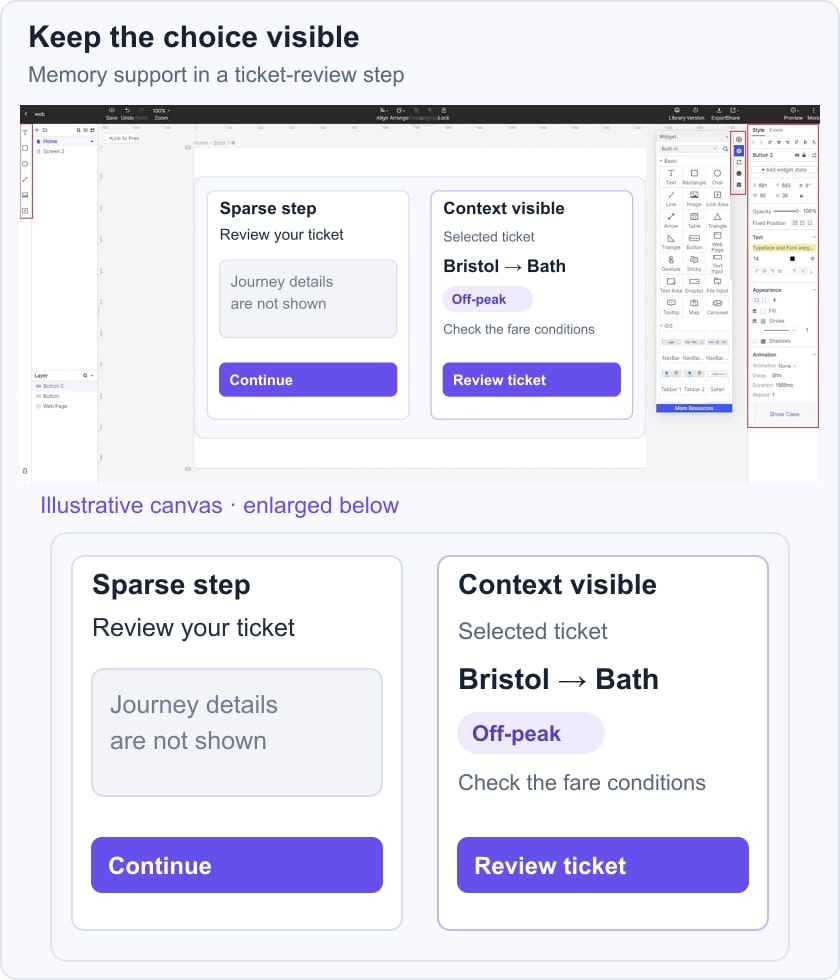
For example, a ticket-review screen can keep Bristol → Bath and Off-peak visible beside Review ticket. A Mockitt UI design workspace can be used to lay out both the sparse and contextual versions for discussion. Ask a reviewer to explain the selected journey and fare conditions; the illustration below is a design hypothesis, not a recorded usability result.
Limit the Choices
Organize choices around the user's decision. Grouping tickets by departure time or making restrictions easy to compare may help more than hiding alternatives. The effect of additional choices depends on their complexity, the person's familiarity and the task. Test whether the available options are understandable and sufficient.
Follow Simplicity
Use simplicity to remove unnecessary effort, not necessary meaning. A short button label still needs to describe the action. A compact form still needs visible labels and useful error guidance. Start with the information required to make a sound decision, then remove repetition and distraction.
Similarity
Group elements that belong together and make meaningful differences visible. Similar styling can signal related controls, while distinct labels and states help explain different actions. Do not rely on color or shape alone to communicate a critical choice.
Use these ideas as a cycle: identify a cognitive demand, propose a design response, observe the task and revise the explanation. The goal is to support understanding and action in context, not to decorate a screen with psychological terminology.