A meeting can show the right hour in the organizer's calendar and still surprise everyone else. The most useful question in time zone scheduling UX is not “Which clock should we display?” It is “What does this event promise to keep the same?” A one-off appointment, a weekly meeting at a local hour, and a reminder that fires after a fixed duration have different rules.
Define that promise before polishing a date picker. You can prototype the scheduling decisions in Mockitt, connect selection and confirmation screens, and ask reviewers to explain the result. The screens make the proposed behavior reviewable; the production calendar still needs a maintained time zone database and tested date calculations.
This guide follows a fictional London team organizing a weekly review with a colleague in New York. The difficult week is the one between their autumn clock changes. The example shows why an explicit event zone and a preview of actual dates are more useful than a permanent “five hours behind” label.
Decide what stays fixed before choosing the controls
An instant is one point in time, even though people in different places see different clock readings. A local wall time is the date and hour someone reads in a particular place. “Tuesday at 16:00 in London” defines a different recurring promise from “Tuesday at 16:00 UTC.” They sometimes coincide and sometimes do not.
The W3C draft guidance on time and time zones distinguishes these concepts and explains why future and recurring events need the user's original intent. This document is a Group Draft Note, not an endorsed standard. Its practical design lesson is to keep the event's rule separate from the way a viewer sees it.
| Scheduling task | Promise to clarify | Question for the interface |
|---|---|---|
| One confirmed appointment | Everyone attends the same instant | Does changing the display zone only change its presentation? |
| Weekly local meeting | A chosen hour in the event's named zone | Whose local hour governs the series? |
| Reminder after a duration | A specified elapsed interval | Does “in three hours” stay three hours when a clock changes? |
| All-day event | A calendar date or date range | Will converting a midnight timestamp incorrectly move it to another date? |
Do not expose every technical choice to every user. A consultation booking might establish the provider's zone in advance. A distributed team meeting might let its organizer choose. The product still needs a documented rule, even when the interface makes a sensible default. A temporary reservation also needs an explicit hold deadline and an availability check after expiry; converting the displayed time does not extend that hold.
A weekly review across two clock changes
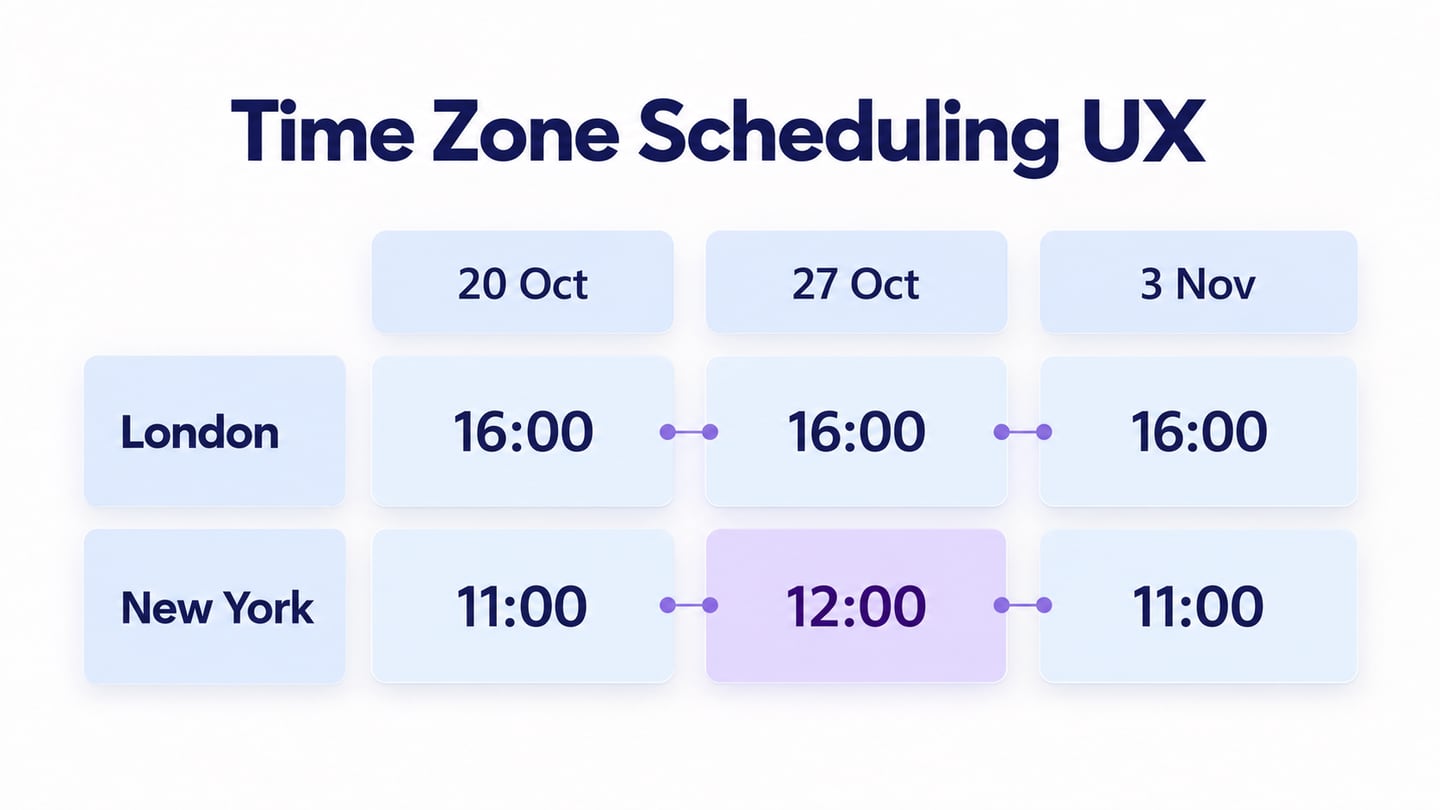
The fictional team chooses “Every Tuesday at 16:00, London.” The meeting lasts 30 minutes. Its event zone is Europe/London; a teammate views it in America/New_York. Under the time zone rules used for the checked dates below, the London hour stays fixed while the New York hour changes for one week.
| Meeting date | London organizer | New York teammate | Same instant in UTC |
|---|---|---|---|
| 20 October 2026 | 16:00, UTC+01:00 | 11:00, UTC−04:00 | 15:00 UTC |
| 27 October 2026 | 16:00, UTC+00:00 | 12:00, UTC−04:00 | 16:00 UTC |
| 3 November 2026 | 16:00, UTC+00:00 | 11:00, UTC−05:00 | 16:00 UTC |
The recurrence preview keeps London at 16:00 and makes the New York change from 11:00 to 12:00 and back visible before the organizer confirms.
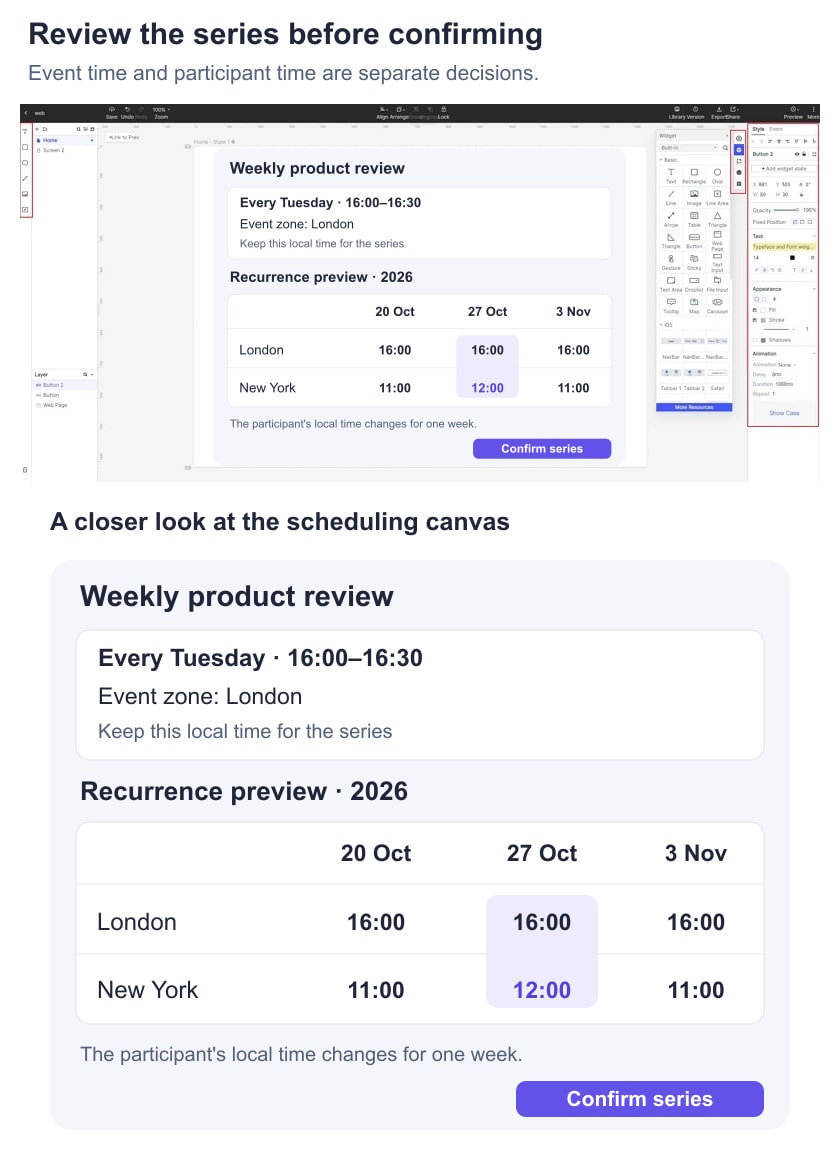
These conversions were checked for the stated dates using named time zones. They are not a permanent rule about the difference between the two cities. Future government decisions can change time zone rules, so the implementation must use maintained data.
A useful explanation under the preview is: “Repeats at 16:00 London time. Participants' local times may change when clocks change.” If noon is unacceptable for the New York colleague, the organizer can deliberately adjust that occurrence. The interface should reveal the conflict in expectations before people miss the meeting.
Put the zone beside the date and time
A zone selector hidden in account settings is too distant from a scheduling decision. Display the selected zone beside the time input and include it in the confirmation summary. For recurring events, identify which zone controls the series, rather than leaving users to guess whether the system uses their device or their colleague's profile.
Let people search by familiar city or region names when appropriate. A label such as “London — UTC+01:00 on 20 October” gives a recognizable place and date-specific context. An offset alone does not represent the city's future clock rules. Short abbreviations are also poor primary labels when readers may interpret them differently.
Auto-detection can provide a default, but keep it visible and editable. A traveler may be booking an appointment back home. If the detected zone changes while someone is editing, do not silently reinterpret the typed hour. Ask whether they want to keep the same appointment or change its local time.
Show the full date alongside converted times. A late appointment can fall on the next day for another participant. On a small screen, use stacked labeled rows instead of squeezing two cities, dates, and hours into one ambiguous line. For a scheduled content release, keep the publication time beside the selected version and destination; reaching that time alone does not confirm publication.
Google Calendar's time zone help provides a real example: an event can have its own zone while invitees see it in their local zones. This illustrates a useful distinction, not a requirement to reproduce Google's interface or its exact settings.
Handle missing and repeated local times deliberately
Some local times do not occur when clocks move forward. Others occur twice when clocks move back. A text input that accepts every combination of date and hour cannot resolve these cases by appearance alone. The design needs a validation and choice policy agreed with engineering.
For example, New York jumps from 01:59 to 03:00 on 8 March 2026. A requested 02:30 on that date does not identify a real local time. Do not silently turn it into 03:30 and display an ordinary success message. One understandable response is: “02:30 does not occur in New York on this date because clocks move forward. Choose another time.” Preserve the date, participants, and notes while the user corrects it.
On 1 November 2026, 01:30 occurs twice in New York. The first occurrence has offset UTC−04:00; the second has UTC−05:00. If your product allows scheduling in this interval, distinguish the choices with both an explanation and the offset: “First 01:30, before the clock change” and “Second 01:30, after the clock change.” A local hour without that distinction leaves the appointment unresolved.
MDN's time zone and ambiguity explanation describes why these gaps and repeated times occur. The UX does not need to expose an API's option names. It needs to communicate the policy the application actually implements. A scheduling service may disallow these slots; another may ask for an explicit choice.
Apply the same policy to recurrence generation. If a future occurrence falls into a missing hour, decide whether it is skipped, shifted, or requires attention. Make the exceptional date discoverable. Do not let a library default silently become a user-facing promise that nobody reviewed.
Separate a display change from a schedule change
Changing a viewer's display zone should normally change the clock reading, not move an already confirmed appointment. If a London event at 16:00 appears as 11:00 in New York on the selected date, switching the view to New York should not reschedule it to 16:00 New York time.
Editing the event's governing zone is different. The editor must make clear whether it preserves the local hour or the existing instant. Preview the consequence before saving, particularly for a recurring series. Use clear interface wording such as “Keep 16:00 in the new event zone” when that is the actual behavior.
Also separate editing one occurrence from changing the series. A one-week accommodation for the New York colleague should not unexpectedly shift every future meeting. If the product supports “this and following events,” show the starting date and summarize what changes. For basic event creation and conflict screens, use the broader calendar event and rescheduling workflow; the time zone rules belong inside that flow.
Build a short review sequence in Mockitt
Create an event editor, a recurrence preview, a confirmation, and one correction state. Use the same meeting name and participant pair throughout. Link the zone choice and recurrence control to the relevant states, then share a preview for review. Keep the verified conversion values in the sample screens; do not imply that static labels calculate live time zones.
Ask the reviewer to schedule the London meeting, identify the New York time on 27 October, and explain what changing their display zone would do. Then give them the repeated-hour example and ask which occurrence they selected. Their explanation is more useful than asking whether the screen looks clear.
- Can the organizer name the zone that governs the series?
- Can the invitee find their local date and time without doing arithmetic?
- Does an invalid local time preserve the rest of the event?
- Can a one-occurrence edit be distinguished from a series edit?
- Does changing only the display zone leave the confirmed instant unchanged?
Turn the agreed outcomes into reviewable acceptance criteria. Include the governing zone, recurrence rule, gap and repeated-hour policy, supported date range, and how changed time zone data is handled. The prototype communicates those decisions; engineering tests must verify conversions, saved values, recurrence expansion, and notifications in the working application.