An approval screen can show a green badge while leaving the most important question unanswered: approved by whom, for which version, and what happens next? Approval workflow UX connects those details. It helps the requester understand what is waiting, and helps the reviewer make a deliberate decision about a specific request.
Consider a fictional equipment-loan service called Elm. A team asks to return loan L-42 on Monday instead of Friday. The reviewer needs a handover location before deciding. We will follow that request through a change request, revision, resubmission, and final decision, then use a Mockitt approval-flow prototype to review the screens from both roles.
Separate submission, approval, and execution
Submitting a request means that it is available for review. Approval records an authorized decision. Execution applies the approved change. Sometimes the last two events happen together; sometimes another person or service must complete the work. The interface should reflect the product’s actual process.
In Elm’s example, “Extension approved” does not mean the inventory system has already updated the return date. Until that update is confirmed, the requester sees “Approved — return-date update pending.” Once complete, the loan record shows Monday as the new return date. A failed update must not be hidden by the approval badge.
Atlassian describes approvals in Jira as a gate before a work item moves to another workflow status. That is a useful distinction to preserve: a reviewer’s decision enables a next step, but its business meaning depends on the workflow. Your product should name that next step rather than assume every green state means the task is finished.
Start by agreeing who can request, review, revise, withdraw, and perform the resulting action. A business flowchart can establish those handoffs. The screen design then needs to answer the questions inside each handoff: what is being reviewed, what information is missing, and who should act now?
Give the reviewer something specific to decide
A useful request detail page carries the object, proposed change, reason, requester, current state, and revision identity. Put the existing and proposed values together where a comparison matters. For L-42, show “Current return: Friday” beside “Requested return: Monday,” with the affected equipment identified.
The reviewer should not have to reconstruct the proposal from a notification, an attachment, and a comment thread. Supporting documents may be necessary, but the decision summary belongs close to the actions. Mark missing information as missing; an empty space can look like a rendering error or a field that does not apply.
Before submission, the requester can check the same summary and correct it. The GOV.UK check-answers pattern provides a practical reference for reviewing entered information and changing individual answers. Adapt the idea to the request rather than placing a second copy of a long form above the Submit button.
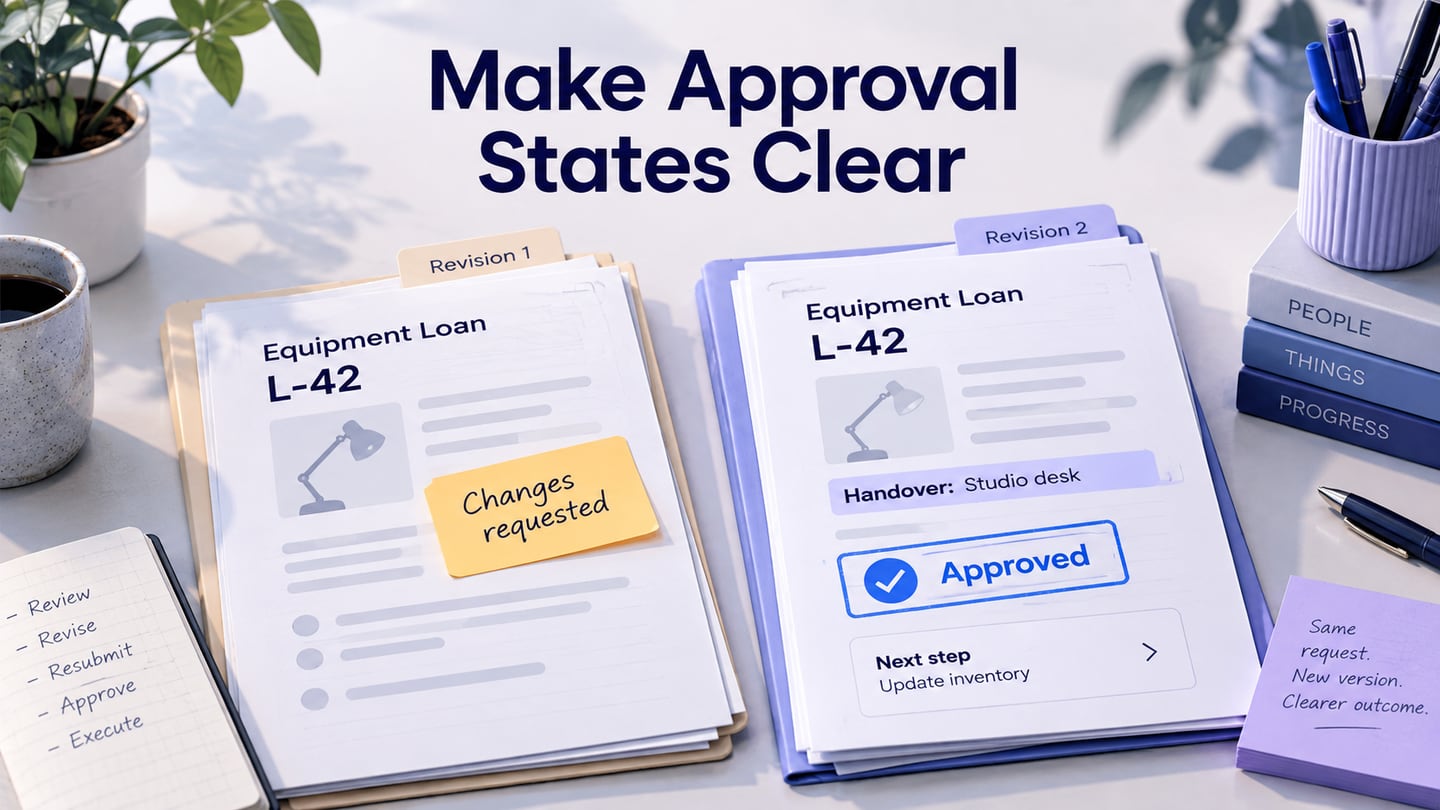
Revision 1 in our example asks for the extension but omits the handover location. The reviewer sees the request, identifies the gap, and asks for that information. This is an intentional example of incomplete context, not evidence that every equipment-loan service requires a location.
Keep Request changes distinct from Reject
These actions lead to different outcomes. Request changes tells the requester that work is needed before the reviewer can decide. Reject records a negative decision under the product’s policy. If both lead to the same unexplained red badge, people cannot tell whether to correct the request, start again, or stop.
Microsoft’s custom approval response example separates Accept, Reject, and Need more info into different branches. The useful lesson is the separation of outcomes; your labels should match the domain and actions actually supported.
| Action | Meaning | Next owner |
|---|---|---|
| Approve extension | Accept this revision’s proposed return-date change | The service or operator applying the change |
| Request changes | Return the request with a specific issue to resolve | The requester |
| Reject request | Decline the proposal; the current loan terms remain | The requester, if another allowed route is relevant |
| Withdraw request | Stop an unresolved request before a decision is applied | No reviewer action on this withdrawn revision |
Require a useful reason when the person receiving the outcome needs one to proceed. “Please add where the equipment will be handed over on Monday” makes Request changes actionable. “Not enough detail” leaves the requester guessing. A short prompt beside the comment field can encourage specificity without generating a response on the reviewer’s behalf.
Use action labels that name the consequence. “Approve extension” is clearer than “Confirm” when several actions are available. Keep a way to return without committing. A modal confirmation is not automatically necessary for every decision; choose it when the consequence or irreversibility warrants an extra review.
Carry one request through revision and resubmission
After the reviewer requests changes, Elm shows “Changes requested” and the unresolved handover question to the requester. The approved return date has not changed. Editing the form creates a revised draft, but does not automatically resubmit it or imply that the reviewer has seen the change.
The requester adds “Studio desk” as the handover location, checks the summary, and selects Resubmit for review. The example records revision 2 as the current submitted revision. Its detail screen identifies the changed field, retains the original reviewer comment, and shows “Awaiting review” with the next responsible role.
The revised request highlights the new Studio desk handover location while retaining the Friday-to-Monday proposal and the reviewer’s original question.
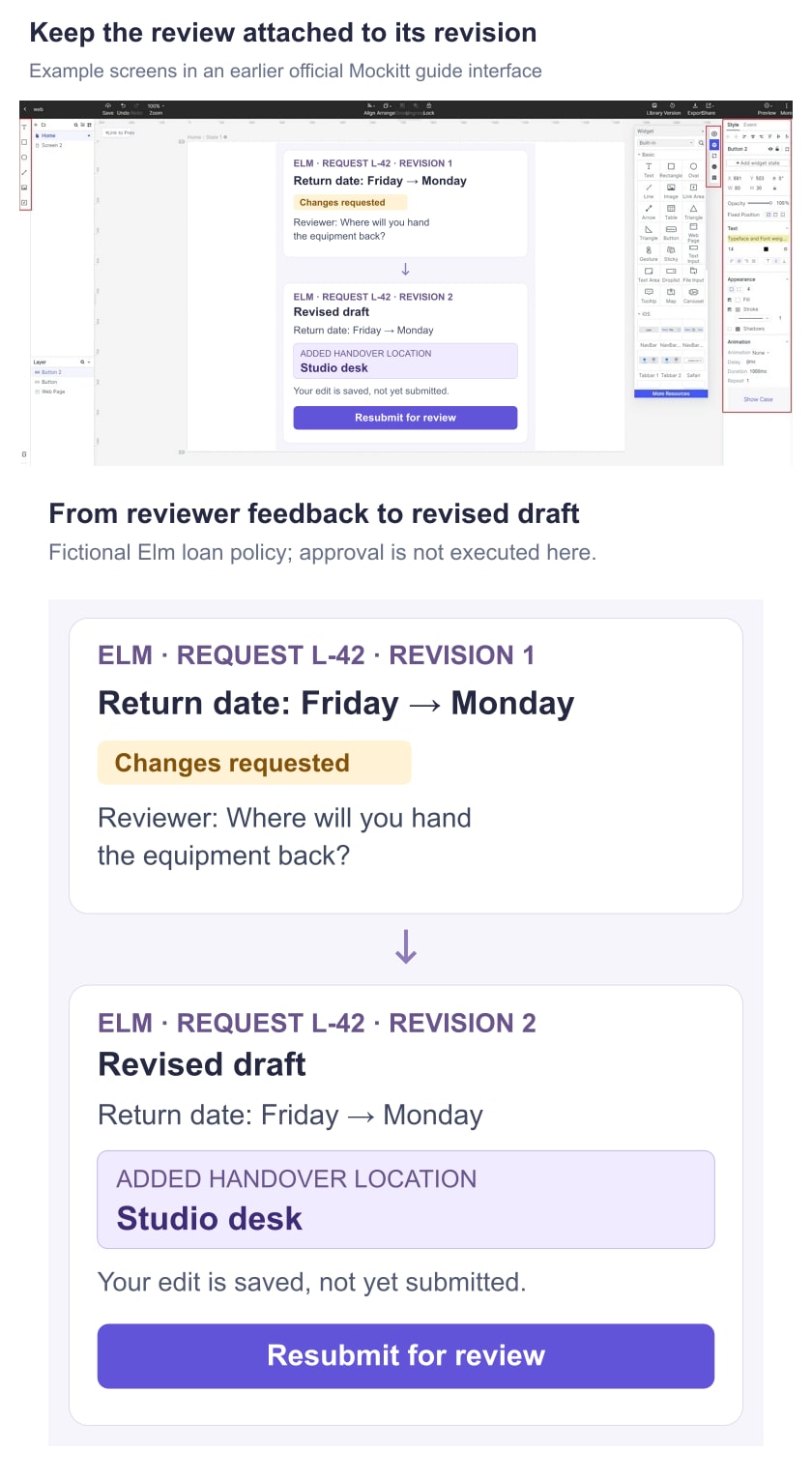
Do not make the reviewer reread every field to discover a one-line correction. A small “Changed since revision 1” summary can point to the handover location while keeping the whole request accessible. If important fields also changed, list them; do not label a broad new proposal as a minor comment response.
Keep conversation and state separate. Adding a comment is not the same as requesting changes. Saving a revised draft is not the same as resubmitting. A reply saying “done” should not silently move a request to Approved. The action that changes the workflow needs an explicit, understandable result.
The requester should be able to see whether their revision was submitted successfully. While submission is pending, prevent accidental repeat decisions and communicate that the request is being sent. If completion is unknown, confirm the current request status before inviting another submission.
Do not approve a version the reviewer has not seen
Imagine the reviewer opens revision 2, leaves the tab, and returns after the requester has submitted revision 3 with a Tuesday return instead. The reviewer’s old screen still says Monday. An approval of that screen must not silently authorize Tuesday.
Define which changes invalidate a pending review and how the interface handles an outdated version. Elm’s example blocks the stale action, explains “This request has changed since you opened it,” and offers View latest revision. The reviewer then sees the changed return date before deciding. This is a proposed rule for the example, not a claim that a prototype enforces version checks.
GitHub’s rules for required reviews include configurable treatment of stale approvals when reviewed changes are updated. It illustrates why the relationship between approval and version needs an explicit policy. A business request need not copy GitHub’s rules; it needs a rule that fits its own consequences.
Preserve the earlier decision in history without presenting it as approval of the new proposal. Show the revision, actor, action, and time with enough context to understand the sequence. If a product allows an authorized person to override a decision, that is a separate action with its own reason and visible record. For content that goes live later, tie the scheduled publication to an approved version so a later draft cannot silently inherit the earlier decision.
Design for the person who cannot act yet
The requester and reviewer need different primary actions. The requester may edit a returned draft but should not see an active Approve control merely because both roles share a page component. A person who can view the request but cannot decide should understand whether another role is responsible.
For an unavailable action, distinguish a state restriction from a permission restriction. “Already withdrawn” describes the request; “Only the equipment coordinator can approve” describes the actor. A disabled button with no explanation communicates neither. The admin interface guide provides broader context for role-sensitive layouts.
When several reviewers are involved, agree whether one decision, all decisions, or a sequence is required. Show the progress against that rule: “1 of 2 reviews complete” can be useful, while “Approved” after the first of two required decisions is misleading. Do not display reviewers’ names or comments to people who are not entitled to see them.
A notification should lead to the request’s current state. An old email is not a safe source of truth after withdrawal, reassignment, or revision. If the destination has changed, explain what happened rather than leaving an outdated Approve button available.
Write results that explain what changed
After a decision, name the affected request and the consequence. “Extension approved for loan L-42. Return-date update pending” is more informative than a checkmark and “Success.” After a confirmed rejection, the result can state that the Friday return date remains unchanged and show the reason.
Keep consequential feedback in the request record, not only in a toast that disappears. Use clear UX writing to distinguish pending work, missing information, and a completed action. Repeating “Approved” in three places does not compensate for an omitted next step.
For updates that do not move focus, the W3C status-message guidance explains how assistive technology can receive meaningful results. Plan the message and focus behavior with the implementation team. Color and visual placement alone are not enough to establish that the status is available to everyone.
Walk through both sides of the request in Mockitt
Build a compact screen sequence: requester summary, reviewer detail for revision 1, changes requested, revised draft, reviewer detail for revision 2, approved-but-pending, and completed. Add one stale-revision screen. Connect the named actions to those prepared states and preserve L-42 and the same equipment throughout.
Give the reviewer a task: decide whether the extension can proceed, asking for any missing information. Then switch to the requester and ask them to respond to the location question. Do not explain the difference between saving and resubmitting in advance; observe whether the interface makes it clear.
After resubmission, ask the reviewer what changed and which version they are approving. Finally show the approved-but-pending result and ask whether the loan record has already changed. Record the specific misunderstanding rather than treating a completed click-through as proof that the whole workflow works.
The prototype demonstrates wording, information order, and intended transitions. Permissions, concurrent decisions, revision checks, notifications, and business updates require a working implementation. Hand off these rules alongside the screens so the final product preserves the distinction between a request, a decision, and the action that follows.