

A report export should not hold someone at a spinning button until a file is ready. When generation can continue in the background, the interface needs to explain what was requested, where the result will appear, and how to find it after leaving the page. The download is the end of that journey, not the whole design.
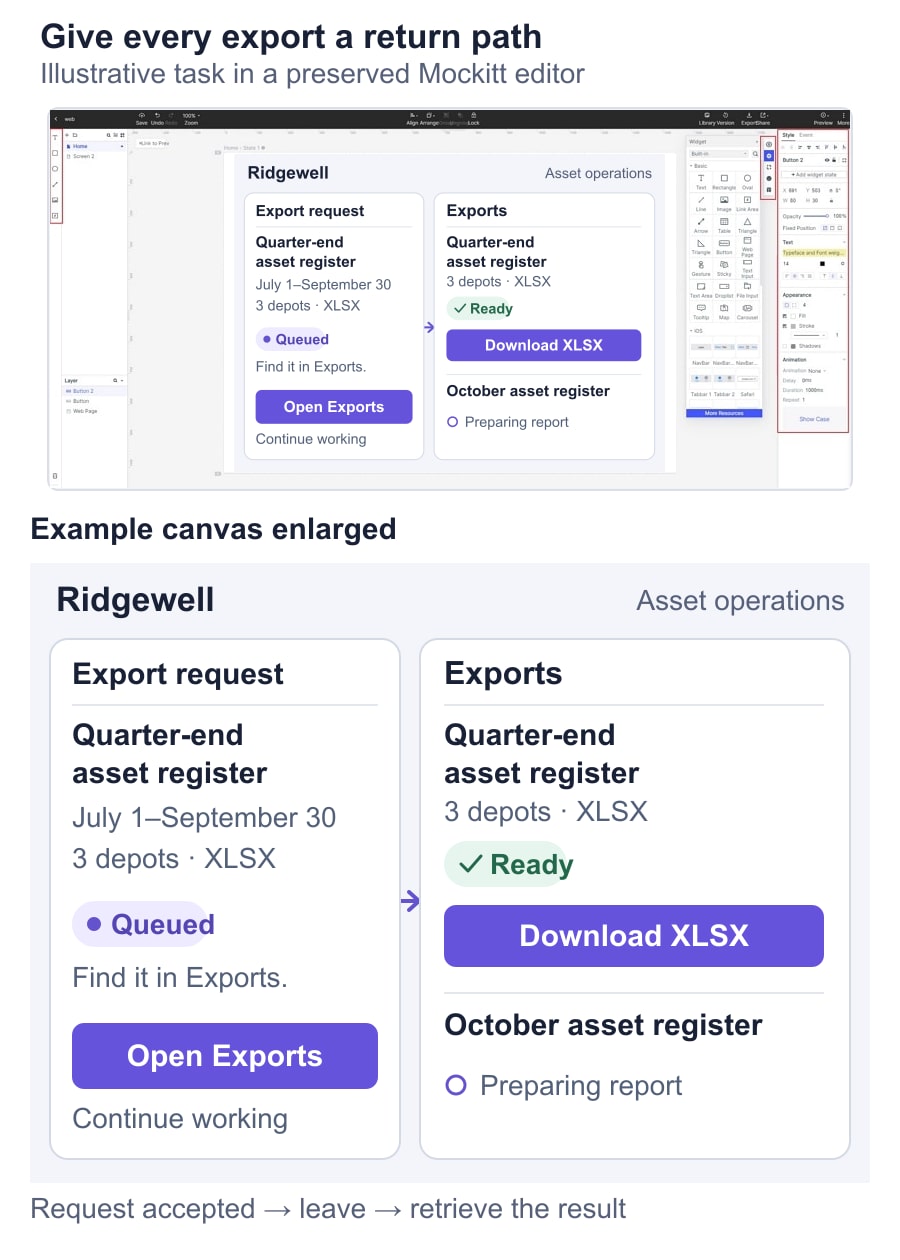
Use an interactive prototype of the export journey to connect the request, exports list, result and recovery screens. This guide follows a fictional asset-operations workspace, Ridgewell: an operations coordinator needs a Quarter-end asset register report for three depots. The example defines an intended experience; the product team must agree which background behavior its service actually supports.
Make the requested report recognizable later
Start with the export's scope. Ridgewell's coordinator has selected three depots and the period July 1–September 30, then chooses XLSX. The export review should repeat those selections. A vague “Export data” confirmation leaves the person unsure whether the file contains the filtered view or every record in the workspace.
Give the resulting job a readable identity: “Quarter-end asset register · 3 depots · XLSX.” In the details, retain the selected depot names, period and requesting account where appropriate. A generated reference can distinguish two similar exports, but it should support the readable description rather than replace it.
Freeze the requested filters for that job. If the coordinator later changes the dashboard to October, the existing export should still describe the selected quarter. Decide separately whether the underlying report uses a consistent snapshot or data read during generation. If an “As of” time is useful, it must come from the actual report process. The filter range alone does not establish when the data was captured.
These decisions connect to dashboard scope and data context, but the export has a longer life than the current dashboard view. It needs enough context to remain understandable when reopened from a history list.
Separate a received request from an available file
Clicking Export does not prove that the service accepted the job. Show a short submitting state while the request is unresolved, then give the person a persistent destination once acceptance is confirmed. The button can prevent repeated activation while that request is pending without disabling unrelated work across the application.
Ridgewell uses the following states. They describe the proposed product's behavior; omit states your system does not have rather than imitating the table.
| State | What the person can understand | Useful action |
|---|---|---|
| Submitting | The request has not yet been confirmed. | Wait for the request result. |
| Queued | The service accepted this export; generation has not started. | Open Exports or continue working. |
| Preparing report | This job is running; a downloadable file is not ready. | Leave the page and return to Exports. |
| Ready | The file is available to the authorized requester. | Download the report. |
| Failed | This attempt did not produce a usable result. | Inspect the reason and start an appropriate recovery. |
| Expired | The stored result is no longer available. | Review the scope before generating another report. |
Do not reuse “Complete” for both an accepted request and a ready file. If the backend reports stages such as collecting records and packaging the file, those can clarify progress. A fixed animation must not pretend to measure the work. Carbon's loading guidance distinguishes a general indicator of activity from information about progress; an indeterminate state can be appropriate when a meaningful percentage is unavailable.
Give leaving and returning a deliberate path
After acceptance, Ridgewell shows “Your report is queued. Find it in Exports.” The coordinator can close the panel and continue analyzing the dashboard. The application also has a persistent Exports entry, so the person does not need to remember a disappearing notification or repeat the original filter setup.
Say “You can leave this page” only when generation continues independently of that page. Closing a dialog, navigating elsewhere, closing the browser and signing out are different events. Agree which ones the service supports before turning them into reassurance. If the request still depends on an open connection, design around that constraint instead of labeling it a background job.
The Exports list shows the report name, scope summary, request time, current status and available action. Keep a running job visible when another export finishes. On a phone, preserve those essentials in each row or card rather than shrinking a wide desktop table until the job names become unreadable.
A return visit should load the latest known job state. A cached “Preparing report” label needs a way to update; a failed status check should say that the current result could not be retrieved. That is different from the report-generation job failing. Let the coordinator retry the status check without starting another export.
Use notifications as a route to the result
A completion message should name the report and take the person to that export or its download, subject to the product's access rules. “Your file is ready” is hard to interpret when several exports are running. For Ridgewell, “Quarter-end asset register is ready” connects the message to the recognizable list entry.
In-app feedback can complement the persistent list. Email, push notifications and sound are separate product choices, not requirements of a background export. Do not promise an email merely because the mockup has an envelope icon. If the product supports delivery preferences, use those preferences and keep retrieval available when the person declines notifications.
Follow the principles of clear status messages and alerts: identify the event, communicate its consequence and offer a useful action. A routine ready message should not seize focus while someone is editing another report. The W3C guidance on status messages explains how meaningful updates can be exposed to assistive technology without moving focus. Specify the announcement and test it in the implemented product.
Distinguish failure, uncertainty and cancellation
A known generation failure can offer a new attempt while retaining the report's scope. A lost response needs a different approach: the first job may already exist. Before inviting the coordinator to press Export again, the service should establish whether the original request was accepted where it supports that check. The interface can offer “Check exports” instead of treating uncertainty as proof of failure.
Write recovery around the known cause. If access to a depot changed, another identical request will not restore it. Explain the permitted resolution, such as reviewing the selected depots. If the service has only a general failure, retain the request details and offer a retry or support route without inventing a diagnosis.
Cancellation also needs a final result. “Cancel requested” may be accurate while the service attempts to stop work; “Canceled” requires confirmation. If generation finishes first, show the actual outcome. Removing a finished entry from a personal history list is a different action from stopping a running job or deleting a shared result.
Keep this flow distinct from file upload and per-file recovery. Uploading moves a selected local file into a service. Here, the service is producing a new output. The coordinator should not have to select a source file again to recover a generated report.
Explain what downloading and expiry mean
Ready means the file is available, not that it has reached the person's device. A Download action can start a transfer, while the browser controls where the file goes. Avoid changing the job to “Saved to your computer” unless the application can actually verify that result.
Show the format and, when known, file size beside the download. If a generated file has a retention limit, put its expiry in the ready state using an understandable date and time. The quarter-end report in this example might display “Available until October 12, 18:00 UTC.” That is an illustrative policy, not a recommended retention period.
Once it expires, preserve enough request context to explain what was lost and what can be recreated. “Generate again” should lead to a review of the original filters. The new file may contain different data if records changed; do not present it as the same immutable artifact. Permissions also need checking when someone retrieves a result, even if they were authorized when requesting it.
Review a return visit, not only the export button
Build prepared Mockitt screens for the scoped request, accepted job, exports list with a running job, ready result and expired result. Keep the quarter date range and three depots consistent across them. Connect the controls so a reviewer can leave the request screen, use another part of the workspace, and then find the report again. The prototype represents the intended journey; it does not generate files or run jobs.
Use a concrete review task: “Prepare the Quarter-end asset register report for these three depots, then continue checking October. Later, retrieve the quarter-end file.” Observe whether the person can distinguish the two periods and find the existing job. In a second path, show an uncertain request outcome and see whether they start a duplicate or look for the original.
Give engineering the same observable outcomes: accepted requests have an identity, a return visit retrieves current status, failure messages distinguish the failed operation, and expired outputs retain their scope. Test those behaviors with delayed responses and changed access in the real product. A well-designed export lets someone stop watching progress without losing track of the work.