Requirements Traceability Matrix: From PRD to Prototype
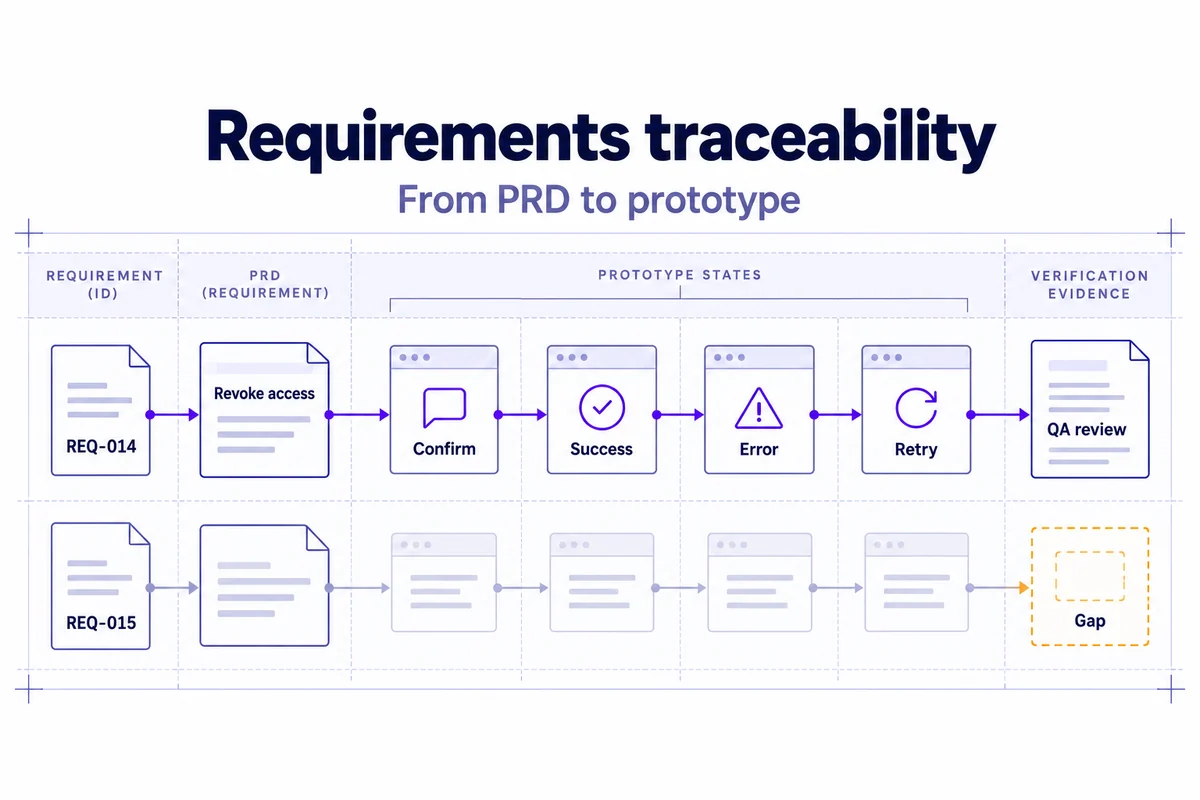
A requirements traceability matrix connects each requirement to the work and evidence that address it. For a product team, the useful chain is often PRD requirement → acceptance criteria → prototype states → implementation → verification. The matrix makes gaps visible before a polished design is mistaken for a complete solution.
This guide follows one example: a workspace owner needs to revoke a member's access. You will see how to map the visible flow, separate it from access-control enforcement, and update the evidence when the requirement changes. The IDs and records are illustrative planning examples, not records from a completed Mockitt implementation. If the requirement itself is still unclear, first work through the structure of a product requirements document.
What to trace—and what the matrix cannot decide
Start with a stable ID and one independently testable outcome. “Support account management” is too broad for a useful row. “An owner can invite a teammate,” “a member can leave a workspace,” and “an owner can revoke access” can each be accepted, deferred, or revised independently.
Trace the requirement to its source and the artifacts that address it. The matrix does not tell you whether the requirement is valuable or technically feasible; those questions still need product and engineering judgment. It helps you locate the decision and identify the consequences of changing it.
NASA's requirements-management guidance describes bidirectional traceability: relationships should be navigable toward the source and toward the work derived from it. A product team can adopt that principle without copying an aerospace process. Ask both “where is this requirement represented?” and “why does this screen, ticket, or test exist?”
A lightweight matrix structure
Keep detailed discussion in the source records; use the matrix to find it. The following fields preserve the relationship from product intent to evidence without turning the spreadsheet into a second PRD.
| Field | What to record | Example |
|---|---|---|
| ID and requirement | A stable key and observable outcome. | REQ-014: owner can revoke a member's workspace access. |
| Source | PRD section, customer need, policy, or technical constraint. | Team-management PRD, access-management section. |
| Priority and risk | Why the outcome matters and the consequence of failure. | High risk: the removed member retains access. |
| Acceptance criteria | Conditions that define the required behavior. | Authorized request removes access; a failed request does not falsely show completion. |
| Prototype reference | Named flow, relevant states, version and link. | Revoke member v2: list, confirm, success, error. |
| Implementation reference | Ticket, component, service or dependency. | TEAM-482 and the access-control service. |
| Verification evidence | Test case plus actual result/version when available. | QA-119; result pending, not yet verified. |
| Status and owner | Current workflow state and a named responsible role. | Designed; product owner for meaning, engineering owner for enforcement. |
| Decision date | When the requirement or status actually changed. | Enter the real review date when the decision is recorded. |
A reference should identify an artifact precisely enough for another person to retrieve the same evidence. A homepage link to a design tool is not a prototype reference. “QA done” is not a test result. Include the relevant flow, revision, case, and outcome when those records exist.
Step 1: Normalize the PRD into traceable outcomes
Read the PRD once for its goals and again for actors, triggers, actions, states, constraints, and success measures. Replace ambiguous verbs only after confirming the intended scope. “Users can manage notifications” might become “a user can turn weekly email notifications on, see the current setting, and turn them off again.” Preserve the original wording or decision history when a rewrite could change meaning.
Separate requirements from solutions and unresolved questions. “Use a three-column layout” is a design constraint; “help reviewers compare plans” is an outcome. Both may need a record, but they have different owners and evidence. Do not make a convenient design choice look like an approved business requirement.
For access revocation, identify two layers before drawing screens: the owner must understand and confirm the action, and the service must actually enforce the changed access. A screen showing “Access removed” demonstrates the planned message. It does not verify the permission change.
Step 2: Define acceptance before mapping screens
Use a given/when/then form when it clarifies behavior. Include the negative path and recovery states that materially affect the outcome. Avoid describing only the button click; state what must remain true afterward.
- Confirm: Given an authorized owner selects a member, when the owner starts revocation, the confirmation identifies the affected member and explains the consequence.
- Cancel: Given confirmation is open, when the owner cancels, the member and access state remain unchanged.
- Complete: Given the service confirms a successful revocation, the interface reflects the new member state and the defined access rules are enforced.
- Recover: Given the request fails or its outcome is unknown, the interface does not claim completion; it offers the agreed way to inspect or recover the state.
The last two criteria require a technical decision about existing sessions, cached permissions, and uncertain request outcomes. Product and engineering must agree on that behavior. Keep it open in the matrix until resolved; a prototype animation cannot supply the missing rule.
An invitation flow follows the same pattern: no pending invitations leads to an explanatory empty state and an Invite teammate action; a failed send retains the address and explains what is known about delivery. The matrix should reference both states, not just the attractive form.
Step 3: Map requirements to exact prototype evidence
Create a named flow for each requirement or tightly related group. Record the screens and states that support the acceptance criteria, not every screen in the project. Mark any missing state as a gap. If one requirement spans several screens, keep the row together unless its outcomes can be accepted independently.
In Mockitt's prototype workspace, the team can prepare linked screens and a shareable review reference. Use consistent state names in the prototype and matrix—for example, “REQ-014 / confirm” and “REQ-014 / request error.” Add the requirement ID or a short reference beside the design so a reviewer can navigate back to the PRD.
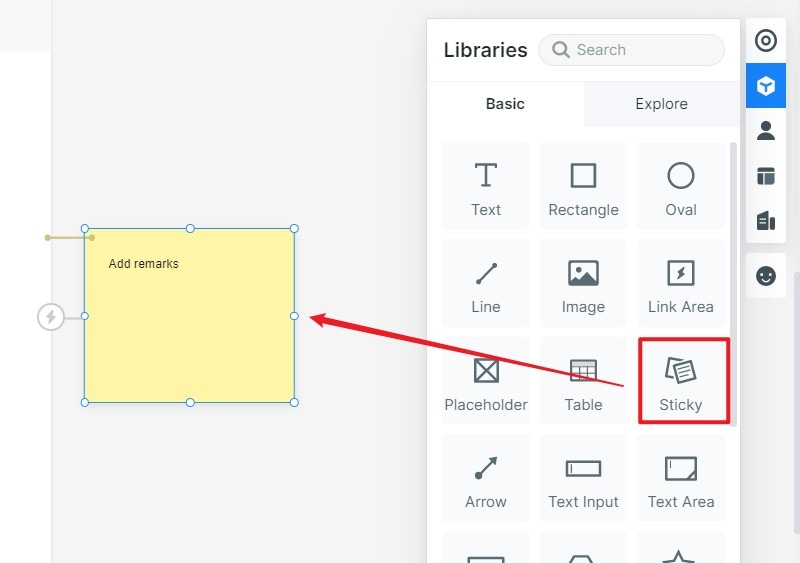
For this example, the note could read “REQ-014 · Revoke member · v2 · confirm / success / error · access enforcement tracked in TEAM-482.” That note is proposed project content, not text already present in the screenshot. Keep business rules in their source record so editing a canvas note does not quietly change the approved requirement.
| Requirement | Prototype evidence | Implementation and verification | Gap or next decision |
|---|---|---|---|
| REQ-014 Owner can revoke access. | Revoke v2: member list, confirmation, success, request-error states. | TEAM-482; QA-119 for behavior and service enforcement. Results pending. | Define treatment of already-active sessions before development readiness. |
| REQ-015 Owner can invite a teammate. | Invite v1: empty state, form and sent state. | Invitation-service ticket not yet assigned; failure case not specified. | Add request-error/recovery state and an engineering owner. |
| REQ-016 Member can leave a workspace. | No flow reference. | No implementation or test reference. | Confirm scope and ownership; do not count as designed. |
REQ-014 has more coverage than the other rows, but it is still not verified. REQ-015 exposes a specific omission. REQ-016 shows unresolved work rather than disguising it behind an empty cell. None of these example IDs should be treated as completed project evidence.
Step 4: Trace a change through its consequences
When a requirement changes, record the earlier interpretation, the agreed replacement, the reason, the owner, and the affected artifacts. Do not overwrite the statement and leave every downstream record looking current.
Suppose the team changes REQ-014 from “remove access on the next sign-in” to “remove access from existing sessions as well.” The UI may look almost identical, yet the implementation and verification change substantially. Search for other requirements using the same permissions service, session behavior, and confirmation language.
- Update the approved requirement and its acceptance criteria with the actual decision date.
- Review the confirmation and success copy so they do not imply a different access rule.
- Flag the permissions/session implementation for impact assessment.
- Add or update verification for a member who already has an active session.
- Reopen affected evidence until it has been checked against the new requirement version.
A design-to-code export is another artifact in this chain. If your team uses a design-to-code workflow, link the resulting artifact to the requirement and review it after a change. Exporting an updated screen does not automatically update service behavior, tests, or accepted scope.
Step 5: Add implementation and test links without overstating completion
As development starts, connect the requirement to the ticket, service, feature flag, or component that implements it. Use distinct statuses such as designed, in progress, built, and verified. Creating a ticket does not mean the behavior exists; merging code does not mean the acceptance evidence has been reviewed.
Record the relevant verification method and outcome. NASA's verification-matrix guidance emphasizes identifiable requirements and their sources. For this product example, make the evidence equally identifiable: a case reference, tested version, observed result, unresolved issue, and reviewer. This is a practical adaptation, not a claim of compliance with a formal engineering standard.
Keep evidence types distinct. A usability session can reveal whether someone understands the revocation confirmation. A functional test can check the request and visible state. An authorization test checks that access is actually refused under the agreed conditions. An accessibility check examines operation and semantics. One successful screenshot cannot stand in for all four.
If a research note such as U-07 prompted a copy change, link it as the reason for that change; do not label it proof of backend correctness. Similarly, an issue that is deferred needs an explicit disposition and owner. “Verified with a known exception” should tell reviewers what was excepted.
Step 6: Review coverage in both directions
Filter for requirements missing an owner, acceptance criteria, a relevant prototype state, implementation, or verification evidence. Review deferred rows separately with their reason and next decision point. Then reverse the check: find screens, tickets, and tests with no requirement relationship. They may be discovery work or technical enablement, but the team should know rather than assume they are approved scope.
| Check | What a gap means | Next action |
|---|---|---|
| Requirement → prototype | The intended interaction may not have been designed. | Add the state, explain why no UI is needed, or revise the scope. |
| Prototype → requirement | A design element may be unexplained scope. | Link its justification or label it as exploration. |
| Requirement → test evidence | The outcome lacks recorded verification. | Assign the appropriate test and keep completion pending. |
| Changed requirement → stale artifacts | Evidence may apply to an earlier interpretation. | Review affected designs, implementation and tests before reaccepting. |
If you report a coverage ratio, define the denominator: which requirement version, which in-scope rows, and what counts as acceptable evidence? For example, “rows with a prototype reference” measures documentation linkage; it is not a quality or readiness score. A high count can still conceal untested failure paths or weak requirements.
A complete example row to adapt
- REQ-014: Workspace owner can revoke a member's access.
- Source: Team-management PRD, access-management section.
- Acceptance: Confirm the member and consequence; handle cancel, success and uncertain failure; enforce the agreed access rule.
- Prototype: Revoke member v2, with list, confirm, success and request-error states.
- Implementation: TEAM-482 and permissions-service dependency.
- Evidence: QA-119 plus the relevant access-control and accessibility checks; U-07 may explain a copy decision.
- Status: Designed; implementation and verification pending.
- Owner: Product for requirement meaning; engineering and QA for their assigned evidence.
- Decision date: Enter the actual date; do not invent one to make the record look current.
Copy these fields, replace the illustrative IDs with your own records, and leave unavailable evidence visibly pending.
Governance without a duplicate PRD
Assign one maintainer for the matrix structure and let each discipline update the evidence it owns. Review it at PRD approval, prototype review, development readiness, and release readiness. Keep required fields limited to those that support a decision, a dependency, or verification. Archive historical rows with their disposition instead of deleting the reason a design changed.
Start with a risky flow, not every spacing value in a design system. The first useful review is one where a teammate can follow a requirement to the exact design state and tell you what is still unproven. When the flow is ready for development, use the design handoff checklist to confirm the rest of the delivery package.
Requirements traceability questions
Is a requirements traceability matrix only for regulated projects?
No. A small team can use a lightweight matrix when requirements cross several people or systems. Formal assurance obligations may demand more; choose your process for the project's actual risk and requirements.
Should every design detail have a requirement ID?
Trace outcomes, constraints, and decisions that affect behavior or verification. Routine use of an established spacing token can stay in the component system. A new permission or recovery rule needs an explicit relationship.
What if one requirement maps to several screens?
List the named states and versions in the same row. Split the requirement only when its outcomes can be accepted, deferred, or owned separately—not merely because the prototype contains several screens.
Can AI generate the matrix from a PRD?
AI can propose candidate rows and missing-state questions. The team must confirm the source, scope, acceptance meaning, actual artifact references, and owner. Generated links and a confident “complete” status are not evidence.