A usability benchmarking plan specifies the tasks, participants, measures, baseline, and repeat conditions before a team collects results. Start with a small set of important user journeys, define what counts as success without help, and keep the test conditions comparable across rounds. The finished plan should let another researcher repeat the study and explain what changed.
Use benchmarking when you need to track the same experience over releases. Use an exploratory study when you first need to discover what the problems are. For an early design, Mockitt’s prototyping workspace can provide the connected screens for a repeatable task attempt; record which behavior is simulated before interpreting the results.
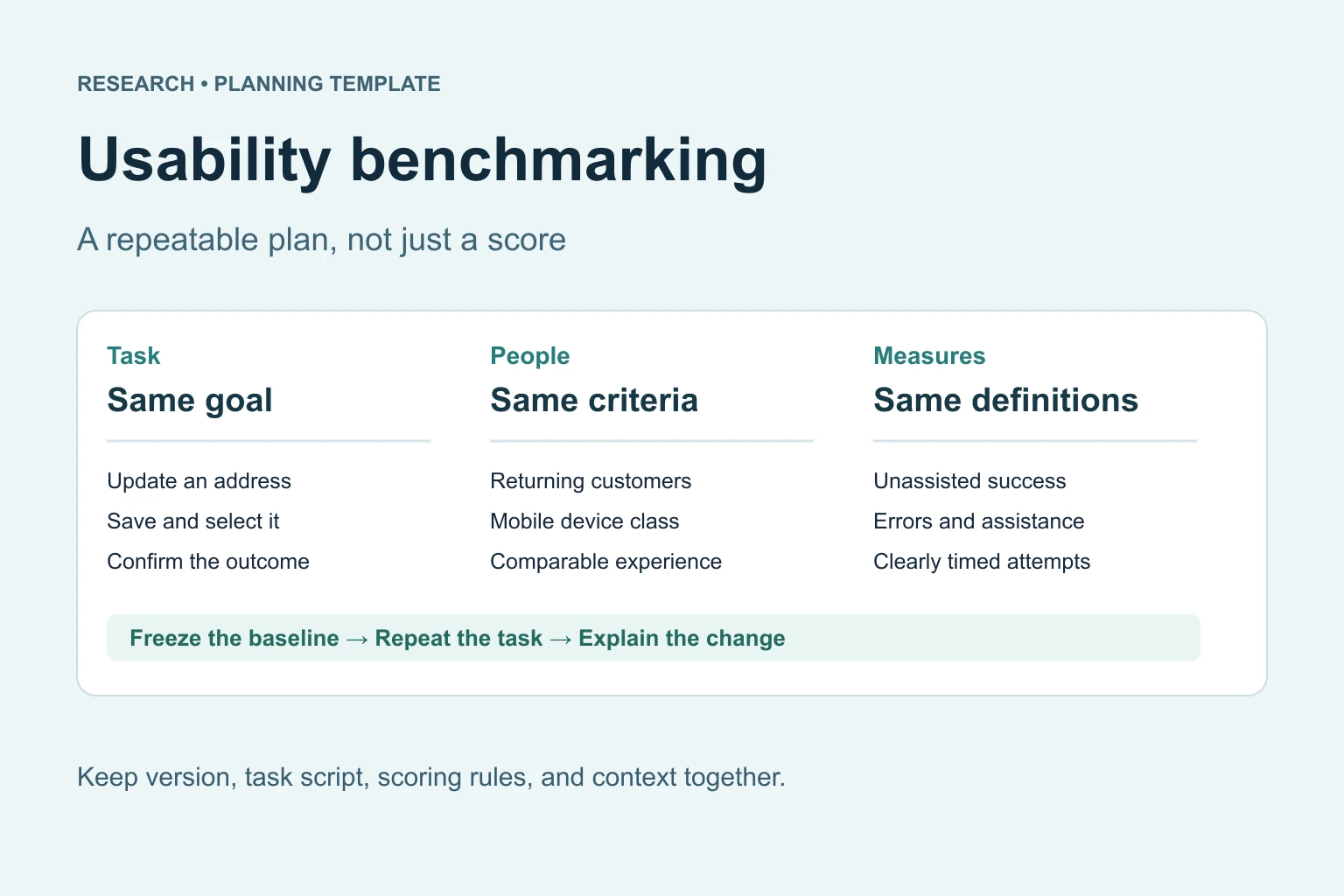
Copy this usability benchmarking plan
Write the plan so another researcher can run the same session without guessing. Name the product area, audience, device, task entry point, and what the participant is allowed to know. The example below concerns a returning grocery customer changing a delivery address. It is a planning example, not a reported study.
| Plan field | What to specify | Address-change example |
|---|---|---|
| Decision | The release decision the result will inform | Whether to retain the revised address-editing flow |
| Audience and context | Relevant experience, device, language, and access needs | Returning mobile customers who have previously saved an address |
| Task | A realistic outcome without control names or instructions | Update the delivery address before placing the next order |
| Success | An observable final state | The new address is saved and selected for the next order |
| Critical error | A harmful or incorrect outcome | The customer continues with the old address while believing it changed |
| Measures | Definitions, timing rules, and exclusions | Unassisted completion, critical errors, assistance, and task time |
| Baseline | The exact version and starting data | Published flow A with the same saved address and cart |
| Repeat conditions | What stays fixed and what may change | Same device class, recruitment criteria, task wording, and scoring |
| Owners and cadence | Who runs, scores, and acts on the next round | Research lead runs the study; product owner reviews it before release |
Choose tasks that can be compared fairly
Choose tasks that matter to the product and occur often enough to be meaningful to participants. A change to an account setting, a return request, and completing checkout may each deserve a separate measure. Combining them into one long task makes it harder to locate the source of an improvement or failure.
For the address task, a neutral prompt is: “You want your next grocery order delivered to your new address. Make the change so the order goes there.” Supply a fictional address separately. Avoid “Open Account, tap Edit, and save,” because those instructions reveal the route you are trying to evaluate.
Define a stopping rule before the session: completion, an explicit decision to give up, or a preselected time limit. If you change the time limit halfway through a round, the resulting completion rates are no longer directly comparable. Pilot the wording and starting state first; if the pilot leads to changes, keep those sessions separate from the fixed study.
Define each measure before collecting it
Record what happened before interpreting why. NN/g’s introduction to UX benchmarking describes evaluating experience against a meaningful reference and repeating measurements over time. Your plan still needs product-specific scoring rules: a saved address is not a success if checkout silently keeps the previous one.
- Unassisted completion: successful task attempts without moderator help divided by eligible task attempts. Report the numerator and denominator as well as the percentage.
- Assisted completion: reaching the outcome after help. Keep it separate from unassisted success, even if the final screen looks correct.
- Critical errors: attempts containing the predefined harmful outcome. Record the error type; do not merge incorrect delivery and minor hesitation into one count.
- Task time: specify when timing starts and stops. Report successful and failed attempts separately, and state whether loading or moderator interruptions were excluded.
- Perceived ease or confidence: ask the same question on the same scale at the same point in each round. Satisfaction does not replace observed task completion.
For illustration, 9 unassisted successes in 12 eligible attempts would be 75%. That arithmetic alone would not establish a reliable improvement over another design. Preserve the individual observations, sample size, and uncertainty; avoid treating a small percentage difference as a release verdict.
Recruit for the comparison you intend to make
Write eligibility criteria around relevant experience, rather than convenience. If the design is for returning customers, a group of colleagues seeing the product for the first time is a different audience. Keep device, language, and experience distributions comparable between rounds, and report any deliberate differences.
Set the sample size around the precision or minimum detectable change your decision requires. A small formative study can reveal problems, but it should not be presented as a precise population benchmark. For a high-stakes quantitative comparison, plan the analysis and sample size with someone who can account for the chosen design and metric.
Testing the same people twice can introduce learning. Testing different people can introduce differences between groups. Choose the approach in advance and document it. If you compare two versions within one session, account for order effects instead of always showing the newer version second. Do not pool materially different user groups simply to make a larger total.
Build a benchmarkable prototype
Start with the smallest connected route that can produce the evidence. Include realistic labels and the states that can change the outcome: empty, loading, validation, error, success, and return. Keep a separate note for what is simulated so a result is not mistaken for production performance.
Prepare a reproducible starting point in Mockitt: the same screen, the same saved data, and the same available paths for each attempt. Before a session, open the review link as a reviewer would and reset the route. Confirm that intended links work and that unrelated hotspots do not accidentally reveal the correct answer. If the prototype cannot represent a relevant behavior, record that limitation in the plan and test that behavior separately.
Example: address-change task
Suppose a grocery service wants to know whether returning customers can change an address before checkout. The prototype should begin at the saved address, show the edit action, include an invalid postal-code state, and end with a clearly confirmed address. The session script should ask the participant to make the change without naming the controls.
Keep two observations separate: whether the participant saved the new address and whether they selected it for the next order. A participant may succeed at the first and fail at the second. In the notes, capture the screen or action where the distinction became unclear. That evidence suggests a specific design change, such as a clearer confirmation or delivery selection, rather than the vague instruction to “make the flow easier.”
Use a recording sheet that another person can score
Give the moderator the task script and give the observer the scoring definitions. Use anonymous participant IDs. Avoid putting identifiable customer details into a shared prototype or report.
| Record | What belongs in it |
|---|---|
| Attempt identity | Participant ID, task ID, version, device, and session date |
| Outcome | Unassisted success, assisted success, failure, or excluded attempt with reason |
| Timing | Start, stop, elapsed time, and any excluded interruption |
| Observation | Action, state reached, critical error, and assistance supplied |
| Interpretation | Possible cause, evidence needed, and confidence in that interpretation |
Have a second person independently score a pilot attempt. If you disagree about whether it succeeded, refine the rule before the main round. A shared definition is more useful than a dashboard of numbers that different researchers would calculate differently.
Compare rounds and decide what to do next
- Use the same task wording, starting conditions, and success criteria for each comparable round; the design’s navigation path may change.
- Record what happened before interpreting why.
- Separate critical errors from cosmetic preferences.
- Compare only like-for-like tasks, versions, and contexts.
- Attach the prototype link, task script, and decision owner to the report.
Report each task’s baseline and follow-up result together with the sample and testing conditions. Show both the numerical change and the observations behind it. If recruitment or the task changed substantially, establish a new baseline or label the comparison as limited rather than drawing a continuous trend.
Agree on decision criteria before seeing the result. These might include no unresolved critical delivery errors, acceptable completion for the target group, and a follow-up investigation of any regression. There is no universal pass percentage that makes every product usable. Bring the evidence into a focused design review, assign the next change, and specify when the task will be measured again.
A benchmark is useful when the team can see what changed and what decision the evidence supports. It is not a promise that one prototype score predicts every user or production outcome. Keep the plan, version, and scoring sheet together so the next round can answer the same question.