A customer who chooses a cheaper plan needs to understand what will happen to the work they already have. A lower monthly price does not explain whether the change starts today, which projects remain editable, or whether a colleague will lose access. Subscription downgrade UX must make those consequences understandable before confirmation and visible afterward.
Start with the transition, not another pricing grid. You can review the downgrade flow in an interactive prototype, showing the impact, confirmation, scheduled state, and recovery path with fictional account data. The prototype demonstrates a proposed experience; it does not change a subscription or enforce a billing policy.
This guide uses a fictional Harbor project workspace moving from Team to Basic at renewal. Its limits and data policy are design examples, not Mockitt's plans. The aim is to help product teams specify a clear lower-plan transition without making assumptions about refunds, retention, or the billing provider.
Separate four decisions that a plan name hides
A plan comparison helps a prospective customer choose an offer. Downgrading starts with an existing account, existing data, and people already using paid capabilities. Before designing its confirmation screen, ask the owners of billing, permissions, and data handling to settle four separate decisions.
| Decision | What the team must define | What the customer needs to see |
|---|---|---|
| Timing | Immediate change, renewal change, or a chosen supported date | The effective date, including time and zone if they affect access |
| Billing | Next charge, credits, remaining usage charges, and applicable adjustments | An accurate consequence, without calling every credit a refund |
| Entitlements | Which actions, roles, and limits change | The impact on this workspace's actual usage |
| Data | What remains editable, becomes inaccessible, or is deleted under the approved policy | A specific explanation and any necessary preparation |
These decisions do not automatically follow one another. A billing change can be scheduled while current access remains active. Losing access to a feature does not necessarily delete its data. Conversely, “your workspace remains available” is not a reliable promise that every file will be retained forever.
Stripe's subscription schedules documentation shows how a future plan phase can be separate from the current one. That supports a distinction the interface needs to express; it does not decide your product's entitlement or retention policy.
Follow one workspace through the limit change
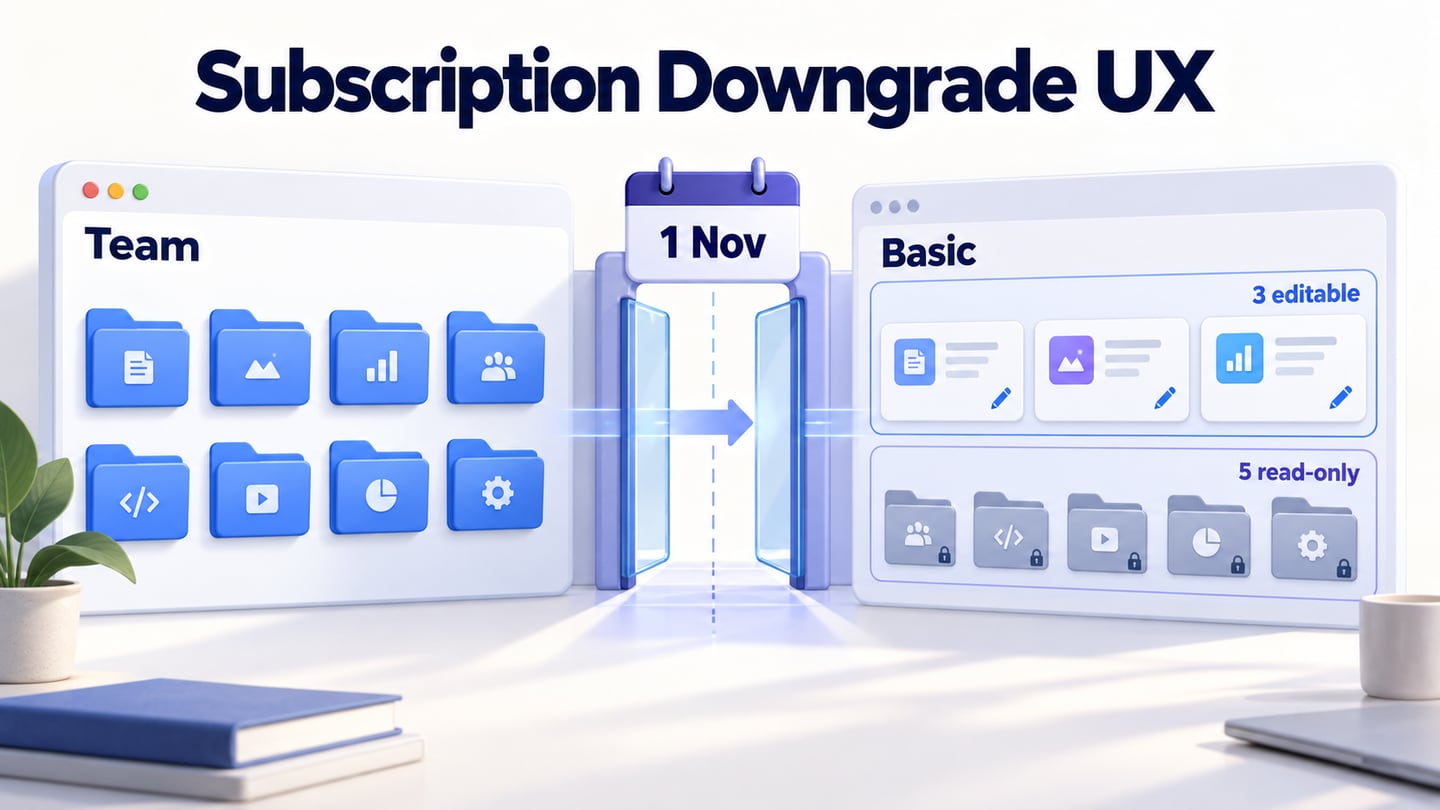
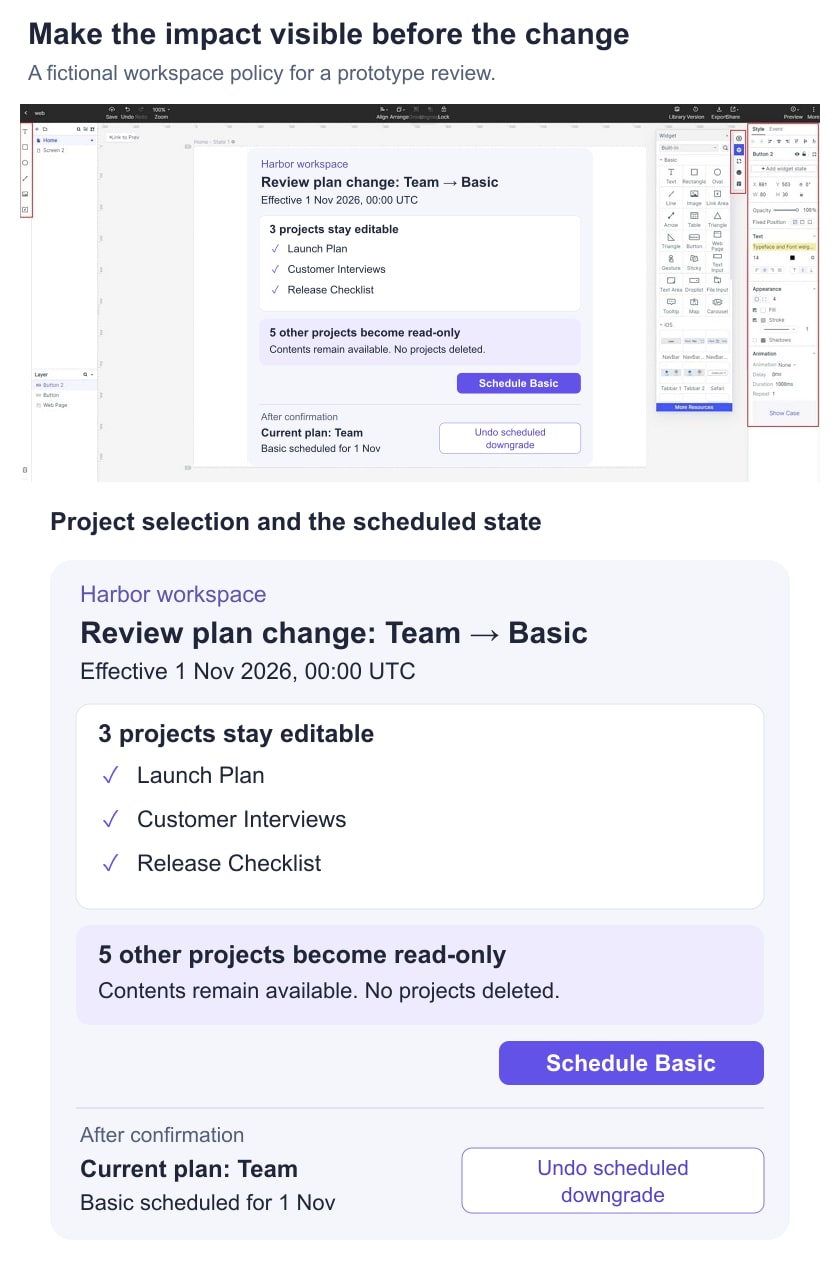
Harbor has eight active projects on its fictional Team plan. Basic allows three active projects. The example policy takes effect on 1 November 2026 at 00:00 UTC: the administrator chooses three projects that stay editable, and the other five become read-only. Their contents remain available under this example policy; no project is deleted by the downgrade.
This is one possible policy, not a default for SaaS products. Another product might block the change until usage is reduced, offer an archive step, or apply a documented retention period. Choose an approach that the implementation and approved terms can support. Do not invent a reassuring read-only promise because it makes the screen easier to write.
For Harbor, the administrator selects Launch Plan, Customer Interviews, and Release Checklist. The other five project names appear in a separate list labeled “Read-only after the change.” The selection is reviewable before confirmation, with a summary of three editable and five read-only projects.
The downgrade review shows the three selected projects, five retained read-only projects, and the effective date before the administrator schedules the change.
Give the reviewer a realistic reason to care: one of the five projects still has an active owner. Can the administrator spot it and change the selection? A count alone would hide that consequence. If project names are long, keep them readable on mobile rather than truncating every distinguishing word.
Make the impact specific before confirmation
Use the account's actual usage in the finished product. “Some features may be unavailable” tells the customer little. A concrete review might say “Five projects become read-only” and name those projects. Where the product affects collaborators, explain the changed permissions rather than suggesting that changing the billing owner automatically removes everyone else.
Group the summary around the decision: what changes, when it changes, and what remains available. Keep the next billing consequence separate from the feature impact. If the next total depends on tax, usage, or another unresolved input, show the accurate basis and the remaining uncertainty instead of presenting a made-up final amount.
A useful confirmation action for the Harbor example is “Schedule Basic for 1 November.” It states an action and a date. “Confirm” is less informative, while “Save money now” would be misleading when access and billing change later. A secondary action can return to project selection without losing the choices.
Do not require a retention offer, a survey answer, or a conversation with sales just to understand the impact. If an optional alternative is relevant, make it distinct from the requested path. Keep the customer's choice legible, especially when a highlighted promotion sits beside the downgrade action.
Slack's plan-change guidance is a useful real example of showing when a change takes effect and which paid features will be lost. Its separate free-plan limitations guidance also illustrates why data visibility, retention, and feature access need their own explanations. Use your own verified policies rather than borrowing another service's limits.
Do not confuse a credit with a cash refund
A reduction in plan price can have different billing consequences depending on timing and configuration. The interface should describe the result supplied by the actual billing system. Avoid promising an immediate refund merely because the selected plan costs less.
Stripe's proration documentation explains adjustments and invoice previews for subscription changes. Its behavior depends on the configured subscription and change. For a design review, work with the billing team to obtain representative outcomes rather than calculating a universal “unused days” formula in the copy.
If Harbor's fictional change occurs at renewal with no immediate charge, the summary can say exactly that once the policy is agreed. Any existing balance or usage charge needs its own explanation. A confirmation should not imply that changing the plan erases unrelated amounts already owed.
Keep the quoted billing information and the selected transition together. If the user changes the effective date or plan, refresh the summary before asking for confirmation. A previously reviewed amount may no longer apply. Production handling must verify the final request; a matching prototype screen is not evidence that an invoice will be correct.
Show both the current plan and the scheduled change
After confirmation, Harbor's billing page still shows “Current plan: Team,” followed by “Basic scheduled for 1 November 2026, 00:00 UTC.” The status should not say “You're on Basic” while Team permissions remain active. The administrator can revisit the selected projects and see how the upcoming limit will affect them.
Where the policy supports reversing a pending request, use an explicit action such as “Undo scheduled downgrade.” Avoid “Cancel” on its own: it could mean closing the screen, stopping the plan change, or ending the subscription. After a successful undo, show the retained current plan and confirm that the scheduled change has been removed.
Do not immediately erase the pending status when an undo request is sent. Show progress, then confirm the result only when the application knows it. If the result is uncertain after a connection interruption, give the user a way to check the current plan state before submitting another conflicting request.
The control belongs in recognizable workspace administration, not only in a confirmation email. Other authorized administrators need to discover a pending change when reviewing the account. Show who requested it if that information is available and appropriate for their role.
Plan for changes before the effective date
A scheduled request creates a period in which the workspace can change. In the Harbor example, a newly created ninth project becomes read-only at the transition unless an authorized administrator selects it among the three editable projects. That rule must be visible beside the selection summary. It must not emerge as a surprise after renewal.
Check other conditions deliberately. If a selected project is deleted, do the remaining selected projects simply stay editable, or does the administrator need to choose a replacement? If the person who requested the change loses billing authority, who can manage it? If another administrator schedules a different change, which request is current?
Do not silently merge contradictory changes. Present the current scheduled transition before accepting a replacement, and preserve an understandable record of what was confirmed. The implementation should also recheck authority and eligibility at the point where they matter; a disabled button alone is not an access-control mechanism.
Separate the failure of a request from the consequences of an accepted request. “We couldn't schedule the change; Team remains active” is appropriate only when the application has confirmed that result. When it cannot tell, explain that status is being checked. Never turn an uncertain outcome into a confident success or failure merely to simplify the screen.
Test the user's explanation of the transition
In Mockitt, create connected screens for the impact review, project choice, final confirmation, scheduled state, and undo result. Keep the fictional project names and effective date consistent. Add a separate review branch for a changed project count or an uncertain request. Use notes for backend policy rather than presenting a simulated rule as a working billing integration.
Run a focused design review with a task such as: “Move Harbor to Basic at renewal, keeping Customer Interviews editable. Then check when your access changes.” Ask the participant to explain what happens to the five other projects and what the main action has committed them to.
- Can they distinguish the current plan from the scheduled plan?
- Can they name the effective date and the affected projects?
- Do they understand the difference between read-only access and deletion?
- Can they undo a pending change without thinking they have cancelled the subscription?
- Do they know what to do when the request's result is uncertain?
Record misunderstandings against the exact screen and policy involved. A completed click path does not establish informed understanding. Before release, verify the agreed billing result, permissions, quota handling, notifications, and data behavior in the production implementation, using test accounts and the billing provider's supported test environment.