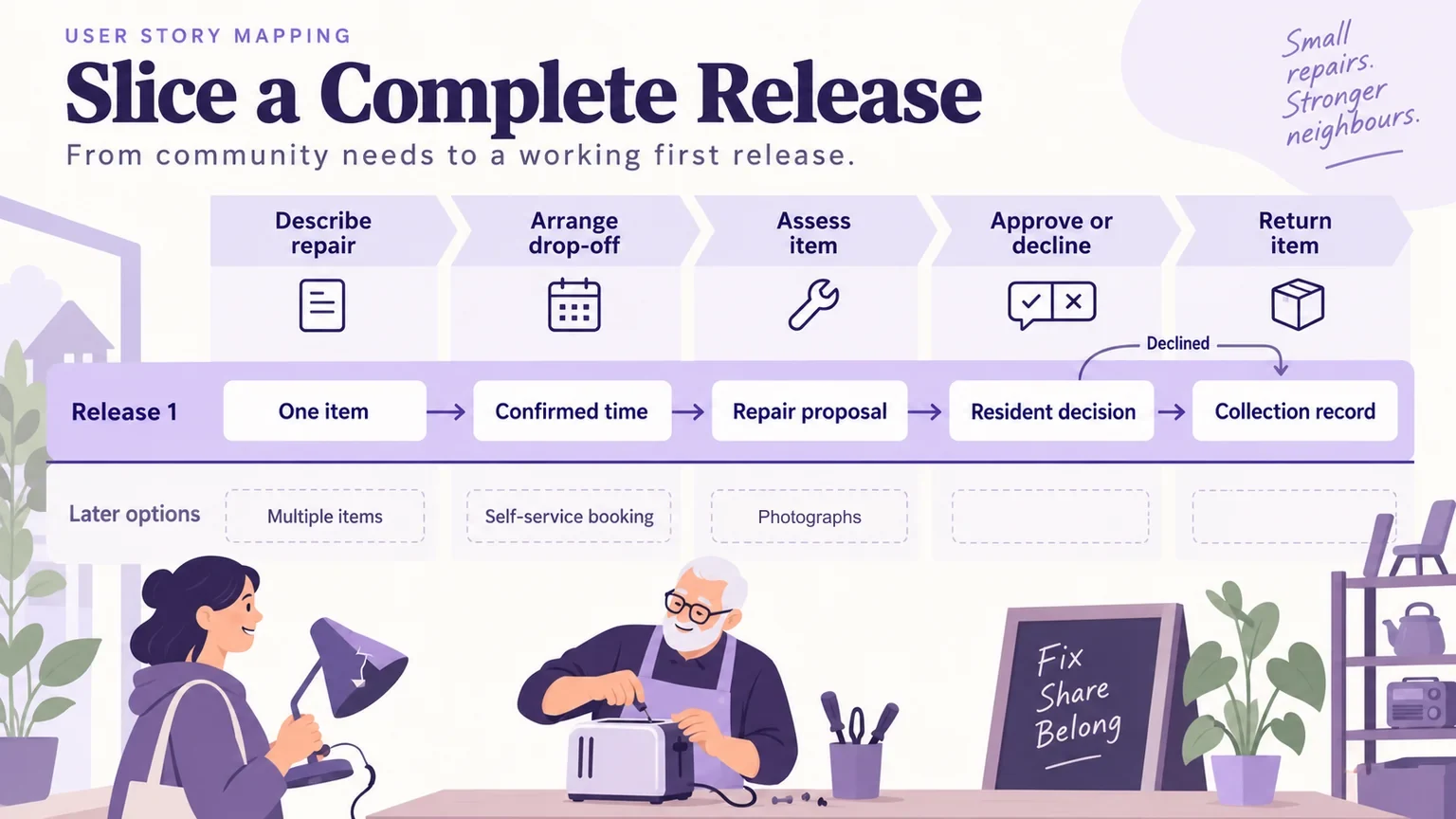
A user story map organizes the work people need to do, then helps a team choose which parts belong in a usable release. Arrange activities across the top, put smaller tasks beneath them, and draw a release boundary around a complete outcome. The result should explain what someone can accomplish, what remains manual, and what the team is deliberately postponing.
You can arrange that discussion in Mockitt’s whiteboard workspace, keeping the proposed scope and its open questions visible together. This guide uses a fictional repair café that wants to help residents submit an item, agree on work, and collect it afterward. The map is a planning example, not evidence from a completed service launch.
Name the outcome before listing features
The café’s initial idea is “a repair portal.” That phrase invites an unlimited list: accounts, messaging, payments, booking, inventory, ratings, and dashboards. A more useful first-release outcome is: “A resident can submit one household item, receive a repair decision, and understand how to collect the item or arrange its return.”
State the operating conditions beside that outcome. The example café has one venue, staff arrange drop-off manually, and the first release takes no online payment. These are proposed scope choices. The team still needs to confirm that staff can support them. A manual step is a legitimate boundary only when a named person can perform it and the resident knows what to expect.
Identify both sides of the service. Residents describe an item and decide whether to proceed; repair volunteers assess it and communicate the result. Mapping only the resident’s screens would hide the work that makes the promise possible. A short user scenario can establish who is trying to achieve what before the team starts moving cards.
Keep three framing notes visible: the intended outcome, the people involved, and the excluded work. If the conversation moves toward selling refurbished appliances, ask whether that belongs to this outcome. Interesting ideas can remain on a separate list without changing the purpose of the map.
Build a backbone that tells the whole story
Jeff Patton’s story-mapping reference describes a narrative backbone with smaller tasks beneath it. Use that structure to tell the repair story at a consistent level of detail. “Arrange drop-off” belongs beside “Approve work”; “Change button color” does not.
For this service, the backbone has five activities. Each activity names work someone must accomplish, rather than an application screen or engineering component.
| Activity | Resident’s task | Supporting staff task |
|---|---|---|
| Describe the repair | Explain the item and the problem | Check whether the item is eligible |
| Arrange drop-off | Receive a place and agreed time | Confirm an available intake appointment |
| Assess the item | Understand the proposed work | Record an assessment and any conditions |
| Approve or decline | Accept the proposal or request return | Record the decision before starting work |
| Return the item | Know when and how to collect it | Record collection and close the case |
Read the row as a story: someone describes a damaged lamp, staff accept it for assessment, the resident drops it off, a volunteer proposes a repair, the resident approves it, and staff arrange collection. Now tell a different ending: the repair is declined. The resident still needs the item returned. That ending belongs in the map even though it produces no completed repair.
The left-to-right order communicates the usual sequence. It is not a precise model of every branch or repeated action. If assessment can return to an earlier step, note the variation rather than filling the map with crossing arrows. Detailed interaction logic can be developed after the team understands the overall scope.
Expand tasks without turning the map into a feature pile
Under “Describe the repair,” add smaller tasks: identify the item, describe the fault, provide a contact method, submit the request, and receive a reference. Beneath those, consider alternatives such as attaching a photograph, saving a draft, or submitting several items. They are different depths of support, not automatically equal priorities.
Use a short verb phrase for each card. “Read the assessment” explains a task. “Assessment page” names one possible implementation. “As a resident, I want everything to be easy” gives the team little to discuss. Keep explanations, constraints, and evidence beside the card instead of making the label carry an entire specification.
Separate proposed behavior from settled policy. A card saying “Approve a repair up to a stated amount” raises questions about charges and authority. In this example, no payment policy has been agreed. Mark the card as a question; do not quietly turn its wording into a business rule.
Explore exceptions while the map is still broad. The café may reject an unsafe item, be unable to diagnose it, or discover that the resident no longer wants the work. Ask which outcome each person needs in those situations. A rejection message alone may be insufficient when the café already holds the resident’s property.
Keep the deeper options visible below the main tasks. This makes postponement explicit and preserves the reasoning for later planning. A mobile photo upload may be useful, but its absence does not necessarily prevent a resident from describing a lamp and receiving an assessment.
Slice a release that reaches an end state
Write the release outcome beside the proposed boundary, then select enough work across the backbone to reach it. Patton’s discussion of release slicing emphasizes considering the user’s usable outcome. Completing every intake feature while leaving assessment and return untouched would not deliver the repair café’s stated promise.
The following slice deliberately narrows variety while retaining the complete service journey. “Later” means excluded from this proposal, not a promised delivery date.
| Activity | First release | Later options |
|---|---|---|
| Describe | One item, text description, contact method, reference number | Photographs, saved drafts, multiple items |
| Drop off | Staff confirm a time for the single venue | Self-service scheduling, multiple venues |
| Assess | Staff record a proposal or explain why repair is unavailable | Parts inventory and specialist assignment |
| Decide | Resident approves or declines; staff can see the recorded decision | Delegated approval and online payment |
| Return | Collection instructions, collection record, closed status | Courier return and satisfaction surveys |
Challenge every included task against the outcome. If the team removes the reference number, how will staff connect a call with the correct item? If it removes the declined path, how does an owner retrieve an unrepaired lamp? Those cuts damage the outcome. Removing photo upload leaves a narrower but still understandable path.
Also challenge attractive additions. A ratings system might help future residents, but it is not necessary to complete this first journey. Keep the candidate visible and record why it sits below the boundary. This makes the discussion less dependent on who argued most recently.
A release slice expresses proposed scope. It is not a delivery estimate, a guarantee of viability, or a commitment to every later row. Connect accepted scope to the team’s product roadmap only after the relevant dependencies and capacity have been considered.
Check the promises hidden between the cards
Walk across the first-release row with product, design, engineering, and the people doing the manual work. At each handoff, ask what must already be true. For the café, a resident cannot receive collection instructions until staff know where the item is and whether it is ready to leave.
Record dependencies separately from user tasks. “Store the resident’s decision” is supporting system behavior; “Approve the proposed repair” is a task. Keeping both visible prevents an apparently small interface change from hiding substantial delivery work.
- Contact: who sends the assessment, and how will staff discover a failed delivery?
- Authority: how will the service associate an approval with the correct case?
- Operations: who owns an item that cannot be repaired or collected promptly?
- Verification: which paths can a prototype represent, and which need a working-system check?
Do not label all four questions “technical.” The first might require an operational fallback; the third needs a service policy. Name the owner and the decision that is blocked. When a dependency is unresolved, either resolve it before committing the slice or narrow the promise honestly.
Review the slice in Mockitt, then test its difficult transition
On the whiteboard, arrange five activity columns with the first-release cards in one band and later options below. Add a small area for open questions and label the two roles. Keep the first-release outcome visible at the side so reviewers can judge each card against the same purpose.
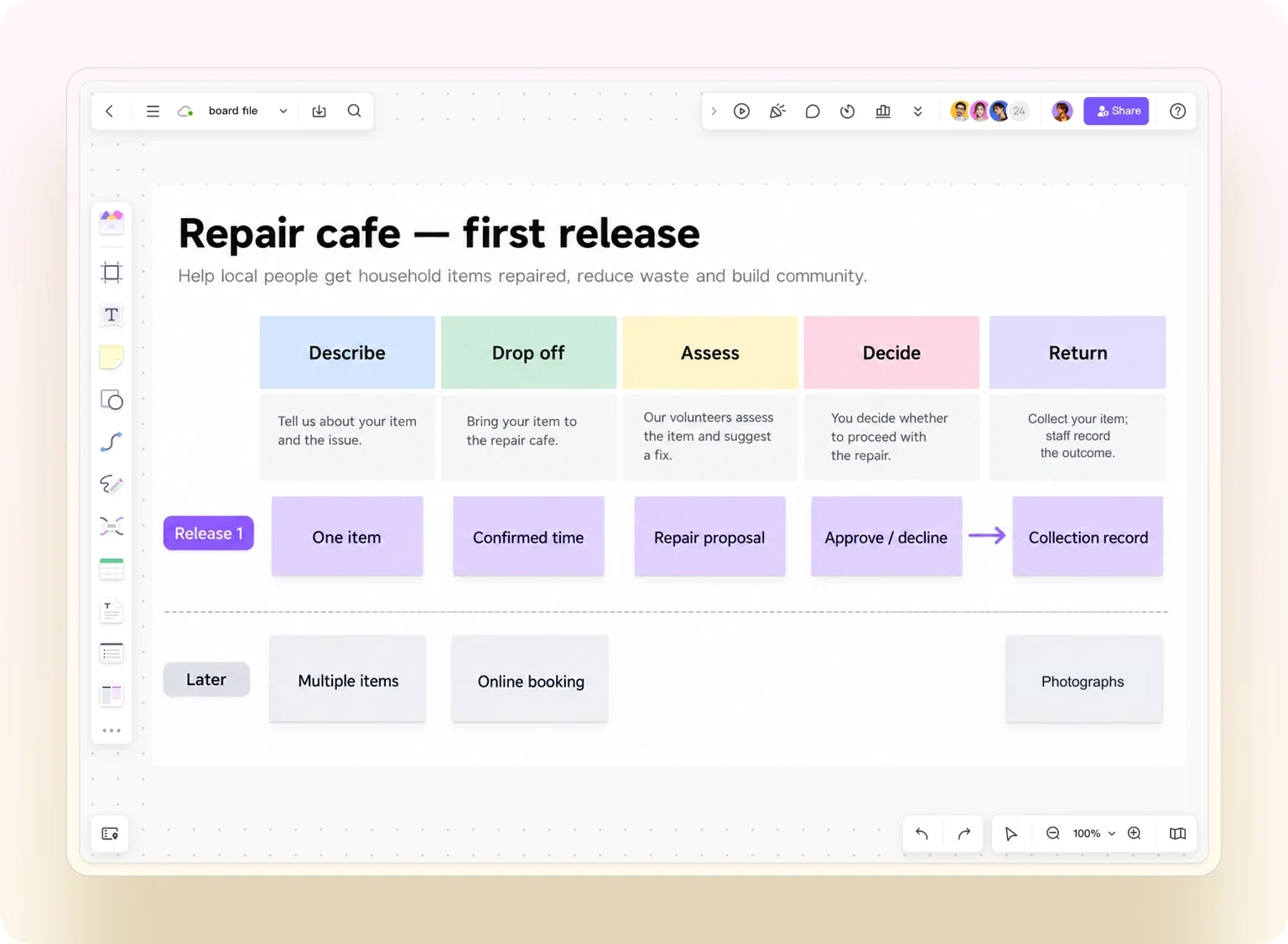
Use the café’s declined-repair path as a concrete review. Point to “Read assessment,” move to “Decline repair,” and continue to “Arrange collection.” Ask a colleague playing the resident to explain what happens to the lamp. Ask the staff representative where their responsibility begins and ends. Record missing information on the relevant card rather than adding an unrelated dashboard.
If the disagreement concerns what the resident sees, build a small interactive prototype of that transition: assessment, decision, and return instructions. The map determines which tasks matter; the prototype makes one proposed interaction inspectable. Neither confirms that messages are delivered or that staff can meet the operating commitment.
After review, keep the updated slice, unresolved dependencies, and reasons for exclusions together. Move a card across the release boundary only with an explicit scope decision. If online payment is added later, revisit approval, failure, refunds, and staff responsibilities rather than inserting one isolated payment card.
The practical finishing question is simple: can the named resident and staff member tell a complete, credible story through this release? When the answer is yes, the map can guide detailed design and delivery planning. When it is no, the missing transition is more useful to discover now than after the team has polished the opening screen.