Mockitt - Best Free Wireframe Tool
Helpful Tips About Wireframe
- How To Create A Wireframe
- Wireframe Tools You Should Know
- Wireframe Templates for Your Inspiration
- Free-to-use Wireframe Kit

Onboarding UX Flow: Get New Users to Their First Useful Task

An onboarding flow should help a new user reach a useful result. Completing a tour, filling out a profile and dismissing a checklist are only intermediate actions. Start by naming the task the person came to do, then decide which information and setup are actually required before that task can happen.
Map the proposed paths in a clickable Mockitt prototype so reviewers can try the first-run experience and its skip routes. This guide uses a fictional shared-reading app, Shelfmate: a new organizer wants to create a reading list and add the first book. Inviting friends, choosing a cover image and enabling reminders can happen later.
Define the first useful task before the welcome screen
Write the outcome in the user's terms: “I have a list with the book we want to read.” This gives the team a concrete destination for the first session. “The user has finished onboarding” says only that they passed through the sequence the team designed.
For Shelfmate, the first useful result requires a list name and a book entry. A profile photo does not make the list usable. A notification preference does not determine whether the user can add the book. Separate those optional improvements from the minimum task before drawing a progress indicator.
Different entry routes can have different destinations. Someone arriving from a friend's invitation wants to open an existing list, not create another one. Keep the invitation acceptance flow as a distinct route and preserve its intended destination through sign-in. Do not merge every new account into the organizer path.
Write the entry assumptions beside the map: new organizer, existing member accepting an invitation, and returning person with unfinished setup. These are design cases to review. They are not research findings about how often each case occurs.
Sort setup into required now, useful now and later
For every proposed onboarding step, ask what breaks if it is skipped. If the answer is only that the marketing profile becomes less complete, it probably does not belong in the required path. If the product cannot perform the requested task without a value, explain that requirement where the value is collected.
In the Shelfmate example, use three groups:
- Required for this task: name the list and supply enough book information to create its first entry.
- Useful but optional: choose an example list to explore before making a personal list.
- Available later: add a cover image, invite friends and enable reading reminders.
A sample list needs a clear identity. Call it “Example reading list” and keep it separate from the person's actual workspace. A user should not wonder whether the sample members, comments or reading history belong to real people. Provide a route to create their own list without requiring them to delete demonstration content first.
Do not disguise a required step as optional. If a reminder choice has a Skip action, continuing without reminders must be a valid route. If a legally or operationally required agreement exists, treat it as such and obtain the appropriate wording; a product designer should not invent the policy to simplify the flow.
Build a short path with a meaningful destination
The initial proposal has four screens: welcome, create list, add first book, and list view. The welcome screen states the task and offers “Create a reading list.” A smaller “Explore an example” action serves people who need context first. Avoid several competing choices before the person understands what each one will produce.
The create-list screen asks for a name, with a short example such as “Weekend reading.” The next step adds a book by the supported input method. The final list view displays the saved title and book, then offers another task: add a second book or invite a friend.
The illustrative Shelfmate flow keeps Create list and Add first book on the main path, with Invite friends shown as an optional action after the list is ready.
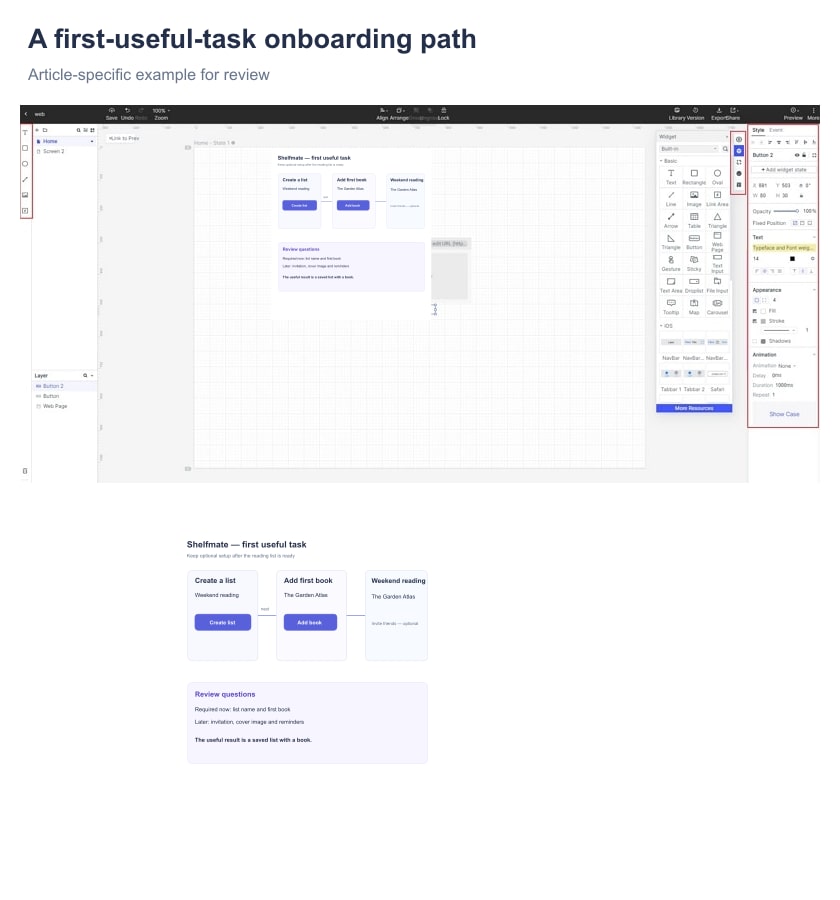
Use action labels that describe the next result. “Create list” is appropriate when the action creates the named list; “Continue” is clearer when the action merely moves to another review step. Do not label an intermediate screen “All done” if the first book has not yet been added.
Include a way back that preserves the input already supplied. A person who notices a misspelled list name on the book step should not lose their book entry while correcting it. The prototype can represent prepared states; engineering must define which values are actually saved and when.
Teach the unfamiliar action when it becomes relevant
A long feature tour asks people to remember information before they have a reason to use it. The NN/G research on tutorials and contextual help describes why intrusive introductions can be skipped or forgotten and why help near the relevant task can be more useful. A novel interaction may still need instruction; choose it for the difficulty people face.
Shelfmate's book screen can show a short example beneath the title field. The explanation remains available while the person types. It does not require remembering a slide from the welcome sequence. If the app supports searching an external catalog, explain the supported search input near that action; do not promise catalog coverage that has not been established.
Make optional guidance easy to reopen. A “How lists work” link near the example route can be more useful than a tutorial that disappears forever when dismissed. Keep the help specific to the current task rather than adding an overlay for each visible control.
When an overlay is necessary, check whether it blocks the control or text it is trying to explain. Give keyboard users a clear way to operate and dismiss it. Instructions should not depend on hovering over a small hotspot, especially when the first session may happen on a phone.
Design the interrupted first session
First-run work is not always completed in one sitting. Write what happens when the organizer closes the app after naming the list but before adding a book. If the list is saved, the return screen can offer “Add your first book” inside that list. If the input was never saved, do not suggest that a recoverable list exists.
Keep onboarding progress distinct from product state. A checklist item might be incomplete because the user deliberately skipped it, because a service call failed, or because the action has not been attempted. Those are different reasons and should not all produce a red warning.
For Shelfmate, invitation remains optional after the first list is ready. Closing the invitation panel should return to the usable list. It should not take the person back to the start or replace the list with a “Complete your profile” gate.
Plan known failure states around the task. If adding a book fails, retain the entered text and offer a specific recovery action. If the network response is uncertain, establish the actual saved state before inviting another submission. The autosave and recovery guide explores this distinction in more detail.
Use progress and permission requests honestly
A step indicator helps only when its scope is understandable. “Step 2 of 3” should refer to a defined sequence, not expand unexpectedly as the person continues. If optional tasks remain after the first useful result, show them as optional next steps rather than suggesting the completed work is still invalid.
A percentage is not necessary for a short flow. Shelfmate can use “Create list” and “Add a book” as clear stages. The list itself provides completion evidence when the book appears. A decorative 100% meter does not add information if it simply means the last welcome card was dismissed.
Ask for device permissions when they support an action the person chooses. Reading reminders do not need to interrupt list creation. Introduce the reminder choice when the organizer sets a reading schedule, explain what the permission enables, and provide a valid outcome if it is declined. The actual permission prompt and available settings depend on the platform.
Do not turn declining an optional permission into a dead end. A person who does not enable notifications should still be able to open their reading list. Describe the consequence plainly and avoid repeated prompts every time they return.
Review the flow with a task, not a tour script
Prepare the organizer path, example route, skip route, interrupted return and book-entry failure in the prototype. Use the same list name and example book across connected states so the reviewer can follow continuity. Mockitt can connect the prepared screens and support shared review; it does not prove that account creation, persistence or notification delivery works in production.
Give a participant a goal such as “You want to keep track of the first book for your reading group.” Do not tell them to click Create list or complete every optional setup item. Observe where they start, what they think the example content means, and when they believe their own list exists.
Then introduce an interruption: return after the list was created but before a book was saved. Ask the participant to continue. This reveals whether the destination and unfinished task are understandable without replaying the welcome sequence. Use a focused prototype test plan to keep observations separate from proposed changes.
For a live product, agree with the team on the event that represents the useful result and the population being measured. A saved first book and a completed welcome tour are different events. Track the relevant path and failures using your actual analytics setup, without treating a prototype review as a measured activation improvement.
Finish by handing off the entry cases, required inputs, optional paths, save points, recovery states and first-useful-result definition. That gives the team a flow it can implement and evaluate, while keeping the new user's purpose visible from the first screen.