A heuristic evaluation is an expert inspection of an interface against usability principles. To evaluate a prototype, choose one user task, walk through its screens independently, record the exact problem and its likely consequence, then agree which findings to fix and which need evidence from users. The useful output is a short, traceable issue list—not a general score saying the design is good or bad.
You can prepare the connected screens in Mockitt's interactive prototype editor and use the same starting point for every reviewer. This guide follows a fictional service-booking app: a customer chooses a repair visit, reviews the charge, and submits a request. The examples show how to turn an impression such as “this confirmation feels unclear” into a specific design change.
What can a heuristic evaluation tell you?
It can identify potential usability problems before you spend a research session watching someone struggle with an obvious defect. For example, a reviewer may notice that a booking screen offers no way to change the selected date, or that a success message does not say whether a visit is confirmed. These are review findings; they are not measurements of how frequently customers will fail.
Nielsen Norman Group's method separates preparation, independent inspection, and consolidation. Evaluators use a shared set of principles, but still judge the interface in context. A deviation from a guideline deserves investigation rather than an automatic redesign.
| Method | Main question | Evidence you collect |
|---|---|---|
| Heuristic evaluation | Where does this design create a likely usability problem? | Interface evidence, the applicable principle, and a reasoned consequence |
| Cognitive walkthrough | Could a first-time user discover the next action? | Step-by-step judgments about goals, visible actions, and feedback |
| Usability testing | What happens when a relevant participant attempts the task? | Observed actions, confusion, errors, and task outcomes |
Use a cognitive walkthrough when learnability is the central question. Choose participant testing when the uncertainty concerns people's expectations or behavior. A heuristic review can help prepare either activity without replacing it.
Define the task and the review boundary
Write the review brief before opening the prototype. “Review the booking app” leaves too much room for reviewers to inspect different features. A more useful brief is: “A returning customer needs a repair visit next Tuesday afternoon, wants to understand the call-out fee, and must know whether the requested time is confirmed.”
For this example, include the service selection, available appointments, review screen, submission feedback, and unavailable-slot recovery. Exclude account creation and payment settlement unless they affect that booking decision. State which screens are interactive, which are visual specifications, and which behaviors are absent from the prototype.
- Audience and context: a returning customer booking on a phone, possibly with limited time.
- Starting state: signed in, saved address available, no appointment selected.
- Completion: the customer can explain the service, date, fee, and status of the request.
- Failure branch: the chosen slot becomes unavailable before submission.
- Review version: one fixed prototype link and a named set of screens, so findings refer to the same design.
Do not record every nonfunctional button as a design defect if it lies outside the declared prototype scope. Conversely, “not implemented” is not an adequate response when the omitted behavior is essential to the decision being reviewed. Mark that as a missing design specification and assign someone to resolve it.
Use principles to ask concrete questions
Nielsen's ten usability heuristics cover feedback, familiar language, control, consistency, prevention, memory demands, efficiency, simplicity, error recovery, and help. Use the principles as prompts for inspection rather than ten boxes that every screen must fill.
For the repair-booking example, a focused set of questions makes the review practical:
| Inspect | Question for this booking flow | Evidence to record |
|---|---|---|
| Feedback | After submission, is this a confirmed appointment or a request awaiting approval? | The exact status message and the screen before it |
| Language | Does “call-out fee” explain what the customer pays and what it covers? | The fee label, its explanation, and the point where it appears |
| Control | Can the customer change the date without losing the chosen service? | The return route and the preserved or cleared selections |
| Prevention | Can someone submit without seeing the address and appointment window? | The review screen and final action |
| Recovery | When a slot disappears, can the customer choose another without starting again? | The unavailable state, retained information, and next action |
A single missing appointment summary might relate to several principles. Record it once with the most useful explanation. Counting the same problem under three headings makes the report longer without giving the team three different things to fix.
Inspect independently before discussing solutions
First take one uninterrupted pass through the normal booking path to understand it. On the second pass, pause at each decision and write observations. Then attempt the return and failure paths. Keep review notes separate until each evaluator has formed an independent view; a shared live discussion can make the first person's interpretation dominate.
In Mockitt, prepare the screens and their connections, then use the prototype sharing workflow to give reviewers a consistent entry point. Check the link as a recipient before the review. Tell reviewers which flow to inspect and where to record findings. A share link alone does not define the task or freeze the underlying content, so coordinate edits during the review.
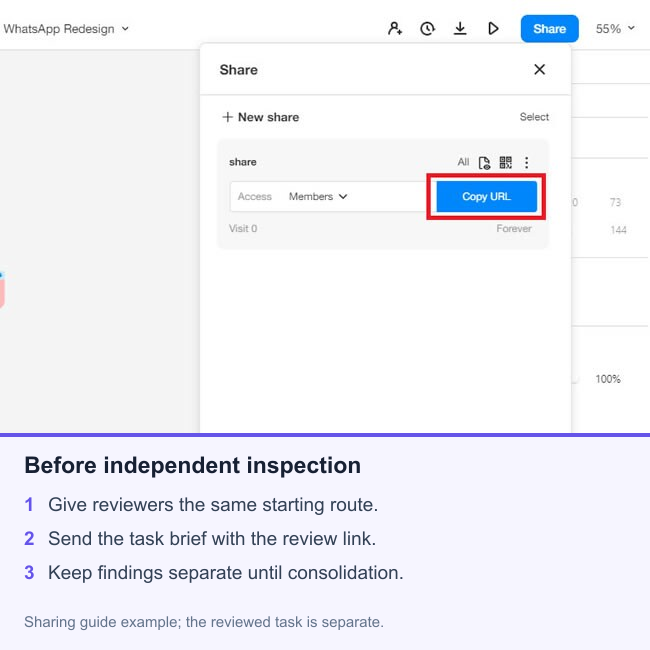
Save a screenshot or screen reference for each finding. If the booking status changes after an action, capture both states. Record the route used to reach the problem, especially when it appears only after changing an earlier choice. Avoid editing the prototype while another reviewer is still inspecting it; a correction can otherwise disappear from the evidence without explanation.
Write a finding that another person can reproduce
“Make confirmation clearer” leaves the designer guessing. A useful finding names a location, an observable condition, a likely effect on the task, and a proposed next action. Keep the observation separate from the hypothesis about user behavior.
Finding H-03 — Request status is ambiguous.
Location: booking submission → completion screen.
Observation: the screen says “Done” and repeats the selected time, but never states whether the provider has accepted it.
Likely consequence: a customer may treat the visit as confirmed when it is still pending.
Relevant principle: feedback about the system's state.
Proposed change: show “Request sent—awaiting confirmation,” explain how confirmation arrives, and give a route to the request details.
Validation: in the next usability session, ask the participant what they expect to happen next without explaining the status.
This is a fictional example of a review record, not a reported user-test result. The uncertainty is explicit: the misleading interpretation is plausible, but its frequency is unknown. The team can fix the missing status description immediately and still test whether the revised wording communicates the intended meaning.
A second finding might concern an unavailable slot. If the recovery screen clears the service and address, record precisely which information is lost. Recommend retaining those selections, then check the proposed recovery screen. Do not bundle this with the status-message issue: it has a different trigger and requires a different change.
Consolidate findings and prioritize the next changes
Group findings by the underlying problem, not only by screen or heuristic. Two reviewers may describe the same missing status in different words. Keep their evidence together in one issue, preserving any different affected paths. If they disagree, return to the prototype and the task rather than settling it by majority vote.
Use consistent usability severity ratings, with a short reason attached to each rating. Consider the possible consequence, whether the user can recover, and how broadly the issue affects the reviewed flow. An expert review cannot supply a measured occurrence rate, so record frequency as unknown unless other evidence establishes it.
- Fix before the next test: a defect prevents the intended task or makes the test answer a different question, such as a broken route to the review screen.
- Resolve the design now: a consequential ambiguity has a clear remedy, such as distinguishing a pending request from a confirmed appointment.
- Test competing explanations: reviewers disagree about the meaning of a service label or whether customers need additional detail.
- Schedule later: a small inconsistency does not obstruct the task under review, but still needs an owner.
These are proposed workflow buckets, not a universal rating scale. Add an owner, target version, and acceptance condition to each chosen fix. “Done when the completion screen distinguishes pending from confirmed and the request details show the same status” is more useful than “improve feedback.”
Close the loop with a revised prototype
After revisions, repeat the affected route from its starting state. Check the unavailable branch as well as the successful booking. An improved completion screen does not resolve the issue if an earlier review screen still promises a confirmed appointment.
Keep three outcomes distinct in the report: observed interface defects, proposed corrections, and questions for users. Hand the unresolved behavioral questions to the prototype usability testing plan. That gives the next research session a purpose beyond asking whether participants like the new design.
Finish with a short decision summary: which flow was reviewed, which version was inspected, which important findings were corrected, and what remains uncertain. The team should be able to open the revised prototype, reproduce the relevant state, and understand why the change was made.