Deprecating a design system component means directing new work toward a replacement while moving existing uses through a controlled transition. It is not the same as deleting the old asset. A useful migration plan identifies where the component is used, which behavior must survive, who owns each change, and what must be true before removal.
Compare the old and proposed patterns in their real screen contexts using Mockitt Design for component and screen review. The example here is Westmere Ops, a fictional internal workspace whose “Message banner v1” has accumulated several different jobs. The goal is to retire that shared pattern without confusing the people who rely on its messages.
Name the reason the old component must change
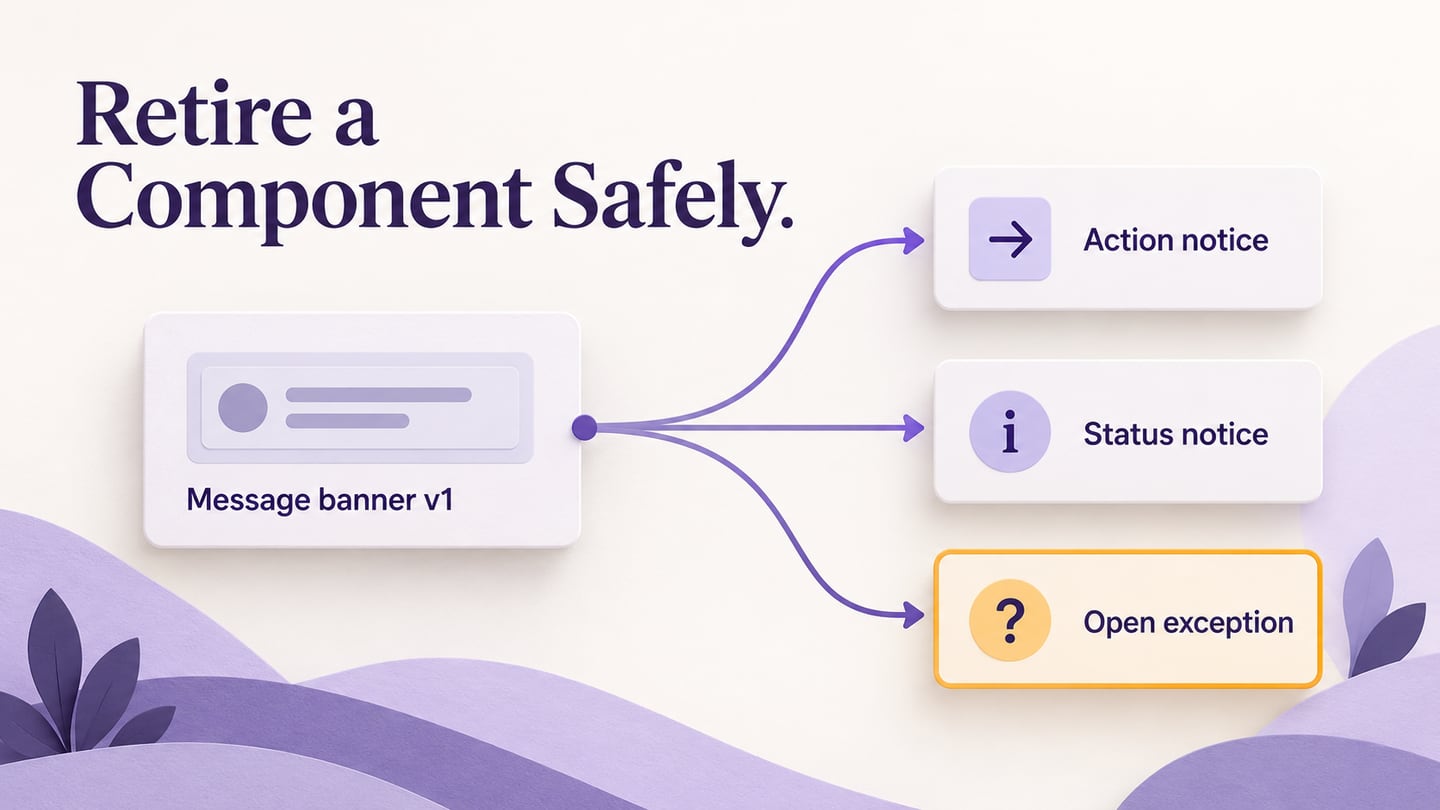
Westmere's banner appears above an asset request when a cost center is missing. It also announces that an export is ready and displays an upcoming maintenance notice. All three uses inherited a Dismiss button. That is convenient for temporary information, but dismissing the missing-cost-center message does not remove the requirement.
The team proposes two replacements: an Action notice for an unresolved requirement and a Status notice for information that can be dismissed. The maintenance case needs a separate decision about duration and where the information remains available. A blanket replacement would hide these differences.
Write the reason in terms of supported behavior: “Separate required action from dismissible status.” Avoid “The old banner looks dated,” which does not explain why existing screens must change. If the problem can be resolved with a compatible variant or a documentation correction, a complete retirement may be unnecessary.
A maintained design system includes ownership and change rules as well as reusable assets. For this migration, name a component owner and a contact for each affected product area. Those people need a way to raise a use that the replacement does not yet support.
Find the uses, not just the master component
A library entry shows what the team publishes, not every place it has been adopted. Inventory the current design files, implemented screens and documentation examples. Ask engineering to check coded uses and product owners to identify supported screens; designers should check detached copies and older files separately.
Record a stable screen or flow reference, the existing variant, the message's purpose, its actions, and the owner. Distinguish an active product screen from an archived experiment. An old design file may not require migration, but it should not remain the default example for new work.
Westmere's initial inventory becomes a decision table. It is small enough to discuss, but each row points to a specific consumer rather than a vague department.
| Existing use | Replacement decision | Evidence needed before completion |
|---|---|---|
| Asset request: cost center missing | Action notice with Add cost center; the requirement remains visible until resolved. | Review the incomplete and completed request paths, including how the message disappears. |
| Export: file ready | Status notice with Download and Dismiss. | Confirm that dismissing the notice does not remove access to the completed export. |
| Upcoming maintenance | Hold as an explicit exception while the message-duration rule is decided. | Agree where the notice can be found after dismissal and who removes an expired announcement. |
Track design and implementation separately. “Updated in the library” does not mean that a released screen uses the new component. Likewise, a coded replacement does not automatically update a help article's screenshot or a designer's local copy.
Map behavior before swapping instances
For each consumer, compare content, states, actions, dismissal, placement and narrow-screen behavior. Mark a mapping as equivalent only when its meaning is preserved. A similar color or shape is not enough: a message requiring action and a success message may look alike while serving different tasks.
In Westmere's asset request, the old Dismiss button is removed from the proposed pattern. The Action notice says “Cost center required” and offers “Add cost center.” The underlying form still has a real validation requirement. Hiding a banner must never be the mechanism that makes an incomplete request appear valid.
The asset-request comparison keeps “Cost center required” unchanged while replacing Dismiss with Add cost center; the migration note records that the requirement remains unresolved.
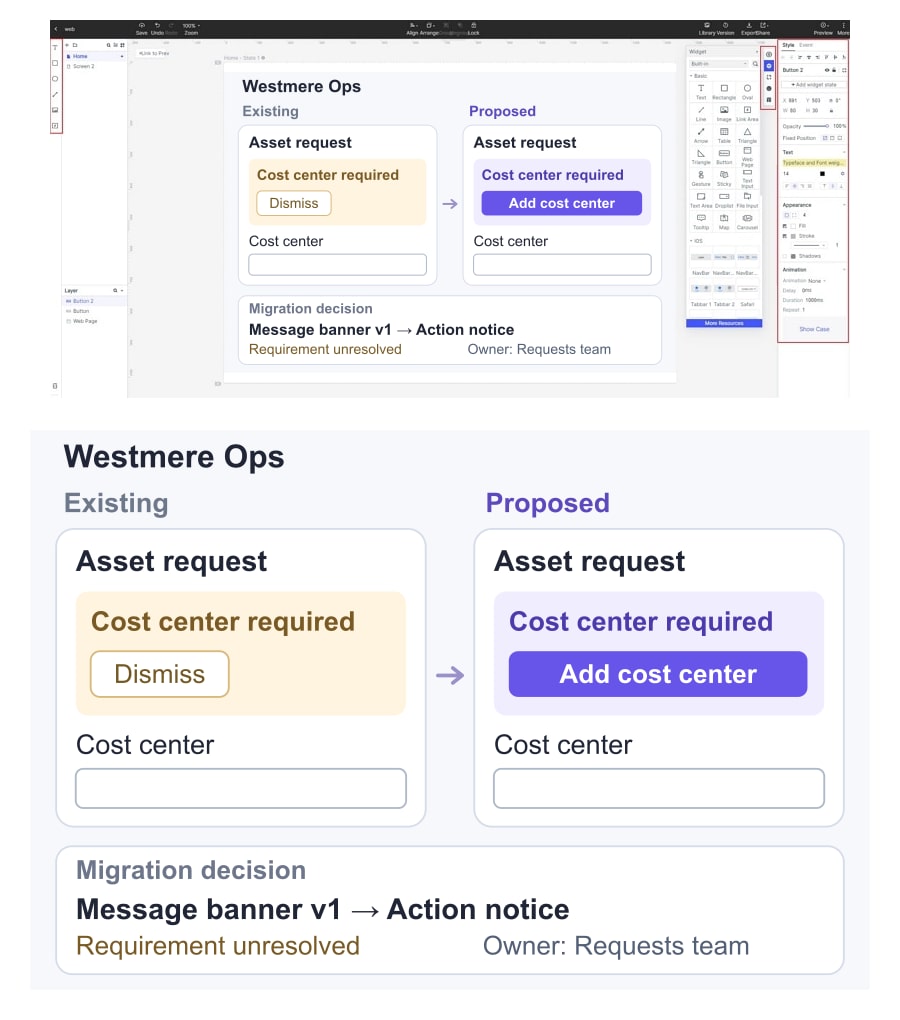
Record what happens after that action. The person reaches the relevant field, supplies a valid value, and can continue. Specify where focus should move and how the changed status is communicated in the implementation. The design review can show the intended states, but it does not establish keyboard or assistive-technology behavior.
Keep an unmapped use visible as an exception, with its reason and owner. Do not force the maintenance notice into Status notice just to report complete adoption. One unresolved consumer is a concrete design question; silently changing its behavior creates a hidden one.
Publish a transition that teams can act on
An announcement should state what is changing, why, what to use for new work, how existing uses should move, and where to request help. Include the old and replacement names and the scope of the change. A component label marked “old” without a destination leaves adopters to invent their own substitutes.
The Atlassian Design System release phases distinguish an intention to deprecate from a deprecated feature and describe a communicated replacement and migration period. The useful principle is explicit expectations. Your team's dates and support commitment must reflect its own consumers, rather than borrowing another organization's schedule.
For Westmere, new asset-request designs should use Action notice once it is ready for adoption. Existing export screens can move to Status notice after their download-access check. The maintenance consumer stays recorded as an exception; it is not silently treated as migrated.
Put the transition guidance where teams already find component documentation and version decisions. Keep the old reference available during the agreed period, clearly marked with its replacement guidance. Do not rename a published asset in a way that obscures which version an existing screen used.
Migrate one representative use before the rest
Start with a consumer that exercises the behavior that motivated the change. For Westmere, that is the incomplete asset request, not the easiest informational banner. Review the normal path, the unresolved requirement, the completed state and the surrounding layout before treating the replacement as ready for wider use.
Keep the pre-migration reference so reviewers can see what changed. Record the accepted design and implementation version, then move other consumers in manageable groups. Teams should be able to tell whether a given screen is waiting for design, implementation or verification.
Plan how to reverse a problematic change. A rollback may require restoring the earlier implementation and its compatible content, not merely relinking a design instance. Ask the responsible engineers what is reversible and record any constraint before rollout. Avoid promising a one-click rollback from a design tool.
During coexistence, make the recommended choice obvious to new adopters. Do not allow both components to look equally current in the library or examples. Retaining an old version for supported consumers is different from continuing to recommend it for new screens.
Remove the old component when the exit conditions are met
Define completion around consumers: supported uses have migrated or have an approved resolution, behavior checks are recorded, documentation points to the current pattern, and the owner has confirmed the agreed support period. A count of replaced design instances alone does not demonstrate that the product migration is complete.
Keep a short record of the old name, replacement decision, affected consumers and final outcome. Link retired guidance to the maintained reference where appropriate. Future teams may need to understand a historical screenshot or investigate a screen that escaped the original inventory.
For Westmere, retirement is complete only after the maintenance exception is resolved as well as the asset-request and export changes. The useful result is a clearer set of responsibilities across the workspace, with evidence that existing tasks survived the transition—not simply one fewer item in the library.