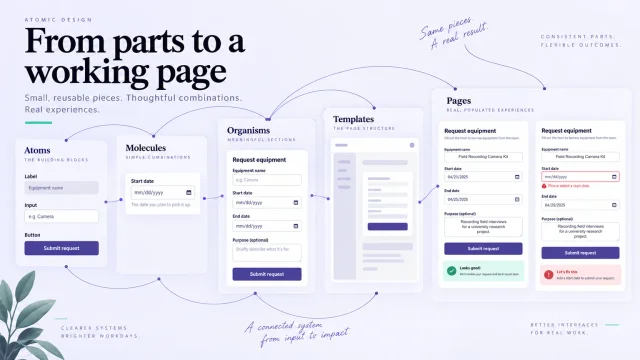
Atomic design is Brad Frost’s method for thinking about an interface as both reusable parts and a complete experience. Its five levels—atoms, molecules, organisms, templates and pages—help teams discuss how a design system fits together. The method does not generate an interface automatically; it gives a useful structure for designing, documenting and checking it.
What Is Atomic Design?
Frost describes atomic design as a mental model, not a linear production process. You can inspect a small component, place it in a larger layout, then return to improve the component when real content reveals a problem. This connection between the part and the whole matters more than assigning every object a perfect scientific label.
Reusable components can be designed and documented alongside the application that uses them. A component example makes its appearance and states easier to discuss before all application data is available. However, atomic design does not determine which CSS a browser loads, replace backend logic or guarantee a faster build. Those outcomes depend on the implementation, tooling and team practices.
Atomic Design Principles and Methodology
Methodology
The chemistry analogy provides the organizing idea: simple elements combine to form more complex structures. Hydrogen and oxygen, for example, can combine as part of a water molecule, whose properties differ from those of the separate elements. In interface design, a small set of controls can similarly combine into a purposeful interaction. The analogy is a way to reason about composition, not a literal account of how software must be built.
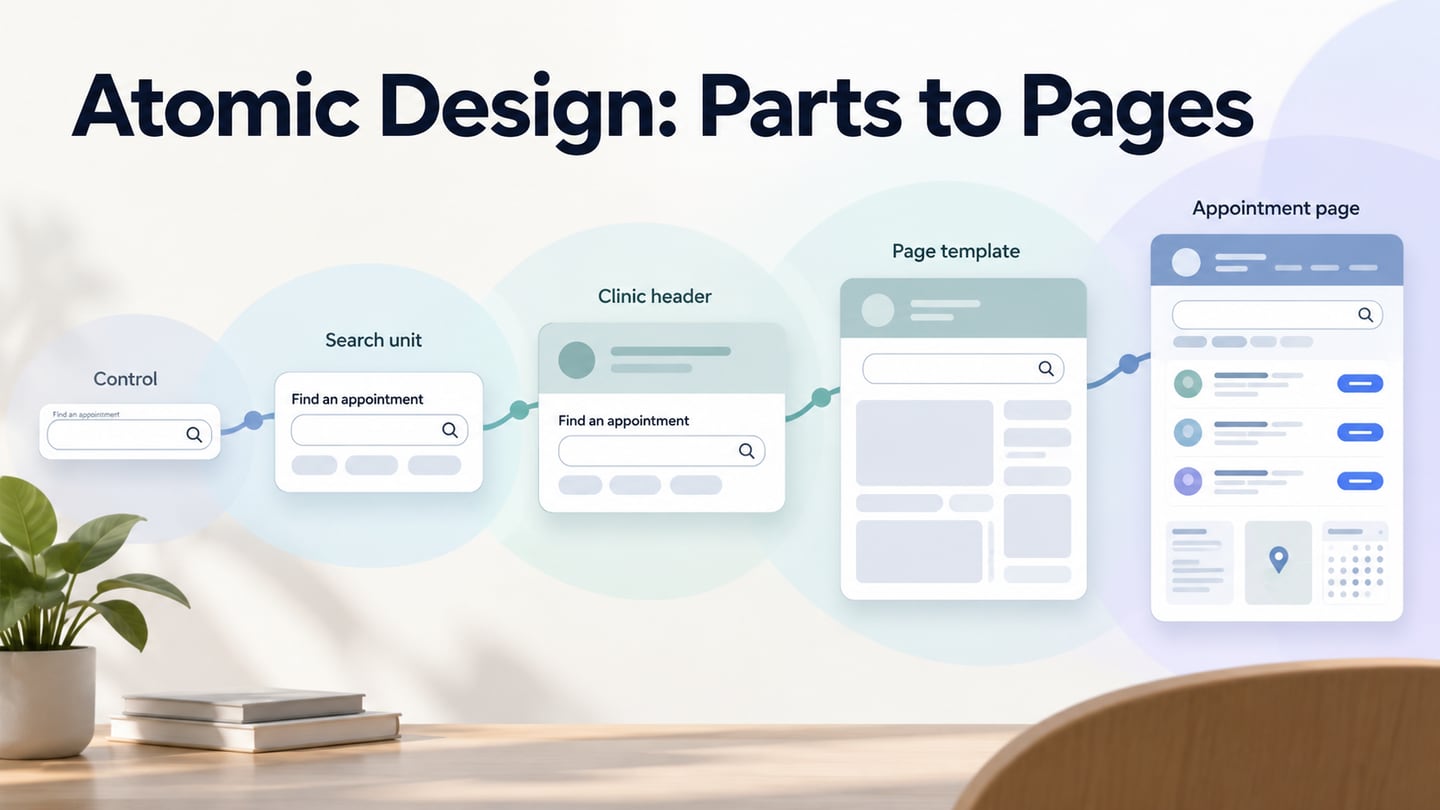
A label, an input and a button become more useful when they work together to support a search. That search unit can sit within a larger header, which in turn appears in a page layout. Looking at each scale helps a team spot inconsistent controls and missing context. It also lets a change in real page content inform the smaller elements, rather than treating the initial component library as finished forever.
The Five Levels
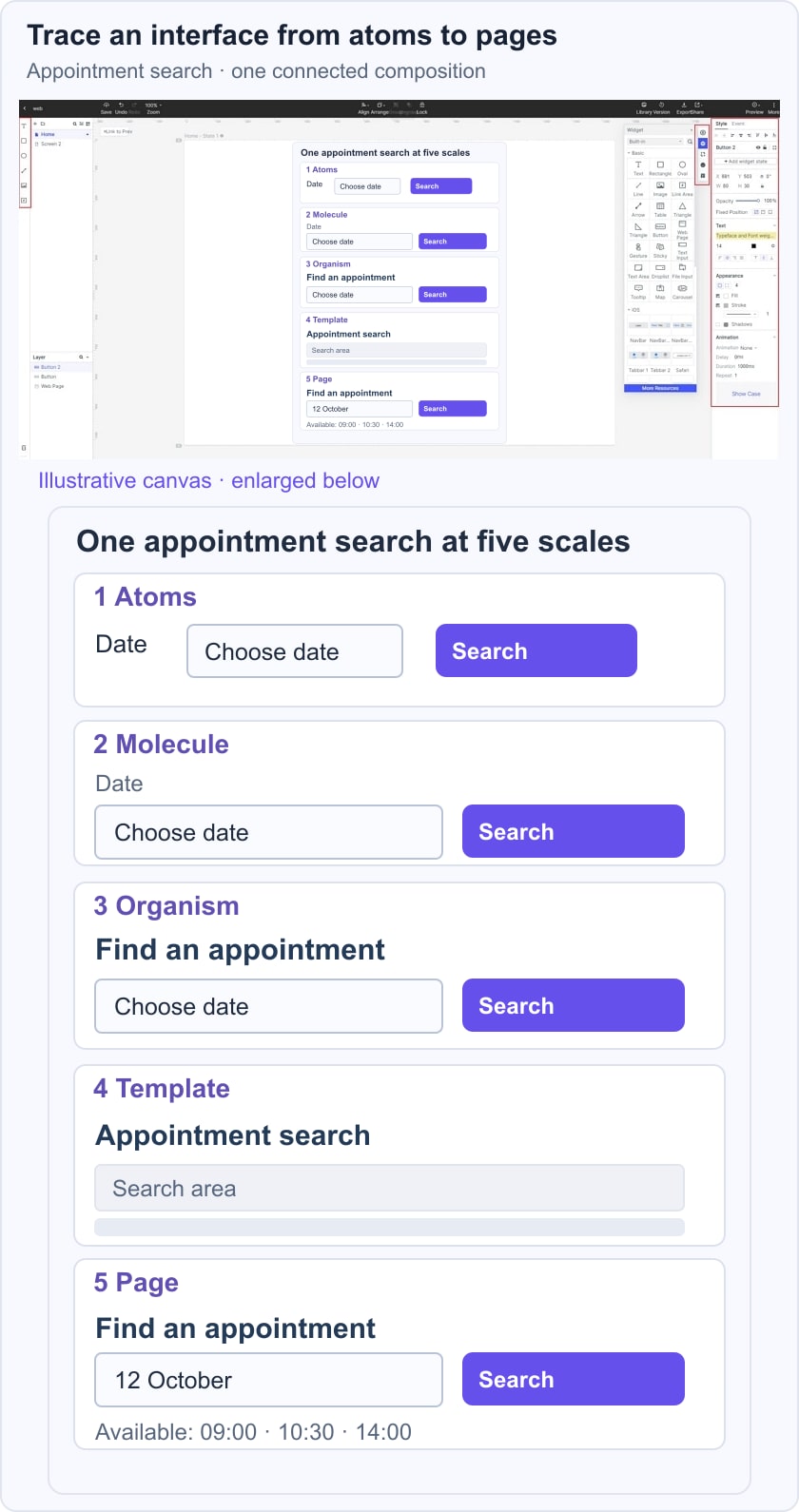
The five levels work together. The appointment-search example below follows them from a small control to a populated page, but a team can move between levels as it learns.
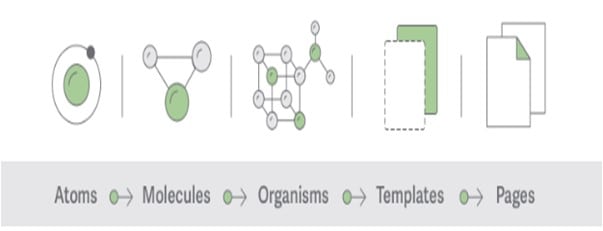 The five levels are a mental model that can be reviewed together, not a mandatory one-way production sequence.
Atoms
Atoms are basic interface elements that cannot be broken down further without losing their functional meaning in the model. Labels, inputs and buttons are typical examples. Their properties—such as type size, dimensions and color—affect how they work in a larger composition. For appointment search, begin with a Date label, a date field and a Search button, each with a clear role.
Molecules
Molecules are relatively simple groups of elements that work together as one unit. A form label, input and button can form a search molecule; an isolated button is not automatically a molecule just because it has a rectangle and text. For the appointment example, the unit asks for a date and submits a search. It needs understandable labels and a defined response when the date is missing or invalid.
Organisms
Organisms are more complex interface sections composed of atoms, molecules or other organisms. A clinic header might combine a logo, navigation and the appointment-search unit. A repeated set of appointment cards could form another section. Such sections have recognizable purposes, but they are not necessarily independent of application state, content or other parts of the page.
Templates
Templates arrange components at page level and describe the underlying content structure. An appointment-results template might reserve space for the header, selected date, result list and supporting guidance. It should account for likely content lengths and image sizes. A template can use example content to communicate the layout; its purpose is to establish structure rather than claim that the final service information is already known.
Pages
Pages are specific template instances with representative content. Populate the appointment page with realistic fictional clinic names, times and availability. Then try an empty result, a long clinician name or a different number of appointments. If the page fails, revisit the relevant organism, molecule or atom. A complete-looking page is a chance to test the design’s assumptions, not proof that every component is resilient.
Atomic Design Examples
Atomic design can organize several familiar design ingredients. Keep their roles distinct: a shared color value is not the same thing as an interactive control, and neither is a complete page. The examples below support the model without requiring a particular naming convention or tool.
Colour palettes
A palette collects colors that a team uses consistently. Give each important color a purpose—such as text, surface or action—rather than adding shades simply because they look attractive together. Check those choices where they appear in components. A useful palette helps a button and a message belong to the same interface; it does not guarantee readable contrast by itself.
Design tokens
Design tokens name reusable design decisions, such as a color, spacing value or type size. A token might describe a primary-action color that several components use. An icon asset is not automatically a token, and calling values “subatomic” is an optional analogy rather than a required sixth level. The useful question is whether the team can understand and update the shared decision consistently.
Typography
Typography concerns the selection and arrangement of type: size, weight, spacing, line length and hierarchy. It is not simply the location of a navigation menu. Define how labels, headings and supporting text differ, then check them inside the components. Iconography is related visual language, but an icon and a text label serve different communication needs.
Core components
Core design components include controls such as buttons and tabs, as well as larger units such as search forms. Their atomic level depends on their function and composition. Document the relevant states and behavior rather than focusing only on the default appearance. For example, a Search button needs a clear relationship to the input it submits.
Platforms and tools
Tools can help a team store and review reusable elements. UXPin discusses components, properties, states and usage guidance in its design-system material. That is a platform example, not a requirement to use UXPin or a promise that any library automatically produces a sound system. Choose a workspace that supports the way the team documents and tests its decisions.
Atomic Design Patterns
A pattern describes a recurring solution in context. Atomic composition helps explain which elements it uses, but the pattern also needs a purpose and rules: when to use it, how it behaves and which exceptions matter. A library that shows only attractive screenshots leaves teammates to guess the interaction. Include enough context to tell whether a pattern fits a new task.
Representative content helps reveal weaknesses in the pattern. Test a very long appointment title, no available times and a full list. A design tool may support sample data or simulated states, but atomic design itself does not fetch dynamic data or connect the interface to a live system. Keep those implementation responsibilities separate from the examples used for design review.
Documentation gives teammates a shared language for the same decisions. Record names, labels, states and relationships that will remain useful during handoff. You do not have to call every section an organism in a client meeting; familiar terms such as appointment search or results header may communicate the purpose better. The hierarchy should clarify the work rather than become a naming exercise.
Prototype the Parts and the Whole
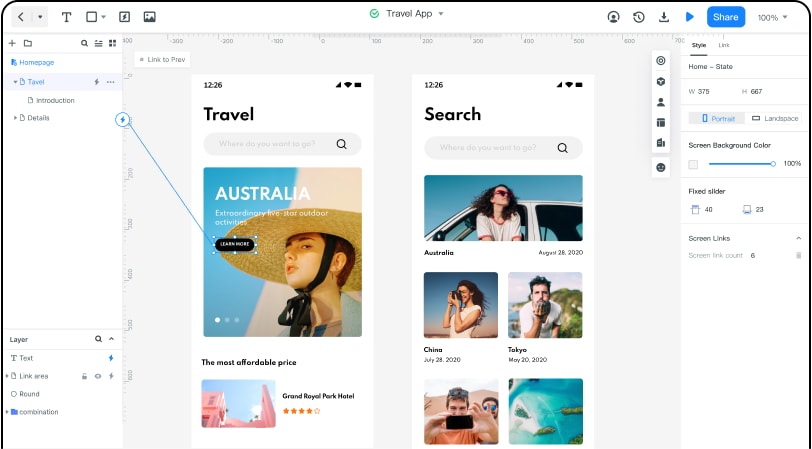
Use Mockitt’s prototyping workspace to make a small collection of related screens and components reviewable. In the appointment example, arrange the Date label, field and Search action; combine them into the search unit; then place it in a populated results page. The historical editor capture illustrates visual organization and linking, not automatic generation of a coded component system.
Start with a Small Prototype
Start with the decision the prototype must clarify. For appointment search, that could be whether the date choice and next action are understandable. Keep the initial scope small, but include the state that could change the decision, such as no available times. There is no fixed number of minutes in which every useful prototype can be completed.
Review in a Shared Workspace
A shared project can make the current design easier to find and discuss. Agree which version is under review, who needs access and where decisions will be recorded. Check the current workspace’s sharing and saving behavior instead of assuming that cloud access eliminates the need for sensible project organization and backups.
Adapt Design Resources
Use available widgets and templates as starting points, then replace sample labels and states with those required by the task. An asset count is less useful than a component that expresses the right behavior. Keep related components visually consistent, and document an exception when the standard resource does not fit.
Manage Access and Responsibilities
Share the review with the people who need it and confirm the access options available to the account. Use fictional appointment details in a demonstration. Treat security, retention and permissions as requirements to verify with current product documentation and organizational policy; a prototype illustration does not establish a particular encryption or disaster-recovery guarantee.
Collect Specific Team Feedback
Ask a reviewer to choose an appointment date and explain the next step. Record confusion about the label, unavailable state or results separately from visual preferences. The illustrative composition below connects the small search controls to a complete page; it does not implement a live appointment service. Bring agreed changes back into the shared components and carry the behavior notes into development.