Generative design uses a defined set of goals and constraints to explore design alternatives. In engineering, the inputs might include available space, loads, materials, and manufacturing methods; the output is a set of candidates to evaluate. Generating an option does not establish that it is safe, manufacturable, or ready to use.
It is also different from generating a UI draft from a text prompt. A structural design tool explores a physical part; an interactive Mockitt prototype helps a team review the interface people use to configure, compare, or approve options. Each supports a different decision.
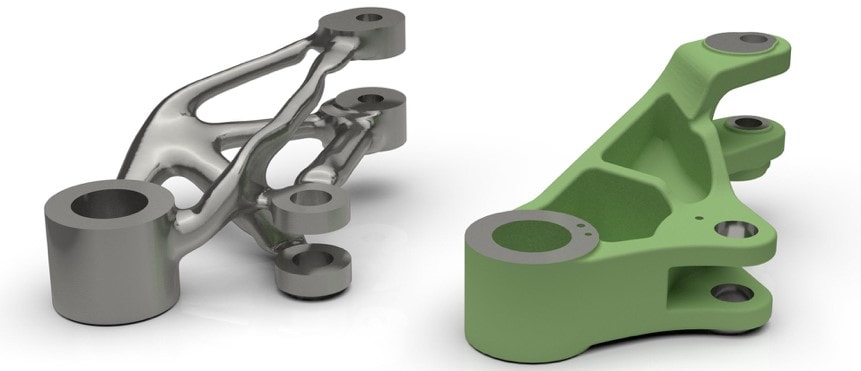
What Is Generative Design?
Generative design is an algorithm-driven exploration process. A designer defines an objective and conditions that a candidate must meet, and software explores possible solutions. Some approaches use AI or machine learning; these are not prerequisites for every generative design method. Autodesk's overview makes this distinction and describes applications in engineering, manufacturing, and architecture.
For an engineering study, the input commonly includes:
- Physical constraints: the space available, attachment points, areas to preserve, and regions to keep clear.
- Loads and operating conditions: the forces and scenarios the analysis needs to consider.
- Material options: the materials eligible for the study and their relevant properties.
- Manufacturing constraints: the processes, access requirements, and practical limits that affect production.
- Objectives: what the team wants to improve, such as mass, stiffness, or an estimated cost measure.
An objective is not the same as a constraint. “Reduce mass” describes a preference; “retain these mounting locations” describes a condition that candidates must respect. Keeping the two separate makes the output easier to interpret.
Explore Multiple Choices, Not Unlimited Possibilities
The process can produce alternatives a designer might not sketch manually. However, it explores a space defined by the model, parameters, and available methods. More outputs do not necessarily mean more useful choices. If an important condition is missing, many candidates can be unsuitable for the same reason.
Begin with a manageable question and compare a few meaningful tradeoffs. A lighter component may be harder to manufacture or inspect. A visually unusual shape is not automatically the best engineering choice.
Use Alternatives to Challenge a Design Assumption
Generative exploration can reveal a different arrangement of material or space. That can help a team question an inherited design, such as a bracket shape copied from an older assembly.
Human judgment remains necessary. Ask what each candidate changes and why that matters to the product. An alternative that improves one modeled objective may create an assembly, maintenance, or usability problem outside the model.
Revise the Inputs and Compare Again
Changing a condition can lead to a different set of results. Keep a record of the inputs for each study so reviewers know whether they are comparing geometry or two different problems. A candidate evaluated with one load case should not be presented as directly equivalent to another evaluated with a different case.
Before rerunning a study, check whether the requested change belongs in the model. If the problem is an assembly technician's access to a fastener, a new visual style will not resolve it.
Reduce Manual Exploration Where It Helps
Automated exploration can assist with producing and comparing options. The overall schedule still includes defining the problem, preparing a trustworthy model, evaluating candidates, refining geometry, and validating the result. A shorter generation step does not guarantee a shorter delivery schedule.
Evaluate Cost Rather Than Assuming Savings
Material use, fabrication, finishing, inspection, assembly, and maintenance can pull a decision in different directions. A candidate with less material may require a more expensive process. Consider the costs relevant to the actual product instead of treating an optimization score as a complete business case.
Generative design does not remove the need for engineering analysis or physical testing where those are required. The model is only as useful as its assumptions and the conditions it represents.
Spend Review Time on the Tradeoffs
Automation changes the work; it does not make the engineer's work redundant. Reviewing inputs, interpreting failures, checking assumptions, and planning validation are still consequential tasks. Use saved effort to investigate the candidates that can plausibly meet the whole brief.
A Generative Design Example: From a Bracket Brief to a Decision
Consider a fictional wall bracket for a small indoor device. The team wants to reduce material while preserving the mounting points and keeping space clear for a cable. This example explains the reasoning; it is not a completed structural study or a specification for a safe part.
- Define the envelope. Identify attachment locations, the device connection, surrounding obstacles, and cable clearance.
- Specify the conditions. Have the appropriate engineer define the relevant loads, material properties, and manufacturing limits.
- Generate candidates. Keep the input set attached to the study so the alternatives are traceable.
- Compare the whole brief. Review the modeled performance alongside fabrication, assembly access, inspection, and maintenance concerns.
- Refine and validate. Select a candidate for further engineering work and the tests appropriate to its intended use.
| Illustrative candidate | Potential advantage | Question before selection |
|---|---|---|
| A: more open geometry | Less material in parts of the design | Can the chosen process produce and inspect the internal features? |
| B: simpler geometry | Easier access for assembly and finishing | Does it satisfy the engineering conditions at an acceptable material cost? |
| C: different support arrangement | A possible alternative load path | Does it interfere with the cable or surrounding components? |
The best next step might be to refine candidate B, change an input, or reject the current set. Choosing among outputs is not a requirement to accept one.
A documented aerospace example is the Airbus bionic partition project, developed with Autodesk and APWorks. It concerned a cabin partition for the A320, not the design of the entire aircraft. Autodesk's project account describes a combination of generative design, materials, and additive manufacturing, as well as crash testing toward certification. Treat it as a specific research case, not proof that any generated part is already validated.
Common Uses for Generative Design
The approach is relevant when a problem can be described through useful parameters and competing objectives. Applications vary by field:
- Automotive and aerospace: exploring components where weight, strength, packaging, and production constraints matter.
- Architecture and construction: comparing spatial or structural alternatives under project-specific conditions.
- Manufacturing: investigating parts, fixtures, and tooling with a defined production process.
- Industrial equipment: balancing performance requirements with maintenance and assembly access.
- Consumer products: exploring physical configurations that must also work for the person using them.
Different tools address different problems. A capability demonstrated in one engineering workflow does not establish that another tool models the same conditions. Check the inputs, outputs, supported processes, and validation requirements of the particular system.
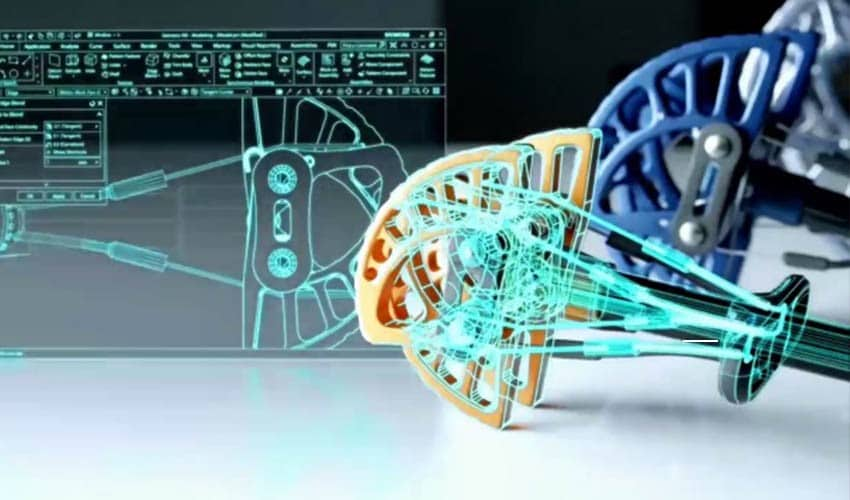
How Generative Design Relates to UX
A technically promising output still needs an understandable interface around it. Someone must enter constraints, notice missing information, compare alternatives, and understand what approval means. Those are UX questions; they are distinct from whether a part meets an engineering requirement.
For the bracket example, prototype an input summary, a candidate list, a comparison view, and a review decision. Keep the fictional candidate names consistent. Show the units and the source of each result. Include a visible state for an incomplete study rather than making every card look ready for approval.
In Mockitt, connect those screens so a reviewer can open candidate B, inspect the assumptions, return to comparison, and request a change. Ask them to identify which conditions are shared across the options and what still needs engineering review. The prototype represents the review interaction; it does not run the structural analysis.
Useful questions include whether a person mistakes an estimated cost for a quote, interprets a generated option as certified, or overlooks an excluded load condition. Clear language and explicit status can prevent those misunderstandings before the production interface is built.
Choose the Output That Answers the Right Question
Generative design is valuable when it helps a team explore a well-defined problem and understand the tradeoffs among candidates. Keep the brief, inputs, assumptions, and validation needs connected to the output. Use interface prototyping for the human decisions around the process, and the appropriate engineering tools and expertise for the physical design itself.