Mockitt - Best Free Wireframe Tool
Helpful Tips About Wireframe
- How To Create A Wireframe
- Wireframe Tools You Should Know
- Wireframe Templates for Your Inspiration
- Free-to-use Wireframe Kit

Roles and Permissions UI: Review What a Role Can Change
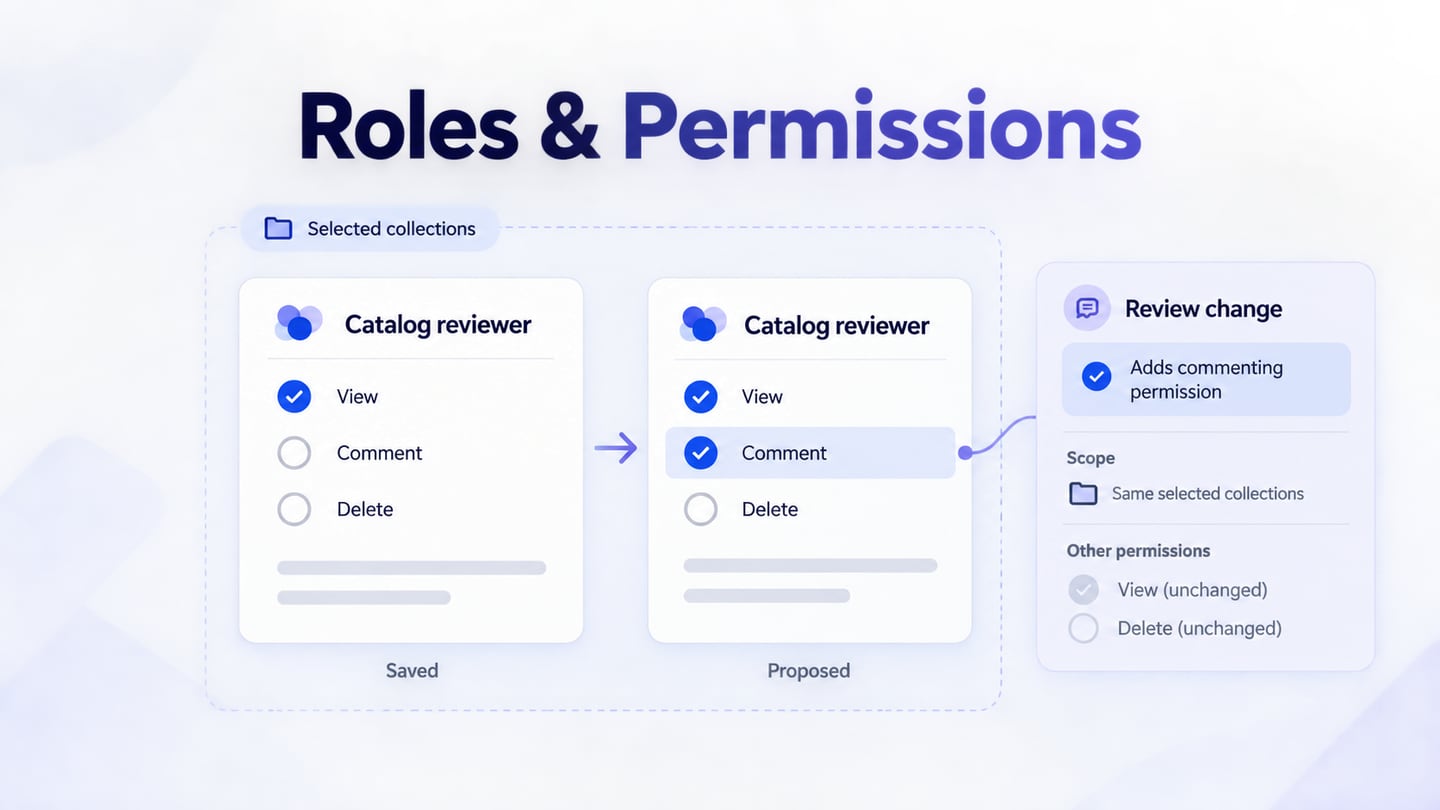
A roles and permissions UI should make three things clear before an administrator saves: what the role can do, which resources those actions apply to, and who will be affected by the change. Start with readable actions and explicit scope, explain restrictions beside the controls, and show the difference between the saved role and the proposed version.
Consider Cedarfield, a fictional asset catalog used to review photographs and documents. Its Catalog reviewer role currently allows people to view published assets in selected collections. The requested change is to let those reviewers comment on the same assets. Editing files, deleting assets, and managing people must remain unavailable. That narrow request gives the interface a concrete job: add discussion rights without quietly expanding other access.
You can explore these permission rows and their review states in Mockitt's UI design workspace, keeping labels and components consistent across the editor. The screens represent a proposed Cedarfield experience; the application's authorization service must implement the rules.
Define the role with actions and resource scope
A role name is a summary, not a complete policy. “Reviewer” could mean reading everything, commenting on assigned work, or approving publication. Put a short description below the name: “View and comment on published assets in selected collections.” Keep that description consistent with the permissions rather than treating it as unrelated marketing copy.
Write the starting and intended states before drawing a matrix. For Cedarfield, collection selection happens when the role is assigned; this editor defines the actions available within those selected collections. It does not silently add every collection to the assignment.
| Action | Saved role | Proposed role |
|---|---|---|
| View published assets | Allowed in selected collections | Unchanged |
| Comment on published assets | Not granted by this role | Allowed in selected collections |
| Edit or delete assets | Not granted by this role | Unchanged |
| Manage people and roles | Not granted by this role | Unchanged |
This separation prevents “Allow comments” from becoming “Allow comments everywhere.” A product may also restrict an action by ownership, asset status, or another policy. Make those conditions part of the design brief. Do not force a complex policy into a row of checkboxes that cannot describe it.
OWASP's authorization guidance recommends the minimum access needed, denial where no permission applies, and authorization checks on every request. Those principles inform the policy behind the editor. A checked box or a hidden button is only its visual representation, not enforcement.
Make each permission row understandable on its own
Group controls by the object people recognize: Assets, Collections, and People. Within Assets, use action labels such as View published assets, Comment on published assets, and Delete assets. Avoid making the administrator decode an internal permission key or guess what a broad “Manage” option includes.
A row needs an action, its scope, and any condition that changes the outcome. Put the explanation beside the control so it remains available while someone compares choices. A tooltip can supply extra detail, but it should not be the only place that says an option affects every collection.
Cedarfield uses explicit Save changes, so selecting a checkbox creates a pending edit. Keep that distinction visible with “Unsaved changes.” A switch that looks immediate would be confusing if its selection remains unapplied until Save. Whichever component you choose, its interaction and confirmation text should tell the same story.
A compact matrix works when the actions and resources fit without losing their relationships. For larger permission sets, use grouped rows with a clear section heading and searchable labels. Apply the same table layout principles for comparing related values: preserve row context, avoid ambiguous empty cells, and keep labels attached to controls on narrow screens.
Separate selected, inherited, and restricted states
An unchecked box does not always mean that a person has no access. Another role or a wider policy might grant it. Label this editor as defining the Catalog reviewer role, and avoid describing its result as a person's complete effective access unless the system actually calculates that result.
Likewise, a locked option needs a reason. In the Cedarfield example, an organization policy prevents reviewers from viewing embargoed assets. Show “Restricted by organization policy” beside that row and identify the relevant setting if the administrator is permitted to see it. Selecting Comment must not appear to remove this restriction.
If your product supports inherited grants, distinguish “Inherited from workspace policy” from a directly selected permission. These are example state categories, not a requirement to invent inheritance in a product that has none. Keep the rule source visible in words; a gray checkbox alone cannot explain it.
A mixed checkbox has a different purpose: it can summarize a group in which only some choices are selected. The W3C checkbox pattern describes this state and keyboard interaction. Do not reuse the mixed appearance to mean restricted, loading, or inherited. Give each checkbox an accessible label and keep its group heading available to assistive technology.
Review the change to the role, not just the checkbox
Editing a shared role is different from changing one person's assignment. Someone may arrive from a member's details and assume the edit applies only to that member. The heading “Edit Catalog reviewer role” and a nearby explanation should make the scope clear before any selection changes.
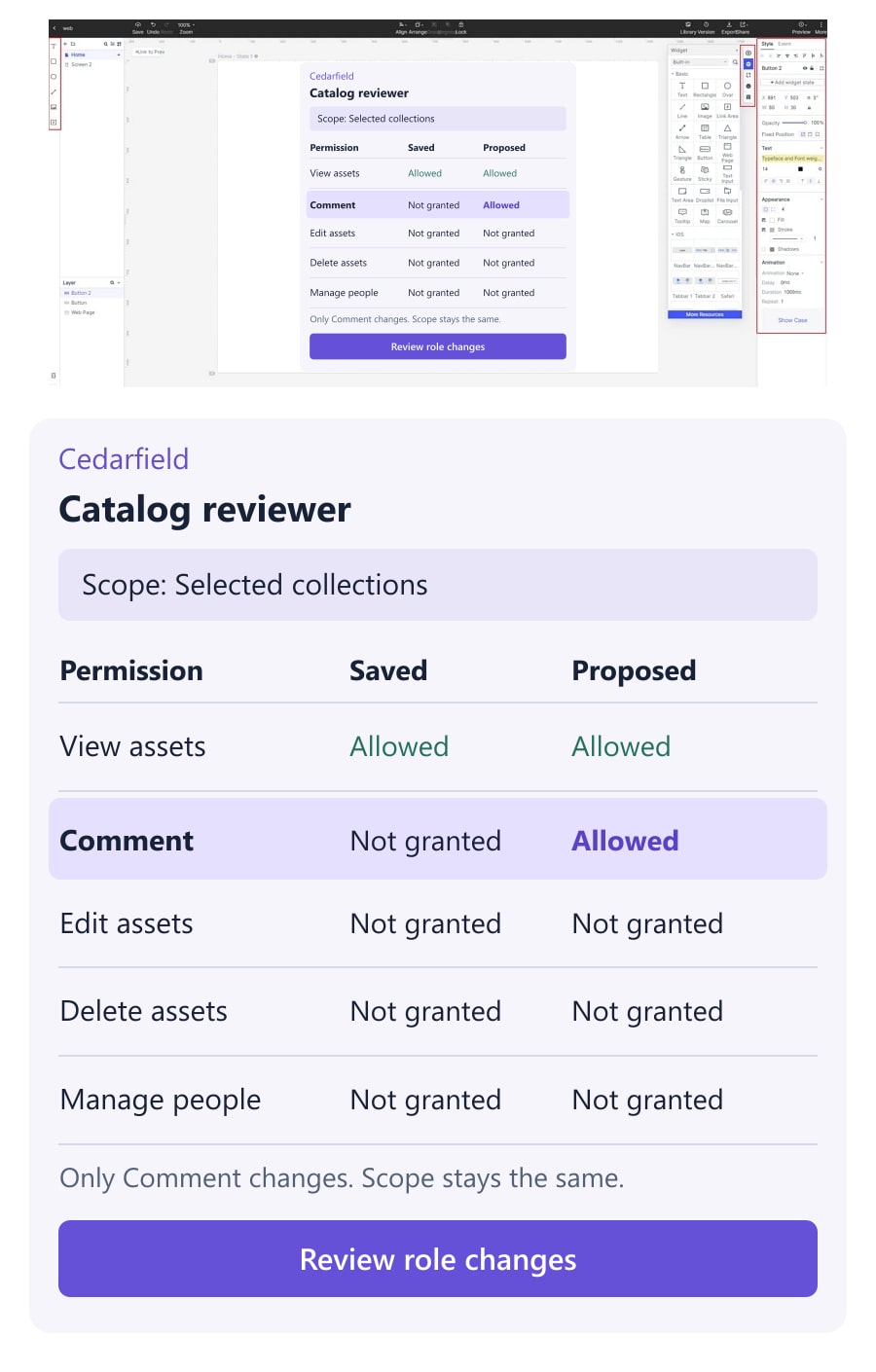
For Cedarfield, the review state says: “Add commenting on published assets in selected collections for members assigned this role.” It then identifies what stays unchanged: assigned collections, file editing, deletion, and people management. Show the affected assignments or an accurate count when the administrator is allowed to see that information; do not use a decorative estimate.
The review panel should compare the saved and proposed role, with Comment as the only changed row. View access and the selected-collection scope remain visible so the administrator can understand the dependency.
Let the administrator return to the editor without losing the proposal. Undoing the checkbox before Save should remove the pending change and restore the saved summary. This is an undo of an unsaved edit, not a promise that the product can reverse a change after other people have used the new permission.
Use a final action such as “Save role changes.” A generic “Confirm” tells people little about what will happen. A separate review step is useful for changes with broad consequences; a minor description correction may need less ceremony. Match the interruption to the actual effect.
Keep failed saves and concurrent edits honest
The page can become outdated while it is open. Another administrator might change the role, or the current administrator might lose authority to edit it. Decide with engineering how the service detects these conditions, then include the resulting interface states in the design.
If the role changed elsewhere, preserve the proposed Comment selection while showing that the saved version is newer. Offer a way to compare the current role with the proposal and review again. Do not silently overwrite the other administrator's change or describe an unresolved conflict as a successful save.
A network interruption leaves another question: did the service accept the change? Where the implementation supports checking the current saved state, establish that result before asking the administrator to submit again. Until then, use wording such as “We could not confirm whether the changes were saved.” Keep the proposal available without presenting it as the active policy.
After a confirmed save, show the saved role and the precise change. Any promise about when access takes effect must follow the application's actual behavior. If permission updates are still being applied, distinguish that state from completion rather than treating a successful form submission as proof that every session has changed.
Design the role editor as a sequence of reviewable states
For the Cedarfield example, prepare a small set of screens in Mockitt: the saved role, the pending Comment selection, the change review, the confirmed saved role, and a concurrent-edit conflict. Keep the role name, collections, and permission labels identical across them. Consistent examples make differences easier to notice.
Build one permission-row component with space for its label, scope, and explanation. Reuse it for the saved and pending views. The restricted embargoed-assets row should remain recognizable in both, so the new commenting right does not visually erase a policy boundary.
Place the role identity and scope above the permission groups. Put the review summary near Save rather than in an unrelated sidebar. On a phone-sized screen, stack each action with its scope; avoid shrinking a wide matrix until “selected collections” becomes unreadable. Essential explanations should survive zoom and wrapping.
These screens support discussion of the intended interaction. Record policy requirements separately for implementation, including how multiple roles combine, where scope is assigned, and when a saved change becomes effective. A designer should not have to infer those rules from the color of a checkbox.
Check whether an administrator can explain the result
Start a review with the task: “Catalog reviewers need to discuss published assets in their selected collections, while editing and deletion remain unavailable.” Let the participant decide what to change. Before they save, ask what this change will allow and who it affects. Listen for an accidental assumption that they are editing only one person's access.
Then introduce the embargoed-asset restriction and a newer role version. Can the participant distinguish a policy they cannot change from a permission they have not selected? Can they inspect the conflict without losing track of their proposal? Record those misunderstandings as concrete changes to labels, grouping, or review content.
Follow the prototype review with implementation checks for the actual interface, including keyboard operation, focus, labels, and save outcomes. Authorization tests must separately verify allowed and denied requests. The finished design should let an administrator explain the role's scope and the pending change before saving, then recognize the state that was actually saved.