Mockitt - Best Free Wireframe Tool
Helpful Tips About Wireframe
- How To Create A Wireframe
- Wireframe Tools You Should Know
- Wireframe Templates for Your Inspiration
- Free-to-use Wireframe Kit

Prototype Test Data: Build Realistic Scenarios Without Customer Records
A directory looks tidy when every supplier is called “Company name,” every row has a phone number, and three short records fit on one screen. That same design may fail when a real company name wraps, a contact field is unknown, or a search returns no matches. The layout has been reviewed, but the content assumptions have not.
Prototype test data is a deliberately chosen set of example records and starting conditions. Its purpose is to make a design question inspectable. In an interactive prototype with realistic example content, those records should remain consistent as a reviewer moves between screens. They do not need to come from a production database to expose a missing label or a misleading empty state.
This guide builds a small fictional supplier-directory dataset for a product review. It uses invented organizations and example.com contact addresses. The method covers selecting useful cases, connecting them across screens, and preparing a repeatable starting point without presenting fabricated records as real research evidence.
Choose the question before inventing records
Start with what the team needs to learn. For the fictional Ridgeway supplier directory, the first question is: can someone identify the right supplier and find its available contact details when names and fields vary? That question needs recognizable names, a category, stable identifiers, and contact information. It does not yet need bank details, tax identifiers, or a realistic invoice history.
The dataset should therefore model the parts that affect the decision. Writing fifty elaborate company biographies would add work without helping this review. Conversely, three identical placeholder rows would conceal the variation the team needs to inspect.
Content fidelity is separate from visual polish. NN/g's explanation of prototype fidelity distinguishes content from visual and interaction fidelity. A simple wireframe can contain credible, consistent supplier information; a polished screen can still contain data that makes its task impossible to understand.
Write a one-line purpose beside each case in your private preparation notes. Keep those notes outside the participant-facing screens. A label such as “Long name test” may be useful to a designer, but it tells a participant what the team wants them to notice.
Build a small dataset with stable identities
Give each record an ID before using it in several screens. The ID connects the list entry, detail view, and any selected state even if the displayed name is revised later. Do not use a row's current position as its identity: filtering can move the second supplier to the first row.
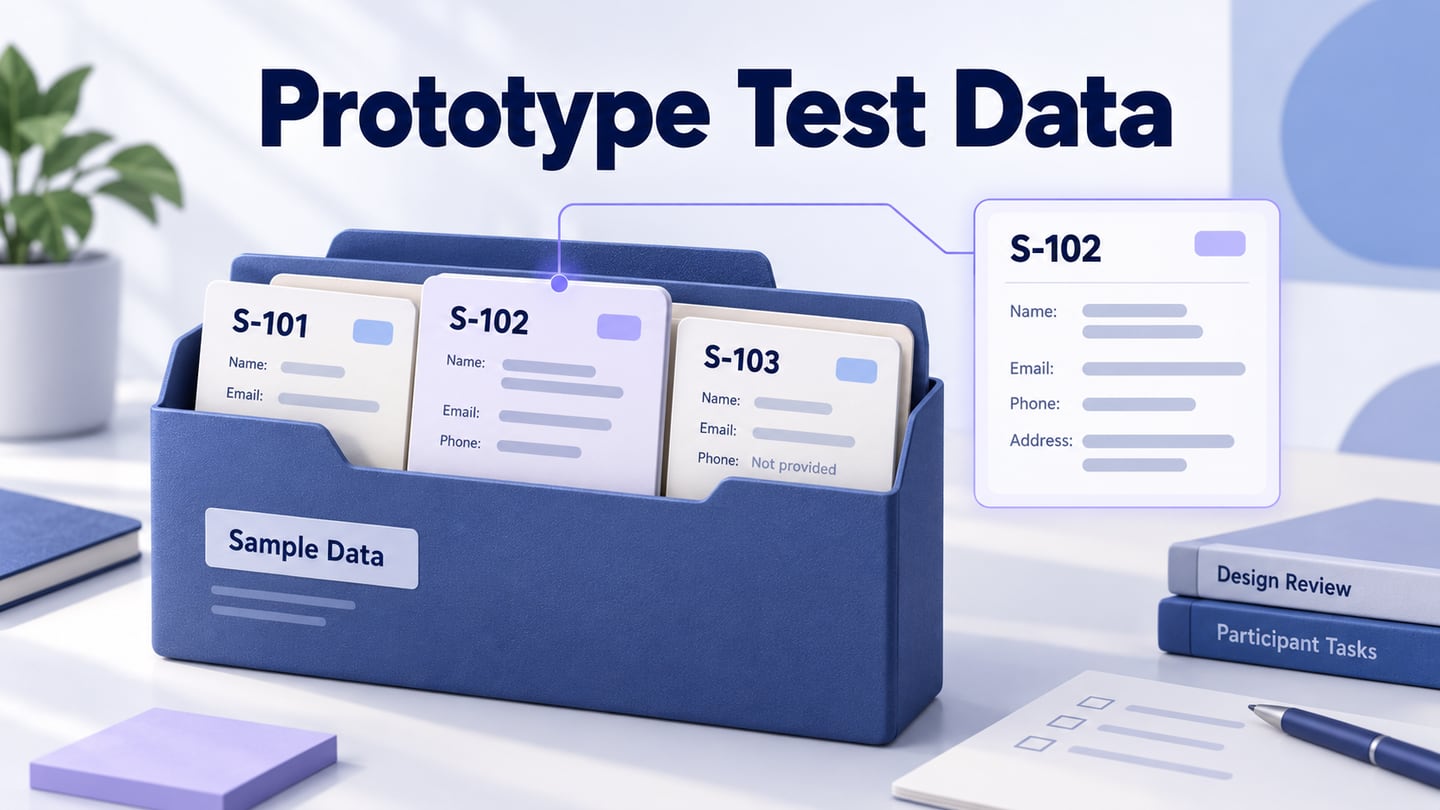
The Ridgeway example starts with these three fictional records. The contact addresses are illustrative and are not intended to receive messages.
| Record | Supplier and category | Contact information | What it helps inspect |
|---|---|---|---|
| S-101 | Alder Works Fabrication | alder@example.com Phone supplied in this scenario | An ordinary record with complete optional information. |
| S-102 | North Coast Repair and Calibration Cooperative Equipment servicing | northcoast@example.com Phone supplied in this scenario | A long organization name and its relationship to nearby labels. |
| S-103 | Brume Studio Graphic design | brume@example.com Phone not provided | A missing optional value without inventing a contact number. |
For a review focused on the presence of a telephone action, define whether a phone is supplied without displaying a dialable number. If the precise number format or wrapping is the question, add an appropriate controlled example for the target market and ensure that the prototype cannot call a real person. Detail should serve the review, not make the dataset look impressive.
Give fields clear meanings. “Phone not provided” is not the same as a failed contact request, a number awaiting verification, or a supplier with no telephone service. Choose the state the record actually represents. A display rule that replaces every unknown value with zero or a dash can conceal distinctions the user needs.
Separate the records from the scenarios that use them
A record describes a supplier. A scenario describes what a reviewer sees and can do with the available records. Keep that distinction so an empty-results demonstration does not accidentally erase the directory's underlying suppliers.
| Scenario | Starting data and action | Expected presentation |
|---|---|---|
| Directory overview | Open the list containing S-101, S-102, and S-103. | Three supplier records; each entry leads to its own detail. |
| Long supplier name | Open S-102 from the list. | The same full organization name and category remain identifiable in the detail view. |
| Missing optional phone | Open S-103. | Phone: Not provided; its email remains available. Do not display an invented number. |
| No matching results | Search the three-record directory for “Catering.” | No matching suppliers and a way to clear the search. The directory itself still contains three records. |
| Empty directory | Open a separate new-workspace scenario containing no supplier records. | No suppliers added yet, with the appropriate first action. This is not a search failure. |
These are authored review cases, not observed user results. They make the interface's claims checkable. For example, a no-match screen that says “Your directory is empty” is inconsistent with its starting data even if the artwork is attractive.
Keep loading and failed-request scenarios separate as well. No records returned because a request failed is different from a successful response containing an empty collection. A prototype may represent both with prepared screens, but their explanations and recovery actions should not be interchangeable.
Keep list, detail, and return views consistent
Once S-102 is selected, the detail screen must not quietly become Alder Works. Its ID, display name, and category should agree with the list. A mismatch may confuse a reviewer into questioning navigation when the real defect is the demonstration data.
Copy from the record set rather than typing a slightly different version into every screen. Keep one authoritative preparation table and check each view against it after a substantive change. If your tool supports reusable content, use it where suitable; if you are preparing static states, a short manual consistency review is still necessary.
The illustrative supplier screens carry S-102 from the list to its detail view, while S-103 explicitly shows that no phone was provided.
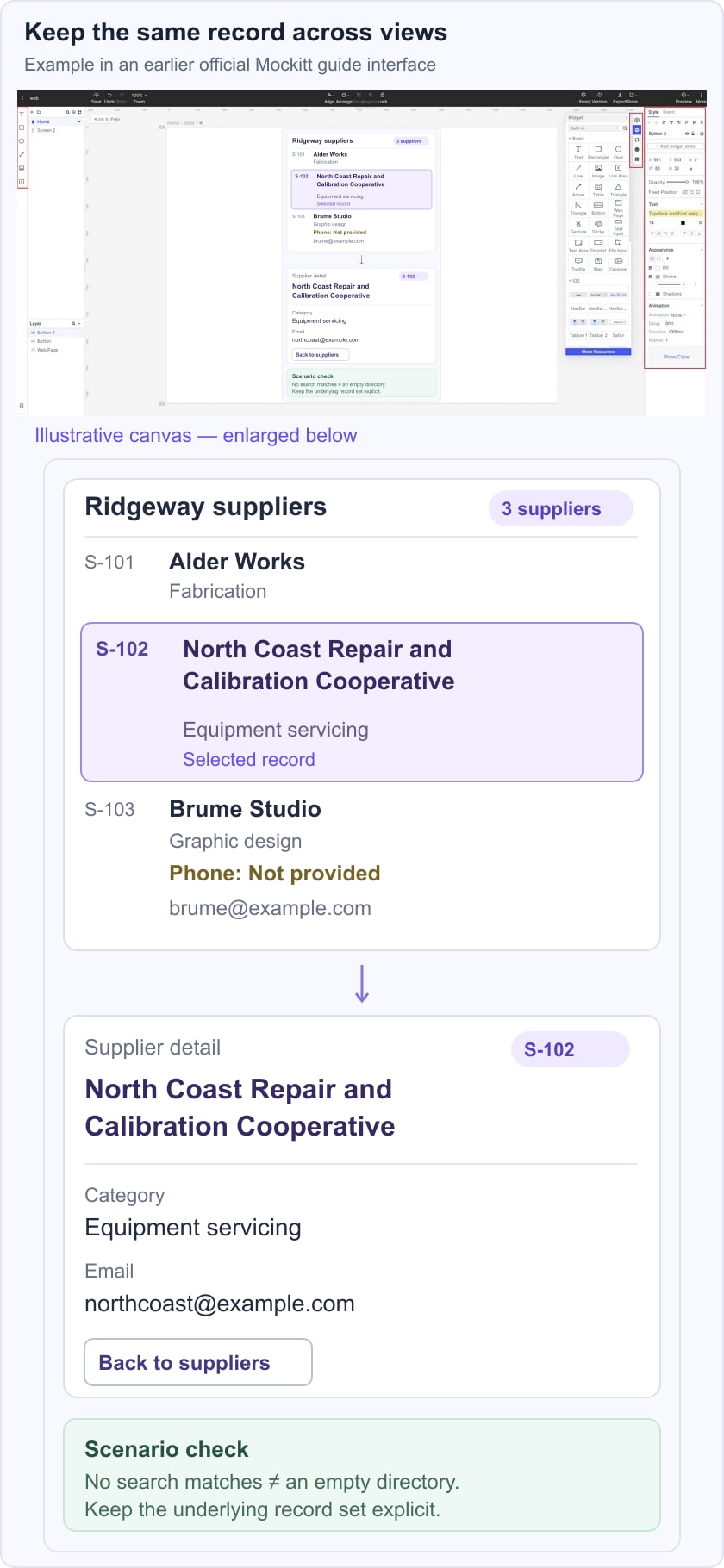
Review the long name at the intended widths. Decide whether the list wraps it, truncates it with a usable route to the full name, or changes the layout. Do not shrink the type until every sample fits. The responsive UI guide explains how to communicate layout behavior; the dataset supplies the content that makes those rules worth checking.
Return paths also need coherent data. If the review scenario preserves the search on return, show the same query and matching records. If it deliberately resets the search, document that decision. Either way, a prepared screen should not introduce a different total merely because it came from an unrelated template.
Use Mockitt's screen composition and linking workflow to arrange the intended views and connect the relevant actions. Keep a separate entry point for the empty-workspace example. These prepared states illustrate a dataset; they do not establish that a live database, search service, or data generator is running.
Add boundary cases that could change a design decision
The first three records cover a useful range, not every possible supplier. Expand only when another question matters. An accented name can expose assumptions about typography and search wording. A long email address can reveal wrapping problems. Many records can expose navigation and pagination decisions that a three-row mockup cannot show.
For each addition, write what differs, why it matters, and which screen or action it affects. Avoid making every record extreme. A directory of only unusually long names teaches little about the ordinary reading rhythm, while a directory of only ideal short names conceals weaknesses.
- Text length: include ordinary and long values that resemble the content the product will receive.
- Optional information: distinguish unknown, not provided, and not applicable when those meanings affect the task.
- Collection size: use separate zero, single-record, and larger-collection scenarios when the layout or available actions change.
- Status: vary a status only when its meaning and allowed actions are defined, rather than adding random colored badges.
- Locale: choose the relevant language, date, and number conventions deliberately; do not scatter unrelated formats across one account merely to make it appear international.
A design stress case is not automatically a good participant task. A designer can deliberately inspect the longest plausible name. A participant should receive a believable goal, such as finding a supplier for a particular kind of work, without being told to inspect text wrapping.
Use fictional data honestly in research
Invented records are useful when preparing layouts and flows without accessing customer information. They are not anonymized customer records: no claim about a real person's behavior follows from them. Keep that distinction in the preparation record and any report that uses the prototype.
Do not paste customer exports into prompts or public prototypes merely to make an example feel realistic. If a study needs real participant data, arrange the appropriate access, handling, and research conditions separately. A public design link and a fictional-data exercise are not substitutes for that setup.
GOV.UK's moderated-testing guidance explains that participants using their own data can reveal contextual issues that dummy data misses, where the service and research arrangements support its safe use. It also describes using believable dummy scenarios when real data is unsuitable. The choice depends on the research question; fictional data is not always the stronger evidence.
For a supplier-directory study, a participant may understand their actual organization's preferred vendors and contact practices far better than the invented Ridgeway set. The fictional task can still reveal whether the page communicates a missing phone number, but it cannot establish that the categories or relationships fit that participant's procurement work.
Use the broader prototype usability testing plan to decide participants, task wording, observations, and study limits. The dataset is one preparation artifact within that plan, not a replacement for research design.
Give the scenario pack a reset and a version
A repeatable review begins from a known state. Record the dataset version, prototype version, scenario entry point, relevant record IDs, and the actions needed to return to the start. For Ridgeway, “Directory data v1 / Overview / three records / no search applied” is more useful than “Open the latest link.”
Check the reset yourself. Can a reviewer return from S-102 to the same list? Does the no-match example retain the intended query? Does the new-workspace entry accidentally open the populated directory? Repair a broken prepared path before interpreting someone's inability to complete it as a design finding.
The GOV.UK Prototype Kit's data guidance is a concrete example of default scenario values, carrying answers between pages, and clearing session data. Those are features of that kit. In a screen-based Mockitt example, document the relevant starting screen and prepared state instead of promising an equivalent session-reset mechanism.
Keep designer notes out of the visible task. Record expected outcomes, known unsupported actions, and reset instructions in the review pack. If someone follows an unprepared path, note the limitation rather than improvising contradictory data and treating the session as unchanged.
Hand off the data decisions with the prototype
The final pack should contain the field definitions, a small set of stable records, named scenarios, display rules, version references, and reset instructions. Include any unresolved question, such as whether a missing optional phone should be omitted entirely or shown as Not provided. Engineering should not have to infer that policy from whichever screen happened to be exported.
For Ridgeway, the valuable result is specific: S-102 stays the same supplier across views, its long name remains understandable, S-103 does not acquire a fictitious phone number, and a no-match search is distinguishable from a genuinely empty directory. Those decisions make the prototype a more useful review artifact without requiring a production dataset or thousands of generated rows.