Preference testing asks people to compare design alternatives and explain which they prefer. Use it when the decision concerns a visible direction, such as how a course card presents information or how a service should feel. Make the alternatives meaningfully different but otherwise comparable, ask a neutral question, and examine the reasons behind the choices. A preferred design is not automatically easier to use or more likely to convert.
Prepare the alternatives in Mockitt’s UI design workspace, keeping the content and version names consistent. Use an appropriate research tool or moderated process to present the designs and record responses. The design workspace helps you prepare the material; it does not turn a collection of comments into a controlled experiment.
Define what the preference should help you decide
Consider Common Ground, a fictional service offering neighborhood classes. The team is choosing between two course-card layouts for adults exploring an unfamiliar activity. One layout leads with a large photograph. The other gives more prominence to the course title, level, date, and location. Both contain the same information.
The decision is not “Which screen is better?” It is whether a photographic or information-led presentation better fits the audience’s expectations of browsing local classes. The team wants to understand the appeal of each direction and which details people use to explain their choice.
That question differs from whether someone can find a beginner class on Tuesday. To study that behavior, give people a task and observe the route. The existing comparative prototype-testing approach is more appropriate when the decision depends on completing equivalent tasks across two interfaces.
Preference testing can inform a visual decision without becoming a vote on every product requirement. If a layout must display an eligibility condition, that condition remains necessary even when some participants prefer a cleaner version without it. Determine the non-negotiable information before preparing alternatives.
Make the alternatives different enough to discuss fairly
Use the same fictional course in both versions: “Repair a Favorite Shirt,” beginner level, Saturday afternoon, at the community workshop. Match the photograph, wording, availability, and action label. Change the presentation hierarchy rather than quietly giving one version a more attractive course.
| Element | Photograph-led direction | Information-led direction |
|---|---|---|
| Course image | Large image across the top | Smaller image beside the text |
| Title and level | Below the image | Prominent in the first reading area |
| Date and location | Grouped beneath the description | Grouped directly beneath the title |
| Content and next action | Same course details and “View class” action | Same course details and “View class” action |
Review each design as a credible option. The comparison is unfair if one has awkward spacing, unreadable text, or unfinished placeholder content. It is also unhelpful if the versions differ only by a tiny spacing adjustment that ordinary participants would not notice.
Nielsen Norman Group’s visual-design testing guidance recommends perceptible differences, limited changes between alternatives, and attention to presentation order. Apply those principles to the decision rather than treating every visual detail as an independent variable.
If several things must change together, describe the alternatives as packages. A different image, tone, and layout might form two legitimate directions, but the study cannot isolate which individual element caused a preference. Keep that limit visible in the eventual decision.
Prepare and inspect the material in Mockitt
Create one course-card composition, then prepare the alternative using the same content. Use neutral version labels such as A and B in your research records. Keep internal names such as “improved layout” out of the participant-facing material.
Show enough surrounding context to explain where the card lives. A card viewed alone at a large size may feel different from the same card among six courses. For this study, prepare a small browsing view with comparable neighboring cards. Keep those neighbors identical so that they do not become an additional explanation for the preference. If you prepare the alternatives as prototype screens, duplicate the base screen in Mockitt and rename the copies before changing their layouts.
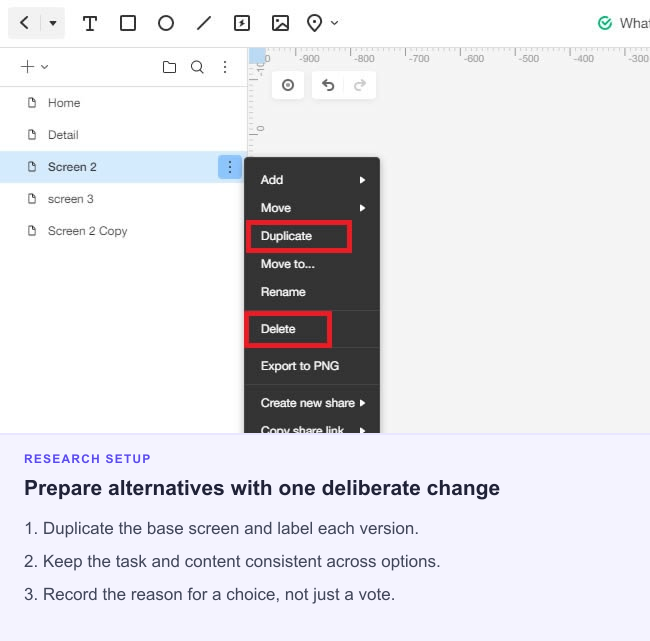
Inspect the output at its intended size. If the research is about mobile browsing, use mobile layouts rather than miniaturized desktop pages. A participant should be able to read the course details without special zooming. Keep image compression, display scale, and loading behavior comparable.
Decide whether people will see the alternatives together or one after the other. Side-by-side viewing makes differences easy to inspect, but gives people a comparison they would not normally encounter while browsing. Sequential viewing is closer to seeing one design at a time, but introduces memory and order effects. Record which question your chosen presentation can answer.
Control presentation without overcomplicating the study
Recruit people who plausibly choose local classes and include the contexts relevant to the product. A first-time learner may explain a choice differently from someone who already knows the venue. Use consistent participant eligibility questions instead of selecting only colleagues who helped create the layouts.
For simultaneous presentation, vary which design appears on the left or first in the reading order. For sequential presentation, plan both orders. Do not always show the team’s favored version first or introduce it more enthusiastically. Keep the viewing conditions and instruction consistent across participants.
A pilot can reveal a practical flaw before research begins: perhaps one image is blurred, the mobile view requires horizontal scrolling, or a version label covers the date. Fix the material and record its version. A pilot with a teammate checks the setup; it does not supply audience evidence.
The Lyssna preference-test documentation describes a tool-supported way to present alternatives and ask follow-up questions. Other suitable setups can work too. Choose a method that preserves the presentation and records the answers you need rather than assuming a particular platform is mandatory.
Ask for a preference and the reason behind it
Give enough context to make the choice meaningful without naming the design feature you want to win. For Common Ground: “Imagine you are browsing local classes for an activity you have not tried before. Which presentation would you prefer to browse, and why?”
Allow a person to say that the difference does not matter or that neither option suits them. A forced choice can still be part of a defined study, but it should not erase uncertainty. If the setup requires selecting one version, collect the strength and explanation of the choice separately.
| Useful follow-up | Purpose |
|---|---|
| What influenced your choice? | Let the participant identify the relevant cue. |
| Was there anything you preferred in the other version? | Preserve a tradeoff instead of forcing an absolute winner. |
| Which information mattered most while comparing them? | Connect the preference to the browsing decision. |
| Is there anything that makes your choice uncertain? | Expose missing information or a weak preference. |
Avoid “Isn’t the larger image more inspiring?” or “Which one looks more professional and is easier to use?” The first steers the answer; the second merges different judgments. If trust, clarity, or visual appeal matters, define that dimension and ask about it separately in language the audience understands.
Interpret the choice alongside the explanation
Start by checking that each response came from the intended material and a usable session. Keep the selected version, presentation order, participant context, and explanation together. A count without the conditions behind it is difficult to interpret.
The following responses are invented examples of how reasons might differ. They are not results from a Common Ground study.
| Illustrative response | What it suggests | What it does not establish |
|---|---|---|
| “A makes me want to explore because I can see the activity.” | Imagery may support interest in this browsing context. | That A helps people find a suitable date. |
| “B lets me compare dates before opening every class.” | Visible scheduling information matters to this person’s decision. | That B produces faster task completion. |
| “I like A’s image, but I need B’s location detail.” | The preferred direction still has a practical weakness. | That combining every element will create a better layout. |
| “They seem about the same to me.” | The comparison may not matter much to this participant. | That the participant’s response should be discarded. |
Group reasons into meaningful themes, preserving answers that contradict the majority. If someone prefers an option because they misread its availability, the preference still happened, but the misunderstanding needs investigation. Do not reinterpret it as successful communication.
Report the response count and relevant audience context alongside any proportions. Avoid treating a few extra selections as proof of a population-wide winner. If the decision needs a statistical conclusion, establish the sampling and analysis requirements before collecting responses.
Choose the next revision or test
A useful outcome identifies a design decision and its evidence: retain a particular visual direction, revise a specific weakness, or investigate a question the preference study could not answer. Preserve the tested versions so a later design change does not inherit findings about a different screen.
For Common Ground, evidence might suggest keeping an engaging image while making date and location easier to inspect. That is a hypothesis for a revision, not a finding supplied by this article. Test the resulting card in the browsing task before assuming that combining favored elements solves the problem.
When the question becomes whether a released change affects completed bookings, use an appropriately planned A/B experiment with outcome metrics. Preference evidence helps explain what an audience finds appealing and why. The next method should address the uncertainty that remains.