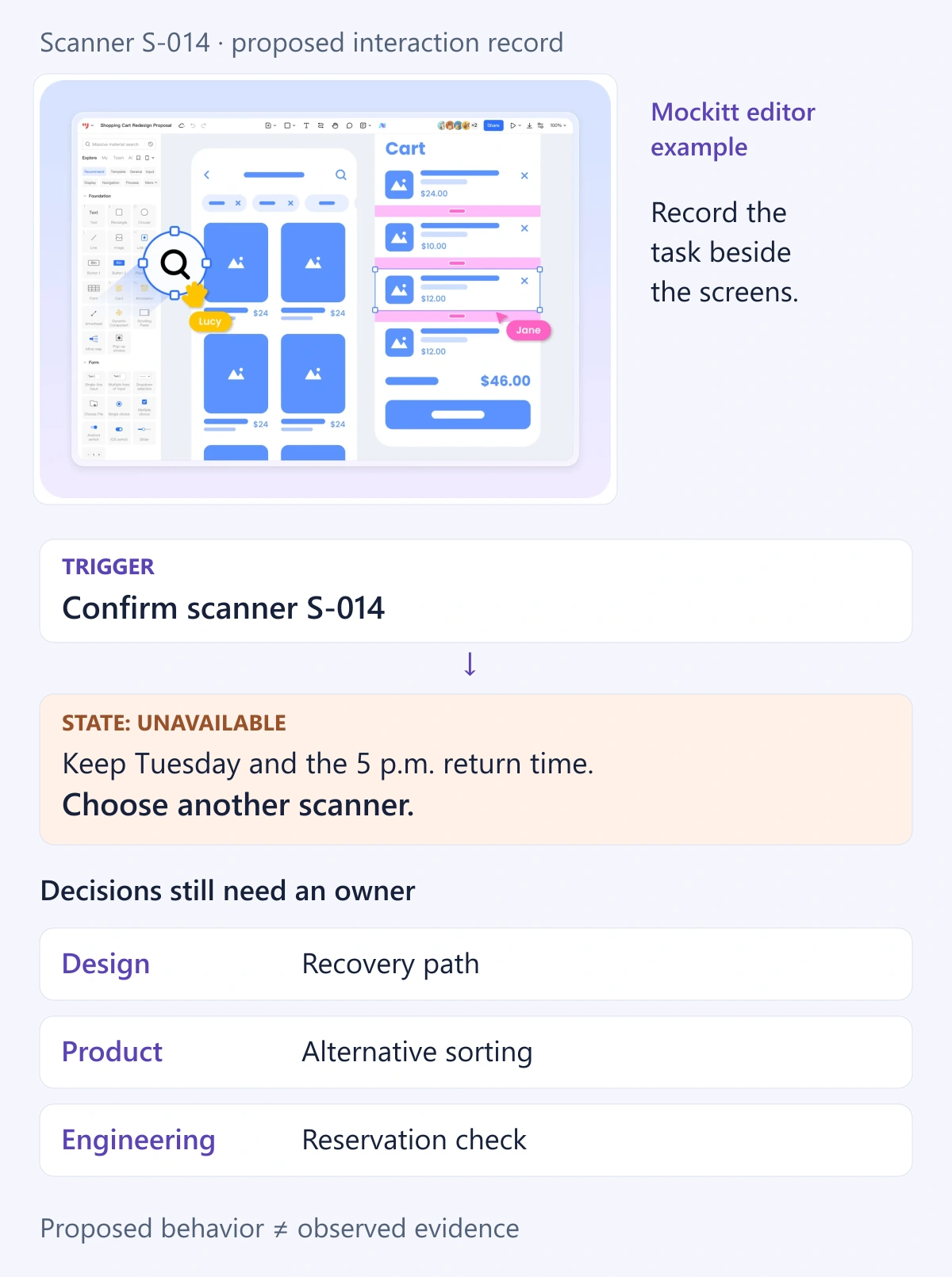
Good prototype documentation lets another person understand the task, starting state, transitions, and open assumptions without a live explanation. Record those details beside the flow in Mockitt's collaborative prototyping workspace while the decisions are still fresh. At minimum, document the review boundary, state transitions, evidence, open decisions, and the exact version being handed over. The result should let a designer, product manager, engineer, or tester continue the work without guessing.
Document the review boundary
Begin with the user, task, entry point, and evidence the review should produce. Say what the prototype does not cover, such as authentication, production data, or edge cases outside the chosen task. This boundary helps readers distinguish an intentional omission from missing behavior.
Worked example: borrowing equipment
The following fictional example follows an employee borrowing a barcode scanner. Its sample decisions illustrate a documentation format; they are not findings from a product test.
- User and task: a warehouse employee needs a scanner for a shift and must understand when to return it.
- Starting state: a signed-in employee opens Equipment on a mobile screen. Inventory and employee details are sample data.
- Main path: choose a scanner → select a return time → review the loan → confirm → see the loan summary.
- Review question: can the employee identify the item and due time, then recover if it becomes unavailable?
- Excluded: identity verification, inventory synchronization, real notifications, and the physical handover.
Annotate the relevant screens with stable labels such as E1 Equipment, E2 Review loan, and E3 Confirmation. Beside E2, record which values can be edited; beside E3, explain whether the reference number is sample content. Use the labels in notes so a renamed screen does not erase the connection between behavior and evidence.
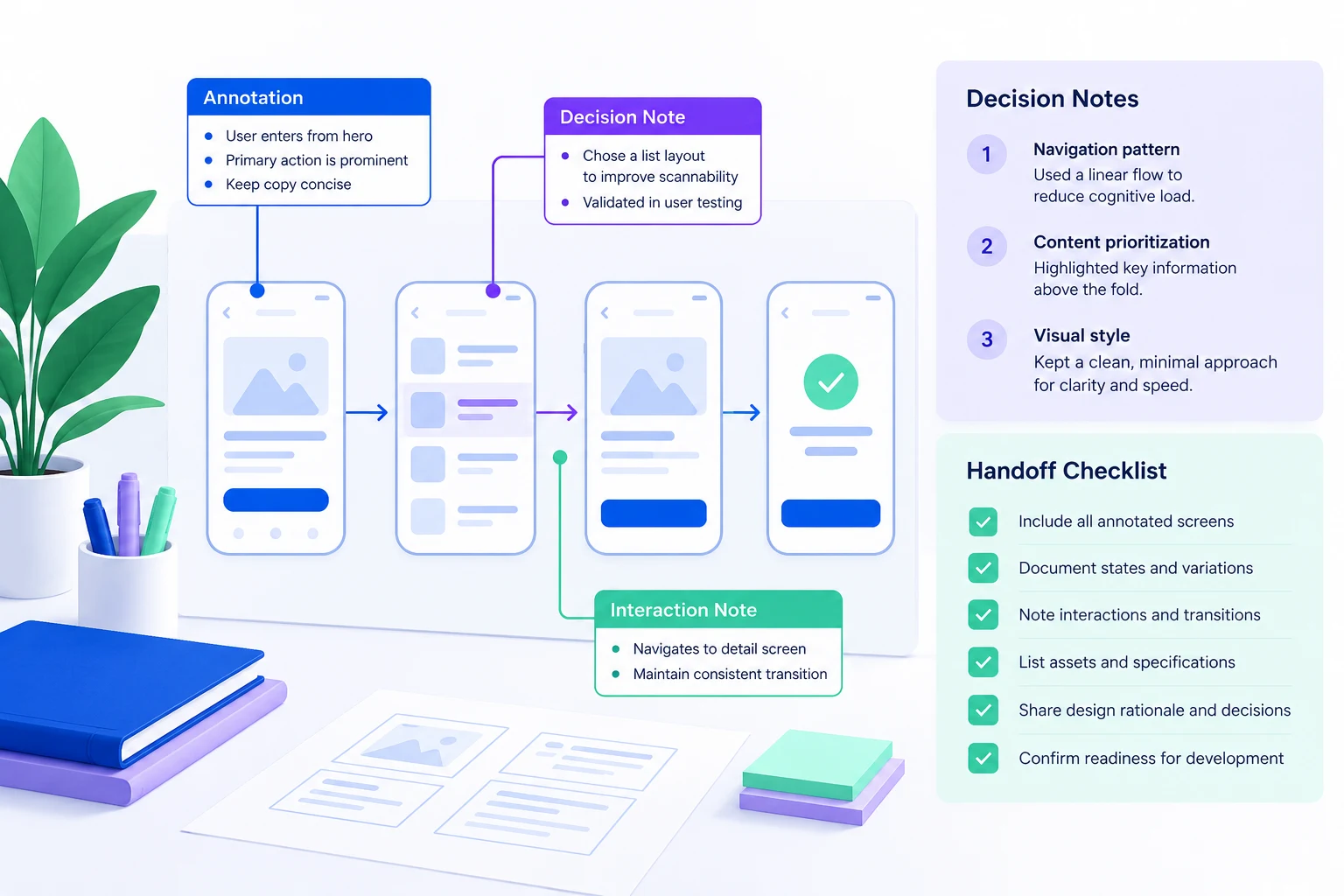
The illustrated learning flow uses annotations to connect the landing screen, lesson progress, and completion action. Apply that same screen-specific notation to E1–E3 in the equipment example: record the selected item, due time, and recovery action beside the relevant screen. A success state does not establish that an inventory service is connected.
Record states and transitions
For each important action, note the trigger, visible result, and route back. Include loading, empty, validation, error, and success states when they affect the decision. A screenshot without a state description can look complete while leaving the behavior undefined.
| State | Trigger and visible result | Recovery or next step |
|---|---|---|
| E1 Equipment | Open Equipment; show available scanners and location | Select an item or change the date filter |
| E1 Loading | Request the list; show a reserved loading area | Show results or a retry action |
| E1 Empty | No scanner matches the selected date | Keep the date visible and offer another date |
| E2 Review loan | Select an item and return time; show both in a summary | Confirm or edit the selection |
| E2 Unavailable | Selected item becomes unavailable; explain the conflict | Preserve filters and choose another scanner |
| E3 Confirmation | Reach the simulated success state; show item and due time | View the loan or return to Equipment |
Turn each important transition into an interaction contract: precondition, trigger, visible result, preserved context, and recovery. For example: “With a scanner selected, tap Confirm. If it is unavailable, show the conflict message, retain the date filter, and offer another item. After dismissing the message, return focus to the item selection.” Mark which parts the prototype demonstrates and which remain proposed requirements.
Do not add every possible error to a small prototype. Document the exceptions that affect the review question, then list unmodeled behavior explicitly. That gives engineering a boundary without suggesting that a prototype is a complete implementation specification.
Capture decisions and owners
Use short notes for the decision, evidence, owner, and due date. Separate confirmed behavior from assumptions. When feedback changes a screen, record what changed and why so later reviewers do not reopen a settled question.
Example decision record
| Version | Example decision | Evidence needed and owner |
|---|---|---|
| 0.3 | Show the due time on E2 and E3 | Product confirms the borrowing policy; a reviewer checks whether the due time is understood |
| 0.4 | Preserve the date filter after an unavailable-item error | Design verifies the recovery path; Engineering confirms feasibility |
| 0.5 | Offer another scanner after a conflict | Product decides whether alternatives are sorted by location or availability |
In a real record, replace role placeholders with the responsible people, add the decision date, and link the actual evidence. Keep “proposed” separate from “approved.” A version number alone cannot explain whether a change is visual, behavioral, or a new assumption. Preserve superseded decisions with a short reason instead of silently rewriting the history.
Prepare handoff evidence
- Link to the exact starting screen and the main task path.
- List content rules, responsive assumptions, and known limitations.
- Attach interaction notes to the state where they apply.
- Assign unresolved questions to a named owner.
- Record the prototype version and distinguish sample values from approved requirements.
Separate prototype evidence from implementation requirements
Prototype evidence describes an observable review result: a participant selected a scanner, changed the return time, or recovered from an unavailable state. Record it only after observing it. An implementation requirement describes what the shipped system must guarantee: preventing two people from reserving the same scanner, validating a return time, or persisting a confirmed loan.
A clickable success screen proves none of those backend behaviors. Label notes Demonstrated, Assumed, To validate, or Implementation requirement. For accessibility, document intended focus and keyboard behavior separately from what the prototype actually supports. This keeps the handoff honest and gives engineers and testers useful follow-up questions.
A compact documentation template
Copy this template into the project record. Repeat the state block for the transitions that matter.
Prototype / exact version: [name, link, version]
User and task: [who needs to achieve what]
Starting state: [screen, device, account, sample data]
In scope / out of scope: [review boundary]
Review question: [decision this flow should inform]

State / screen label: [E1, E2...]
Precondition and trigger: [what starts the transition]
Visible result: [message, destination, focus]
Preserved context and recovery: [what stays; next action]
Status: [Demonstrated / Assumed / To validate / Requirement]

Decision: [chosen behavior and reason]
Evidence: [observation or source; unavailable if absent]
Owner / due date: [responsible person / agreed date]
Version affected: [exact version]
Open questions: [question, owner, next evidence]
A completed example entry might read: “E2 Unavailable; Confirm is tapped after scanner S-014 becomes unavailable; show ‘This scanner is no longer available’; retain Tuesday and the 5 p.m. return time; return to available items; proposed behavior, not yet tested; Product owns the alternative-sorting decision.” The status prevents an illustrative requirement from masquerading as a validated result.
Keep the documentation synchronized
When a screen changes, update its state note, decision record, and handoff summary together. Check the starting screen, recovery paths, screenshots, and links for obsolete labels. If scope changes, revise the boundary and tell affected reviewers which earlier conclusions need another look.
Before sharing, follow the documented path from its starting point and compare each state with its contract. Give the prototype and record the same version label. For handoff, identify the agreed revision and link to the continuing draft separately, so later edits do not silently change what engineering received.
Conclusion
Prototype documentation is a shared memory for the flow. Keep it close to the screens, write down the states that matter, and make every unresolved assumption visible before handoff. A clear boundary, interaction contract, and versioned decision record turn a clickable flow into evidence that a team can discuss and act on.