Evolutionary Prototyping: Process, Benefits, and Trade-Offs
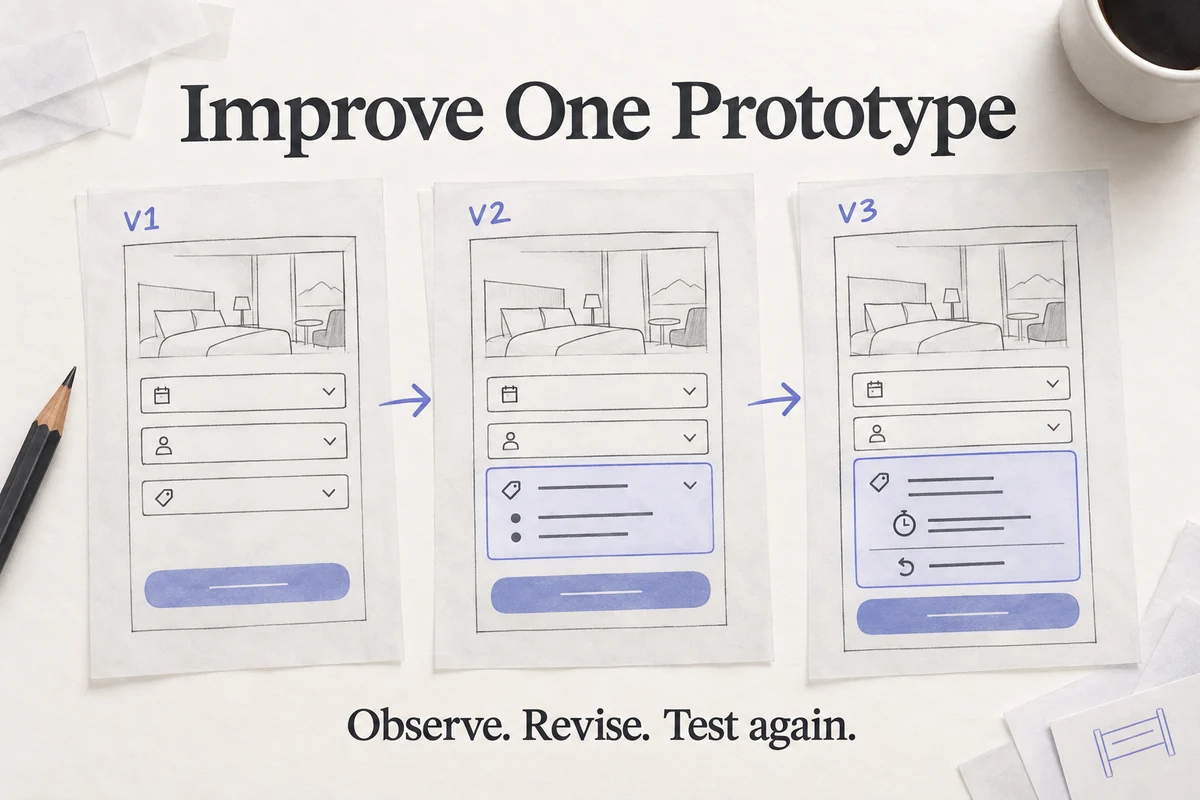
Evolutionary prototyping means refining a prototype through successive rounds of feedback instead of discarding it after one experiment. A team starts with enough of the product to investigate a question, observes how people use it, and changes that same model as requirements become clearer.
The important choice is what will evolve. A UX team may evolve a linked screen design; a software team may evolve executable code toward a production system. These have different quality requirements. A clickable design can become a detailed specification, but it does not become a secure, working application simply because more screens have been added.
What is an evolutionary prototype?
A prototype represents selected aspects of a proposed product so that a team can learn before committing to the full implementation. In the evolutionary approach, useful work is retained and improved across iterations. In throwaway prototyping, the learning survives but the experimental artifact is deliberately set aside.
Evolutionary, incremental, and extreme prototyping are not interchangeable labels. Incremental delivery divides work into pieces; evolution describes how an artifact changes through feedback. A team can combine these ideas, but an evolutionary prototype does not have to be a combination of the other two models, nor must every interface be divided into independent modules.
A practical development cycle
- Write the initial requirements and uncertainties. Separate an observed user need from an untested assumption. “Travellers need to compare cancellation terms” is more useful than “make the booking screen better.”
- Select a coherent slice. Choose a journey that someone can complete, such as finding a room and checking its cancellation conditions. A set of disconnected controls is difficult to evaluate.
- Build the first usable representation. Include the information, states, and navigation needed for the task. Leave unrelated features as documented exclusions.
- Observe use and collect feedback. Ask participants to accomplish the goal. Record the difference between a stated preference and a problem that prevents completion.
- Change the prototype and explain why. Link each change to evidence or a clearly identified requirement. Retain the earlier version for comparison.
- Repeat with a decision rule. Decide whether to refine, expand the next feature, seek stronger evidence, or stop. Agreement in a meeting alone is not the acceptance criterion.
- Maintain the artifact. Remove superseded paths, document current limitations, and keep the reference version clear for the team that will implement it.
For a booking flow, revision one might reveal that cancellation terms are overlooked. Revision two places those terms before confirmation. A later session might show that people read them but misunderstand the deadline, leading to a specific date and time in revision three. This is an illustrative sequence, not a report of measured results. Each revision changes something the team can inspect and test.
When the approach fits
It can help when requirements are uncertain and people need to experience a design before they can give useful feedback. A complex service may benefit from evolving one journey at a time, provided shared states and dependencies are considered. Large project size alone does not make this the best model: a small but uncertain workflow can benefit just as much.
It is less attractive when the foundational concept is still being compared with radically different alternatives. In that situation, keeping one polished artifact can make the team reluctant to change direction. A quick disposable experiment may answer the question with less attachment.
Advantages and trade-offs of evolutionary prototyping
The original appeal of the method is continuity: the team can inspect what changed and why. Its benefits depend on the quality of the research and the discipline of the iteration cycle.
- Earlier discovery of missing behavior. Running a whole task can reveal a missing confirmation, recovery route, or data state. It does not guarantee that all defects will be found.
- Closer contact with user requirements. Participants react to something concrete. Their feedback still needs interpretation; one requested feature may be a workaround for another problem.
- Manageable investment. Teams can spend effort on the next uncertainty instead of completing every feature upfront. Repeated rework can become expensive if the scope is not bounded.
- Reusable design decisions. A tested navigation pattern or component can carry forward. Reuse is a choice, not a reason to preserve an unsuitable pattern.
- Room for new requirements. A new constraint can be tried in the model before implementation. Record its effect on other flows rather than adding it silently.
- Shared understanding. Designers, product managers, and developers can discuss the same version. Clear version names matter when several alternatives are circulating.
Three risks deserve attention. First, repeated refinement can become scope creep: define what decision this round will support. Second, stakeholders may treat a convincing demo as a finished product: label simulated data and unsupported behavior. Third, if code is intended to evolve into production, engineering quality must evolve too. Architecture, testing, security, and maintainability cannot be deferred indefinitely.
The GOV.UK guidance on prototypes explicitly separates experimental code from production standards. Apply that distinction even when a prototype receives enthusiastic feedback. A design decision can be validated while the implementation remains unproven.
Evolving an interactive design in Mockitt
Mockitt provides an online environment for interactive prototypes. You can use pages, widgets, and links to keep the changing flow visible to the team. Start with a small set of screens, identify a start point, and retain only the interactions needed for the next review.
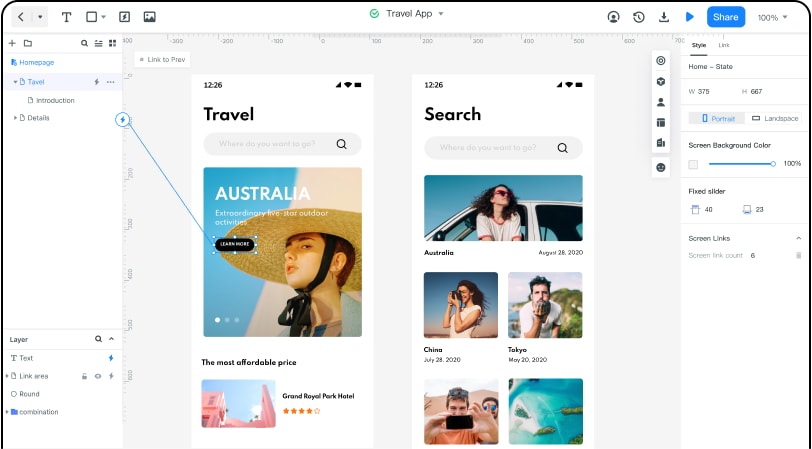
Use this travel example to make the next revision concrete. Keep the list screen and destination screen recognizable; alter the information or transition being investigated. If someone misses cancellation details, changing the entire color palette at the same time makes the next comparison harder to interpret.
Features to use deliberately
Reusable widgets support consistent controls; interaction events connect an action to its result; preview lets the team walk through the task before sharing it. Comments can attach feedback to the relevant place. These are means of organizing the design work, not evidence that the underlying booking, payment, or account service works.
Before sending a new review link, name the version, state the changed question, and list what remains simulated. Use the prototype usability testing plan to keep tasks and observations comparable. When the interaction decisions are stable, document the remaining states and implementation questions in the handoff rather than expanding the prototype without an end condition.