When you are ready to turn the brief into connected screens, Mockitt's online prototyping workspace lets the team inspect the flow before production code exists.
Choose fidelity by the decision
Fidelity is useful when it exposes the uncertainty you need to resolve. A rough layout is enough to compare information hierarchy; a connected flow is better for navigation; a detailed screen is justified when copy, states, or implementation constraints are the decision.
| Decision | Evidence to include | Review question |
|---|---|---|
| Structure | Sections, labels, and a clear entry point | Can someone find the next action? |
| Flow | Connected screens, feedback, and a return path | Can the task be completed without explanation? |
| Handoff | States, content rules, and edge cases | Can the team identify open assumptions? |
A prototype is a decision tool, not a smaller finished product
A useful prototype makes a proposed experience observable. It can be a paper sketch, wireframe, clickable flow, or high-fidelity interaction, but it should expose the part of the idea that is still uncertain. A production application must handle data, security, performance, and operations; a prototype only needs enough believable behavior to answer the current question.
| Decision | Useful prototype evidence | Stop when |
|---|---|---|
| Does the flow make sense? | Connected screens with clear labels and a return path | A reviewer can complete the happy path unaided |
| Can people find the control? | Realistic copy, states, and a focused task | Observed confusion has a documented change |
| Can engineering estimate it? | States, edge cases, and notes attached to the flow | Open assumptions are assigned or accepted |
Want to Make Prototypes Professionally?
Mockitt Prototype Designer realizes easy & rapid prototyping for iPhone, Android, Websites, and more. Drag and drop to create wireframes and prototypes. Give it a try!
Say you are starting a new project and already have a vision in mind. The problem is how you can present it to your stakeholders so they'll fully understand what you're saying. That's where a prototype comes in. "What is a prototype?" you may ask.
That is a good question. What is prototyping, and how important is it? Also, what tools can you use to make a prototype? In this guide, you will learn the answers to all of these questions.
Without further ado, here's the ultimate guide to prototyping.
- Part 1: What Is a Prototype?
- Part 2: Benefits of Prototyping
- Part 3: Qualities of A Good Prototype
- Part 4: Basic Rules of Prototyping
- Part 5: Types of Prototyping
- Part 6: How To Create a Prototype Efficiently? [Step by Step Tutorial]
- Part 7: Prototype Frequently Asked Questions
Part 1: What Is a Prototype?
A prototype is a sample version or a simulation of the final product. The purpose of the prototype is to enable you to test your ideas. It is working, but it only includes some of the capabilities or shows only the core concept of the final product.
Since a prototype does not include all the functions, making one does not consume lots of time. Thus, it allows you to present ideas quickly. Furthermore, it allows you to validate the ideas to your stakeholders.
Needless to say, UX designers build prototypes before the development process.
Part 2: Benefits of Prototyping
Some doubt that prototypes help. They think making one is a waste of time. But prototyping is very beneficial. It ensures the project's success and more. Here. The benefits of prototyping are:
Reduce Costs
By building a prototype to validate your ideas with your clients, you can avoid costly development errors. A prototype costs so much fewer resources than the actual product. If you can identify the issues using a prototype, you will not spend resources on unneeded and unwanted features.
Faster Design Process
Building a feature only to remove or change it later takes time. Meanwhile, a prototype is quick and easy to build. Since that is the case, prototypes can help you identify issues early on. Then, you can correct things before you even build the product. Therefore, a prototype also enables you to save time.
Part 3: Qualities of A Good Prototype
The big question is: What makes a good prototype? These are the qualities it should possess:
First and most importantly, a prototype must accurately represent the final product. It does not matter if it's low-fidelity or high-fidelity; the prototype must be able to show the idea clearly. With that, users can identify issues that need fixing. Therefore, a good prototype should help you make research-backed decisions.
Next, developing the prototype should not cause more resources than the actual product. If that happens, you are doing something wrong.
Part 4: Basic Rules of Prototyping
Here are the basic rules to keep in mind when prototyping:
1. Ask Who Benefits from the Feature
So you have a feature idea in mind. Ask yourself who benefits from it and how much they would benefit. If you think it will greatly improve the product, incorporate the idea into the prototype.
2. Test Early and Test Often
Prototypes are easy and fast to build, as stated above. After making one, test it immediately and let the user inspect it. Collect feedback - what do they like and don't like? What lines up with their expectations, and what does not? Create a new prototype iteration based on the information you have collected.
Part 5: Types of Prototyping
There are different types of prototypes. Learn more about them below.
- Low-fidelity prototypes - These prototypes are user flows using wireframes. They outline the basic user flows and information architecture.
- High-fidelity prototypes - High-fidelity prototypes dive into more details. This type of prototyping includes interactions, user interfaces, and HMI.
- Medium-fidelity prototypes - This type of prototype is in-between the two above. They have clickable areas for navigation and interactions. However, medium-fidelity prototypes are not fully functional.
Part 6: How To Create a Prototype Efficiently?
Now you know what a prototype is and its importance. The next step is to learn how to make a prototype efficiently. Below are the basic steps you should follow.
Step 1: Open a prototyping tool. We will use Mockitt for this tutorial.
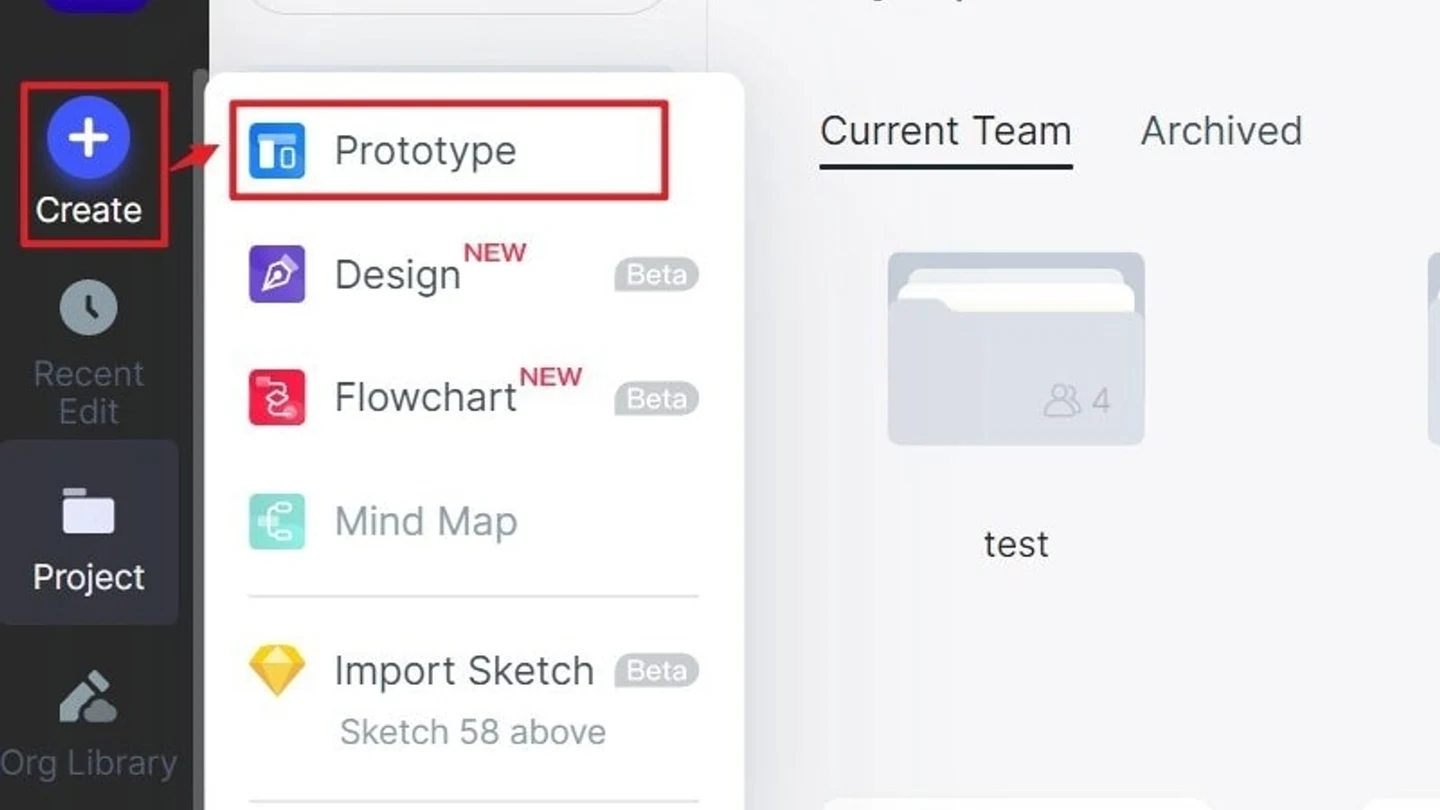
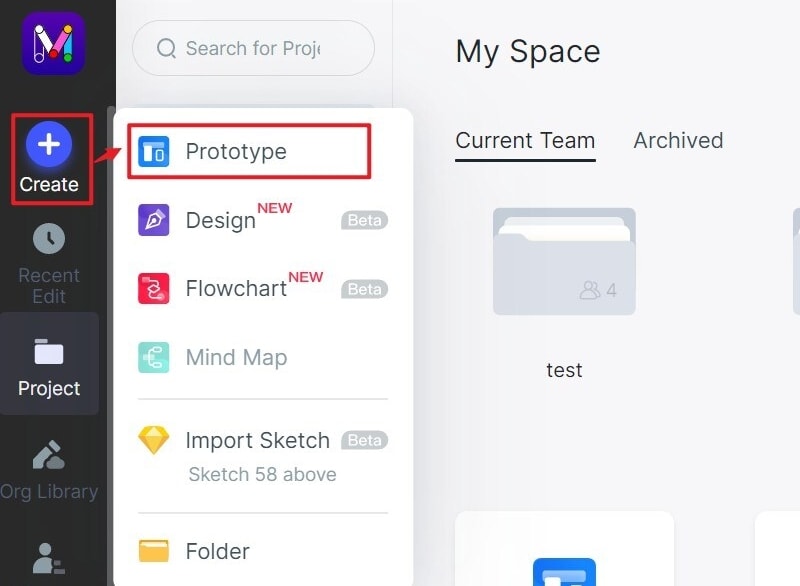
Step 2: Click Create > Prototype.
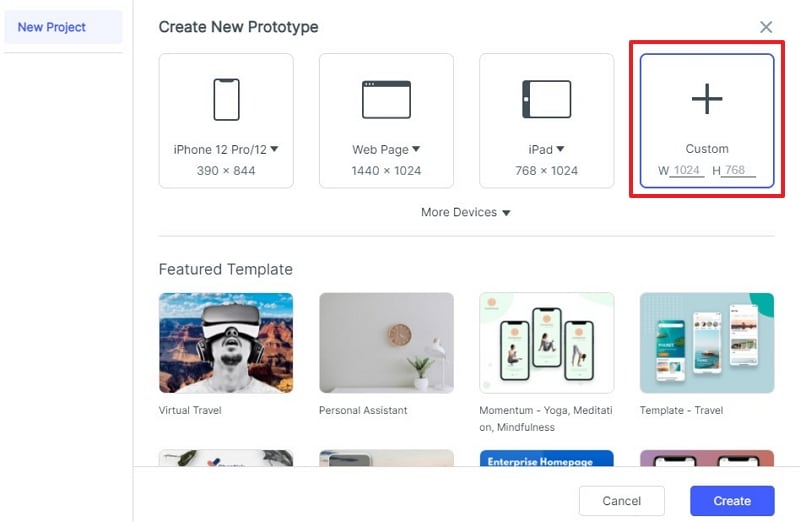
Step 3: Select canva size or choose from the provided prototype templates.
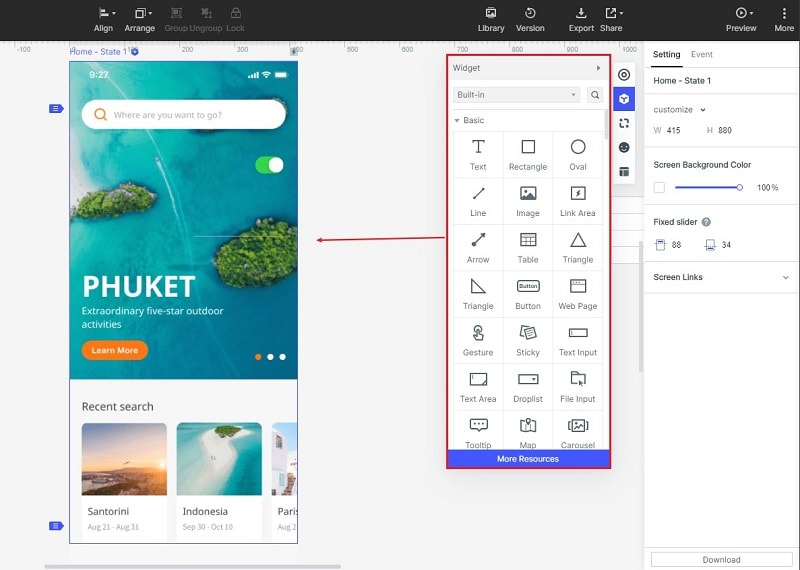
Step 4: Drag and drop widgets and design elements from the sidebar. Personalize them as needed.
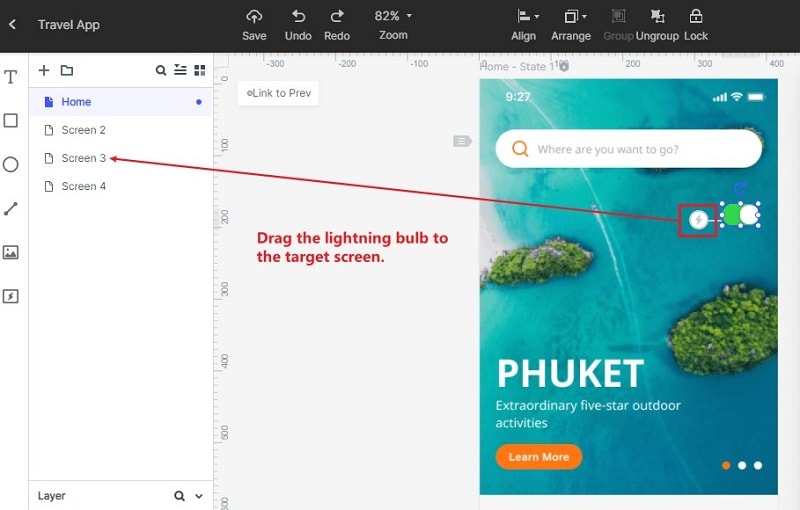
Step 5: Create interactive links for your high-fidelity prototypes. You can select the widget to which you want to add links. Then, drag the Lighting Bulb icon to the target screen.
Step 6: Click Preview to get a live preview of the interface.
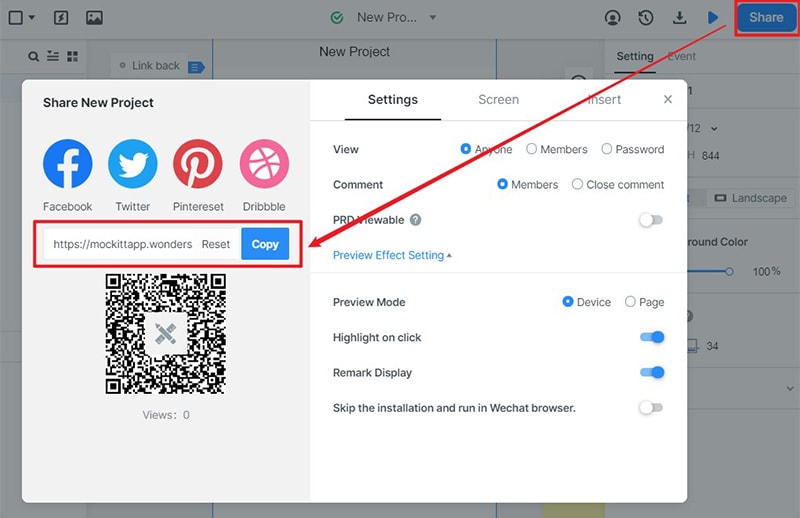
Step 7: Click the Share button at the top. It will generate a link or QR code to the prototype. Send the link to the people who need to see the prototype.
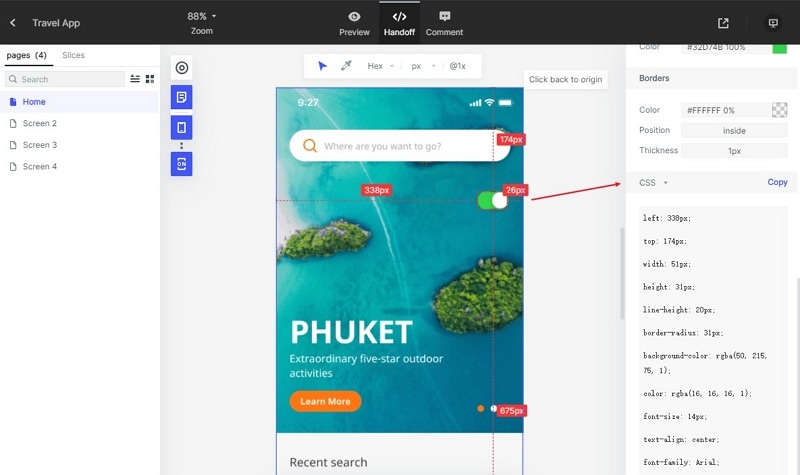
Step 8: Give the developer the automatically generated CSS/Swift/Less/Sass/Stylus/Android code. Also, collect feedback and comments for the next iteration of the prototype.
Part 7: Prototype Frequently Asked Questions
Here are three commonly asked questions regarding prototypes.
1. What are the 3 forms of prototypes?
As mentioned above, the three forms of prototypes are low-fidelity, medium-fidelity, and high-fidelity. The higher the fidelity is, the more functional it will be. Therefore, a high-fidelity prototype will include more features and can sometimes be a replica of the actual product.
On the other hand, a low-fidelity prototype will not have clickable elements. They're used more to see how the layouts and flows will be.
2. What are the two main functions of a prototype?
These are the two main functions of a prototype:
A prototype allows you to see your vision turn into reality. While it could be non-functional, it gives you ideas on executing things and how the finished product will look.
A prototype slows you down to speed you up. It allows you to identify problems early on to prevent having complex problems.
3. What should be included in a prototype?
Add everything (layouts, flows, interactions, etc.) to the prototype as much as possible. Doing so ensures you can identify all of the issues you need to address.
Conclusion
A prototype is something that can help UI/UX designers tremendously. It is a simulation of the final product, which you can use to test ideas and collect feedback and comments. It can help you save time and resources by preventing development errors. So, it is wise to always build prototypes for your projects.
For the tool you can use to make your prototypes, you can use Mockitt. It is an online prototyping, design, and collaboration tool. Mockitt makes it easier to make prototypes by providing you with all the tools you need. It offers features that cover everything- from designing the interface to sharing the prototype. Indeed, Mockitt can expedite prototyping.