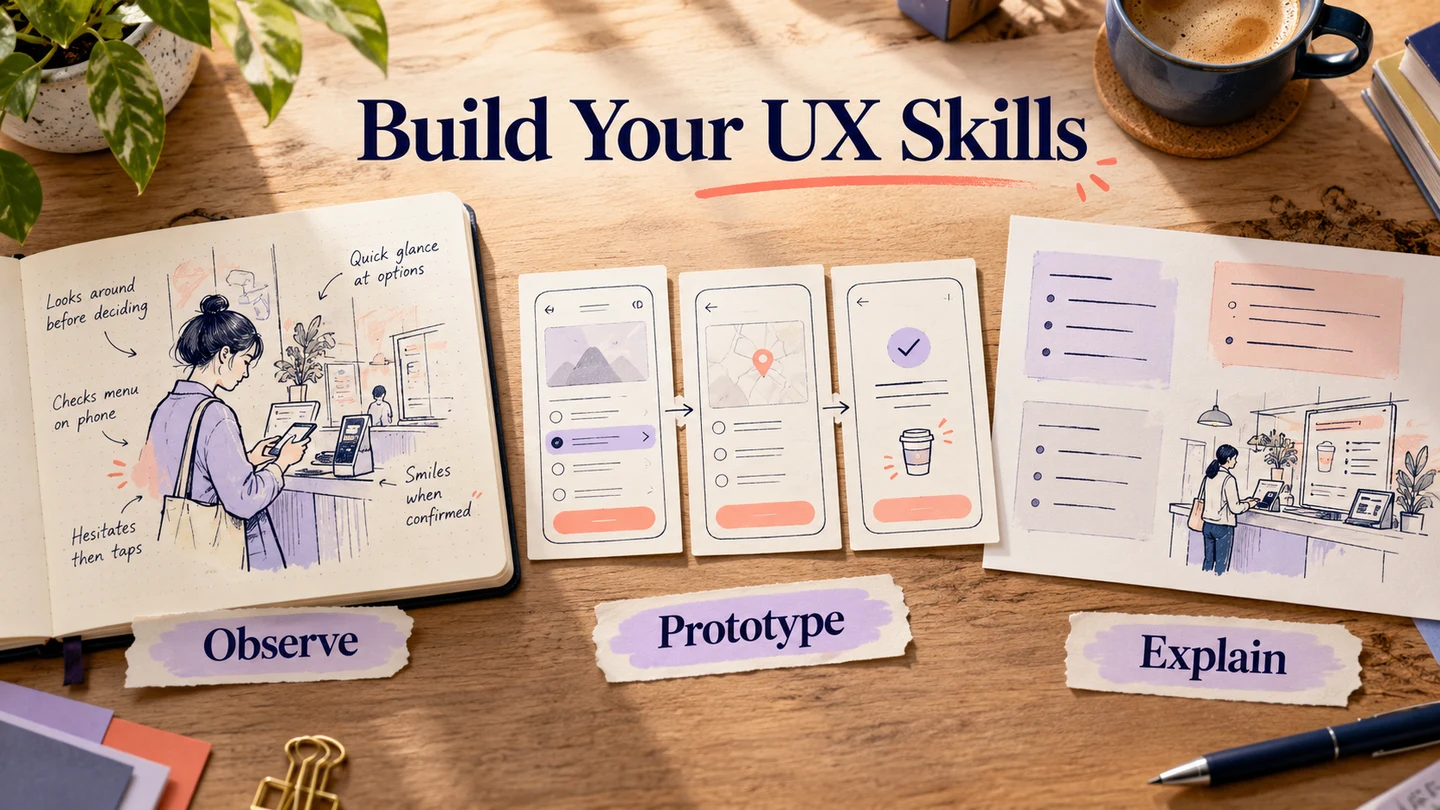
UX design skills include research, usability evaluation, prototyping, interaction design, information architecture, visual design, writing, and collaboration. You do not need the same depth in every area: assess the work your role requires, then use examples of completed work to decide what to practice next. Frontend development and voice design are useful specializations for some roles, rather than universal prerequisites.

User experience design is applied in different industries. How professionals implement their UX skills can affect the usefulness of a product. After all, the UX design process considers the application, usability, function, and branding of the product together. Practicing with a reviewable interactive prototype can connect several of those skills: layout, interaction, clear wording, and explaining decisions to a teammate.
If you want to develop in your profession, work on UX skills assessment as well as learning tools. This article starts with an eight-area skills map, then explores five related areas you can develop according to your responsibilities.
Part 1: What should you know about core UX skills?
If you are planning to make a career in user experience design, try to have a holistic approach towards the domain. To provide a useful experience to the end-user, we need to understand how different areas of work fit together. That does not mean one person must perform every specialist role.
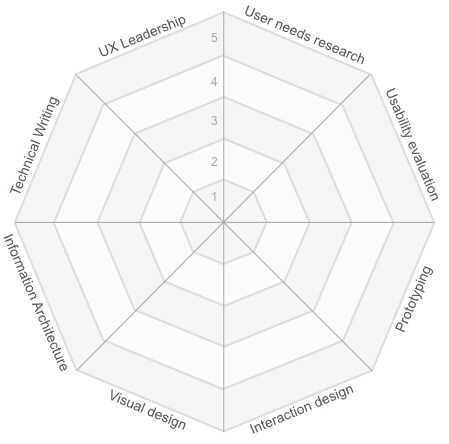
From the knowledge of emerging technologies to technical writing, there are many skills relevant to UX designers. The following Userfocus competency map identifies eight skill areas. These are eight domains, not eight proficiency levels: the numbered rings show a separate scale. Use the chart to discuss the areas you can demonstrate, with a concrete example of work for each assessment.
1. Research
While working on the design of a product or checking its usability, you need to research the users, market, and relevant context. The skill includes choosing an appropriate question and method, then distinguishing an observation from your interpretation.
2. Usability evaluation
Usability evaluation helps determine whether people can use a product to accomplish specific tasks. One of the crucial UX skills is planning a fair evaluation and explaining what its evidence does and does not establish. A design will not necessarily have universal appeal.
3. Prototyping
Many UX skills assessments include prototyping so that you can create a representation of the product to work on. Choose the level of detail that supports the question; a high-fidelity prototype is not necessary for every decision.
4. Interaction design
This is another vital part of the UX designer skills list that works on how the user interacts with the product. Consider the action, the resulting state, and what happens when something goes wrong, rather than considering only the smooth path.
5. Visual design
This area of user experience skills works on creating a visually clear and appealing product. From the color pattern to the grids and icons to the overall interface, it includes the visual components. Readability, emphasis, and recognizable states matter alongside appearance.
6. Information architecture
Information architecture concerns the organization, labeling, and relationships of information. A useful assessment might ask whether you can group content and explain a navigation structure based on users' tasks. It is different from the technical architecture of a software system.
7. Technical writing
Writing and editing content can be important parts of a UX designer's work. This includes instructions, explanations, and interface microcopy. The responsibility may be shared with a content designer or technical writer.
8. UX leadership
Leadership skills help you work with your team and make difficult decisions when needed. The expected scope depends on seniority: explaining a recommendation, facilitating a discussion, and setting a research strategy are different levels of responsibility.
Assess one skill through evidence
Choose one small task, such as changing a delivery address. Prepare the starting screen, an editable form, and a confirmation. Connect the primary action and the route back. Then ask a colleague to review why each screen is needed. Keep the prototype, the review comment, and the revision together: those artifacts say more about your skill than a self-rating without an example.
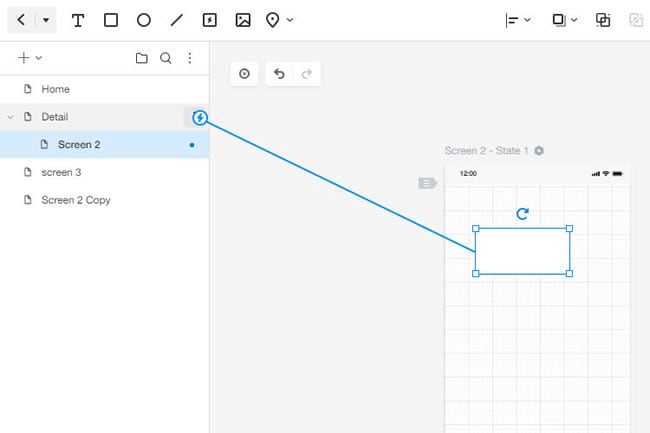
The official Mockitt interaction guide illustrates connecting a selected element to a destination screen. Practice that operation with the address-change task, then explain which screen should follow the save action and why a route back is needed. Name the unresolved decision: does the change apply to the current order or future orders? The exercise assesses your reasoning as well as your ability to connect screens.
Review the example with your mentor or teammate. Could you explain the interaction independently? Did you identify a missing state? Which decision still needed support? Choose one improvement to practice on the next task. The purpose of the assessment is to guide learning, not to turn a chart into a hiring guarantee.
Apart from these general areas of the UX skills map, there are more specific skills you can develop. The following five areas are useful in different roles and product contexts.
Part 2: Frontend development and technical collaboration
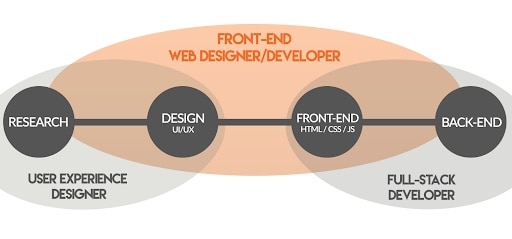
Frontend development can be a valuable specialization, particularly when your role involves coded prototypes or close collaboration with engineers. Effective design is a problem-solving activity, but writing production code is not the defining requirement for every UX designer.
- To work on frontend development, you need to check the performance of your product based on relevant parameters. A designer can help identify the user impact of slow or incomplete feedback.
- At times, you may collaborate on search engine optimization and technical constraints. Agree with engineers which parts of the work you own and which need specialist review.
- Apart from the overall design of the interface, learning the basics of HTML, CSS, or JavaScript can help you discuss what is feasible. The depth needed depends on the role.
- Keep exploring users' needs and reviewing comparable products. When proposing a different frontend interaction, explain the problem it should solve rather than copying a competitor's implementation.
Part 3: Voice design for products that need it
Voice design is another area of user experience work. It matters when a product asks people to speak, listen, or move between speech and other input methods. Prioritize it when those interactions are relevant to the people and product you are designing for.
Voice assistants have changed the way people interact with some devices, but product examples age. Cortana should not be presented as a current platform to learn: Microsoft documents its retirement. The transferable skill is designing a conversation that remains understandable when recognition or fulfillment fails.
- While creating a voice experience, define a consistent tone and persona that suit the task.
- Adapt the interaction to the context. An instruction heard while driving has different constraints from one read quietly on a screen.
- Work on cognitive load by keeping prompts clear and making it possible to repeat, correct, or cancel an action. Adding AI does not automatically make an assistant learn from every conversation.
- Data privacy and security are important considerations in voice design. Understand when audio is captured, what the interface communicates, and when specialist support is needed.
- Plan error handling for misunderstood speech, missing information, and unavailable services. Provide a recovery route rather than assuming the assistant cannot fail.
Part 4: Writing UX microcopy
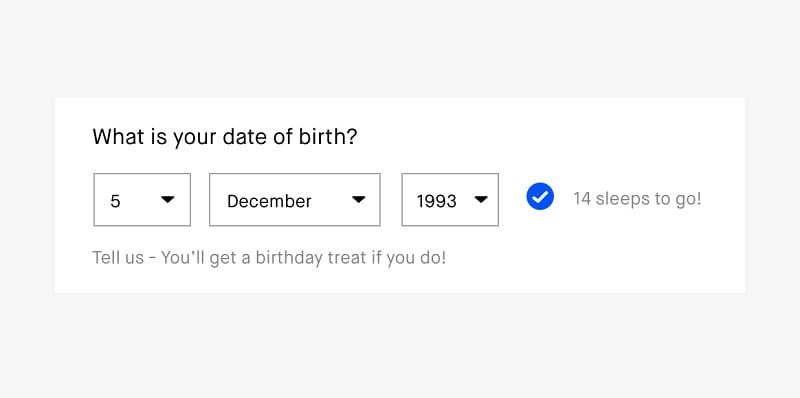
In a nutshell, microcopy is the set of short phrases and words on the interface that help people understand an interaction. To work on these user experience skills, you need a clear purpose for the interaction and a way to gather feedback.
- Set the overall voice and character of the copy. It should be consistent and fit the tone of your organization.
- Make the copy conversational where that suits the task. Familiar, direct wording can make the interface easier to understand.
- Try not to complicate things: keep the microcopy clear, with minimum technical jargon.
- To assess this skill, explain what a label or message should help the reader decide and how you checked its meaning.
- A/B testing can compare outcomes when suitable traffic, assignment, and measures are available. For an early prototype, asking people to interpret a message may reveal a comprehension problem more directly.
Part 5: User interface design
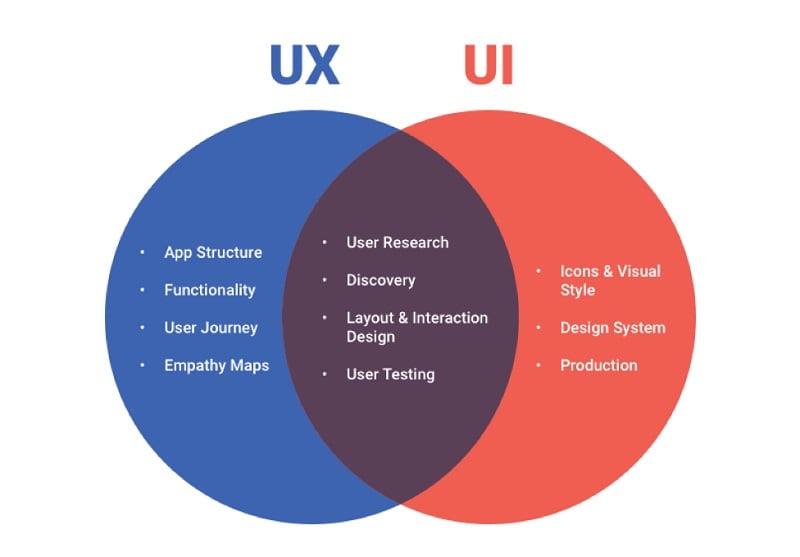
While UX and UI are different practices, they are related to each other. Understanding UI design helps a UX designer discuss how an interaction is presented, even when a visual-design specialist owns the final styling.
UX is focused on the overall experience of the user while UI is about building an interface people can interact with. UI is therefore an important part of the experience. Their responsibilities often overlap.
- To improve your UX design skills, understand the tools used for UI design and the overall process involved in it.
- Beyond icons and other graphics, become familiar with the design system and the production methodology.
- Research and layout decisions can involve both UX and UI designers.
- Understanding user testing helps you review the interface of the product and improve it over time.
Part 6: Data understanding
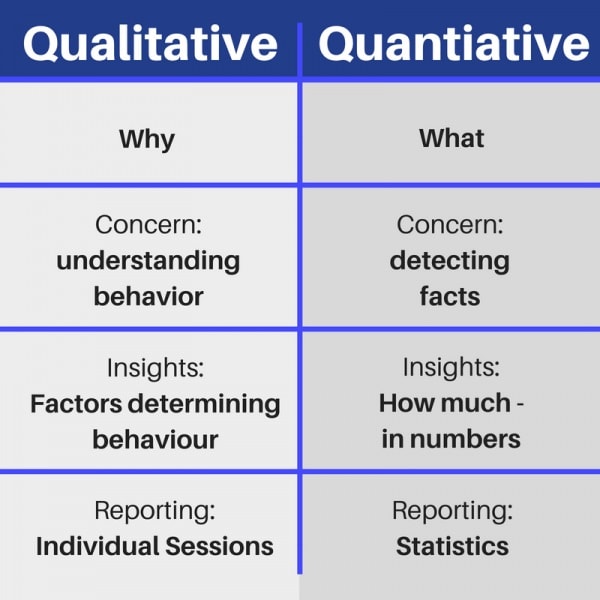
Even though it might seem simple at first, data understanding can be a deep subject. UX work does not require you to master every statistical or data-engineering technique, but you should understand the basics of quantitative and qualitative evidence.
- Understand how the data was collected and processed before relying on it. Missing events or an unrepresentative sample can change the interpretation.
- Distinguish observed behavior from an explanation of why it happened. A click count alone does not establish a person's intention.
- Compare relevant groups when there is a reason to do so. Keep individual context available, and do not combine incompatible measures simply to produce a larger number.
- You can work with researchers, analysts, or data scientists when a question needs deeper expertise. Tools can record behavior; the team still needs to interpret it responsibly.
If you are just starting, first explore the eight-area UX skills map. After reviewing this essential skills list, choose an area that connects to your current work and collect an example of what you can do. Keep learning new tools and practices, and revisit the assessment as your responsibilities change.