

Human factors considers how people, tasks, equipment and environments work together. The International Ergonomics Association uses human factors and ergonomics interchangeably and adopted its definition in 2000. The aim is to support human well-being and system performance. For a digital task, a reviewable interface prototype can make questions about control, effort and recovery concrete before implementation.
The goals of Human Factors
Human factors applies knowledge about human behavior, abilities and limitations to systems, activities, environments and equipment. It also informs training and instructions that support a task. The focus is the whole working system, not a requirement that people compensate for an awkward interface.
Human factors focus on how people interact with tasks, with equipment/technologies, and with the environment to understand and evaluate these interactions. The goals of human factors are to optimize human and system efficiency and effectiveness, safety, health, comfort, and quality of life.
Human factors draws on several disciplines and applies across fields such as transport, healthcare and digital services. UX also extends beyond websites: it considers people’s experience of products and services before, during and after use. Their methods and concerns overlap, rather than fitting one universal hierarchy.
Research in UX can examine usability, expectations, perceptions and the wider service experience. Human factors can examine performance, workload and risk within the larger system. Both need evidence about the actual people, task and context; a design team’s preference is not enough.
How Do Human Factors Affect Product Design?
People may develop workarounds for design problems, but a product should not depend on those workarounds. Consider a toothpaste cap: a detached cap can be misplaced or left off, while a hinged cap stays with the tube. This is an everyday design example, not proof that every hinged design is suitable. For digital products, ask what information or action a person is likely to lose when interrupted and how they can resume.
Human factors vs. UX
Human factors and UX share an interest in people using products and systems. Human factors includes physical, cognitive and organizational concerns; UX includes the experience and perceptions associated with use. Ergonomics in UX explores the wider working context. The principles below focus more narrowly on interface control, effort and recovery. Usability and pleasure can both matter, but neither can be inferred from an attractive screen alone.
Principles of Human Factors Design
A sense of control
The user is the one who should control the interaction with the system, not the other way around. Here are a few things to keep in mind when designing your system:
- Provide adequate feedback: make the current state and the result of an action understandable. Do not depend on sound alone; use appropriate visible or accessible feedback too.
- Control of operations: provide appropriate ways to stop, cancel or complete an action. NN/g’s user-control guidance explains the role of clear exits and undo.
- Personalization: let people understand and adjust relevant preferences. Do not hide a consequential decision behind an unexplained assumption about their needs.
- Interactive elements such as buttons should always provide visual feedback when interacting.
Efficiency
Users should be able to complete their tasks with appropriate effort and accuracy. Break a complex task into understandable steps, remove unnecessary work and keep information available when it is needed. Fewer clicks do not automatically mean better efficiency: an extra review step may help someone catch a consequential mistake. Evaluate completion, effort and errors together.
Error management
Making errors is in human nature. But that doesn't mean your users like it! The way a system handles errors has a tremendous impact on your users. This includes error prevention, error correction, and helping your user get back on track when an error does occur.
Here are a few things to remember when designing error handling:
For an illustrative support-reply draft, make the consequence explicit before discarding it. Show the subject “Delivery question,” identify the reply as unsaved, and offer “Keep editing” alongside “Discard draft.” After discarding, show a clear result. This example is a proposed interface, not a real message being sent or deleted.
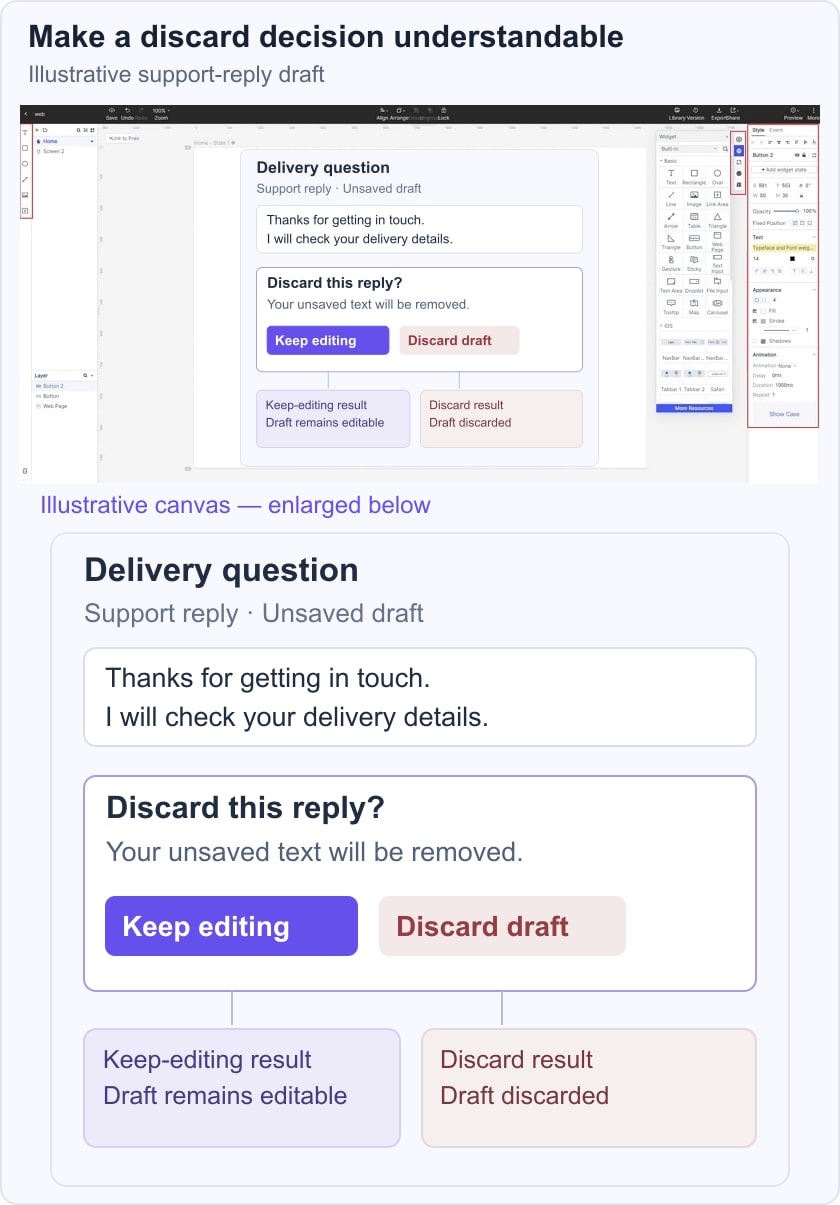
Ask a reviewer what each action will do and whether they can continue editing without losing the draft. If undo is offered, its availability and limits must match the implemented behavior. A static mockup cannot establish that the recovery actually works.
- Prevent errors from occurring whenever possible. Create user journeys and analyze them to identify places in which users might face troubles.
- Protect users from consequential mistakes. A confirmation can help before an irreversible action, but explain what will happen and provide a clear way to cancel. Do not add the same interruption to every harmless action.
- Support 'Undo' operations. Make it possible to reverse actions.
- When an error does occur, provide messages that help users solve the problem.
- Avoid blaming language in error messages. Investigate the interface, instructions, context and other contributing factors instead of assuming either that the user is at fault or that every error has one cause.
Methods for Identifying Human-Factors Issues
Start by understanding the user, task and context. Different evaluation methods answer different questions; choose one that can reveal the uncertainty in your design rather than requiring a polished prototype for every study.
Here are some testing methods to understand the human factor at work:
- A cognitive walkthrough is an expert review of whether a new user could understand the actions and feedback needed for a task. It can expose learnability questions in a prototype, but it does not replace observations of participants.
- In moderated usability testing, a facilitator observes participants attempting realistic tasks. Choose a prototype with enough detail to answer the question; high visual fidelity is not always necessary. Thinking aloud can add context to observed behavior.
- Contextual research examines people’s activities in their usual environment, such as a workplace. It can inform discovery before a product exists as well as improvements after release. Observe interruptions, workarounds and constraints that a controlled session may miss.
Conclusion
Human factors play a significant role in the development of successful products. The discipline of human factors design helps you identify areas where you can potentially improve your system and enhance productivity, safety, and overall satisfaction when using a system.