Image sliders (also known as image carousels or slideshows) can be a convenient way to display multiple images, videos, or graphics on your website. Image sliders are an effective way of displaying images or content cards. They can add visual interest and reduce clutter. When it comes to bringing in such dynamic content in your website, jQuery is usually a great option. Jquery image slider can easily be designed with minimal effort using the wide variety of jquery plugins available.
- Part 1:How to Create Image Slider with jQuery
- Part 2:The Best Tool to Create Image Slider and Generate Code
- Part 3:Five Slider Libraries: jQuery Options and JavaScript Alternatives
How to Create Image Slider with jQuery
Here is a quick tutorial on creating image sliders quickly with jQuery.
1. When it comes to creating a jquery image slider, it is best to start with a concept. Determine why the slider is the best fit for your content, instead of a standalone image or video. With this question answered, you will have a good sense of the type of content you plan to use. Sketch out a storyboard to get an idea of how many frames you'll need. Decide if your jQuery image slider will jump from one image to the next, or have a continuous, panoramic effect. You can also use popular tools like Mockitt to sketch the storyboard.
2. Select a jquery image slider plugin that fits your requirement. This archived example uses the WaltzerJS jQuery plugin. The snippets below illustrate its integration pattern; they require a compatible local plugin package and its CSS. Verify the package documentation and compatibility before using it in a new project.
3. Include the jQuery javascript library and jQuery WaltzerJS plugin on your web page as shown below -
<!-- Load these existing local files in this order, before initialization. -->
<script src="jquery.min.js"></script>
<script src="waltzerjs.js"></script>
There could be other possible ways to import the jQuery image slider plugin and this varies from one plugin to another.
4. Markup the HTML structure as follows. In this example, the image slider comprises of 3 slides.
<div id="carousel">
  <div class="item"><div>Item 1</div></div>
  <div class="item"><div>Item 2</div></div>
  <div class="item"><div>Item 3</div></div>
</div>
5. Add appropriate CSS styling based on the jquery Waltzer plugin documentation. Each plugin may have a specific CSS requirement for the slider to appear as expected.
6. After loading jQuery, the compatible plugin script, and its required CSS, call the plugin on document ready as follows –
7. Add default configurations and callback functions as per the jquery plugin documentation. You can then call the various API methods and event handlers based on your image slider logic.
Indeed, writing up a jQuery image slider can be time and effort intensive especially if a designer with minimal coding experience is working on it.
Designers love to focus on creative ideas and experiments. Rarely do you find a designer who loves to play with HTML, CSS and jQuery. However, from a designer's perspective it is also imperative to perform a seamless handoff to developers. On the other hand, it can be quite complex for a developer to manually look at a wireframe and code the jQuery image slider. When specifications are manually called out, there is bound to be significant human error.
The Best Tool to Create Image Slider and Generate Code
Since jQuery is more programming and JavaScript focussed, designers may not be aware of this technology on a working basis. However, it is imperative for designers to handoff accurate specifications to the development team. Designers seek a complete package/tool in which they can design the jQuery image slider and also seamlessly handoff specifications to developers.
Mockitt is a complete tool that lets you test, share, and gather feedback quickly while saving data. All of this can be done completely online without the installation of heavy packages.
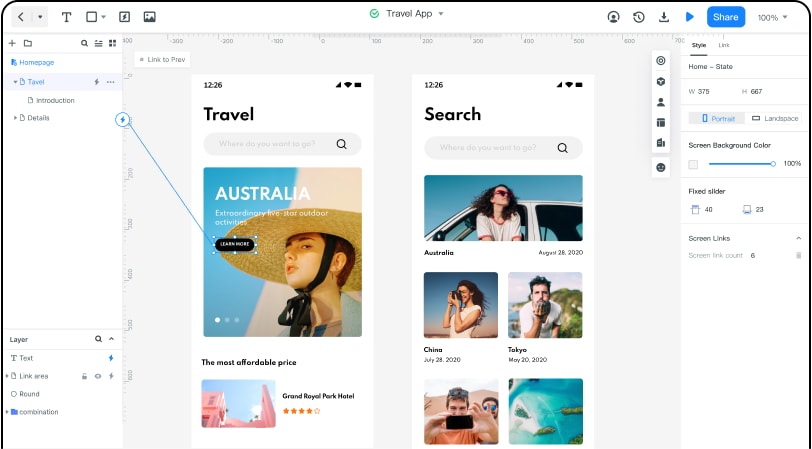
Since jQuery image slider design is likely to be an iterative exercise, it is imperative to maintain intact records of the same project. Mockitt offers the capability to revert to previous versions of your project any time. Versioning enables teams to manage their design and determine the best work for final launch.
Teams can share the carousel prototype, review its image order and timing, and agree on styling before implementation. Use comments and design specifications to record that feedback for the developer.
Here is a step-by-step guide to prototype the image slider and hand off its styling specifications. The developer still integrates and tests the actual jQuery plugin.
- Create a new Project on Mockitt and choose a webpages layout.
- On the canvas launched, select built-in widgets -> carousel widget
- When you drag out the carousel component, a picture placeholder will enable you to choose the collection of images.
- You can customize the various aspects of the jQuery image slider.
- Once your carousel design is complete, you can use the handoff tab to capture the specifications. The right panel will display the CSS specifications. Click on 'Copy' and share the styling with your developers.
When sharing your designs with other teams, you can assign one of the 3 roles (Owner, Administrator and Member), each with specific permissions. Team members can be managed flexibly and securely. This makes the work handover seamless.
Five Slider Libraries: jQuery Options and JavaScript Alternatives
These five options include jQuery integrations and standalone JavaScript alternatives. Check the current documentation, dependency requirements, and maintenance status against your project before choosing one.
- Swiper — A standalone JavaScript slider with touch interactions and integrations for frameworks and Web Components. Its current API is not a jQuery plugin; use the setup instructions for the integration you choose.
- blueimp Gallery — An image/video gallery, carousel, and lightbox. It has a standalone JavaScript API and an optional jQuery plugin, so choose the matching setup from its documentation.
- Owl Carousel 2 — A jQuery carousel with responsive layout and touch support. It is an option for an existing jQuery project; check its package version and project status before adding it to a new build.
- Glide.js — A dependency-free JavaScript slider and carousel. It does not require jQuery; follow its own markup, stylesheet, and initialization instructions.
- responsiveCarousel — A legacy entry in this list. Confirm the exact package, its jQuery compatibility, and the available documentation before relying on it; this article does not verify a current maintained distribution.
Choose a slider that fits your existing dependencies and interaction requirements. You can review the design in a Mockitt prototype, share the styling specifications, and then have a developer implement and test the selected library, including keyboard controls and any autoplay pause behavior.